|
|
|
Would it not be easier to pick up a small portable film scanner?
Software Engineer
(the practice of real science, engineering and management)
A.I. (Automation rebranded)
Gender Neutral
(a person who believes in equality and who does not believe in/use stereotypes. Examples such as gender, binary, nonbinary, male/female etc.)
...they/their/them...
TwoSeven:
Would it not be easier to pick up a small portable film scanner?
Nope because as I said earlier, I need to scan APS film cartridges which very few film scanners support
Staying in Wellington. Check out my AirBnB in the Wellington CBD. https://www.airbnb.co.nz/h/wellycbd PM me and mention GZ to get a 15% discount and no AirBnB charges.
Well the operation was successful but the patient died :-( I had a CD around with SP3 on it and installed VMware Workstation Pro and then installed XP. That worked pretty seamlessly and during the installation I chose the advanced option as I had a SCSI card. Once Windows started up, I plugged in my Adaptec USB to SCSI device, connected it to my scanner and powered the scanner up.
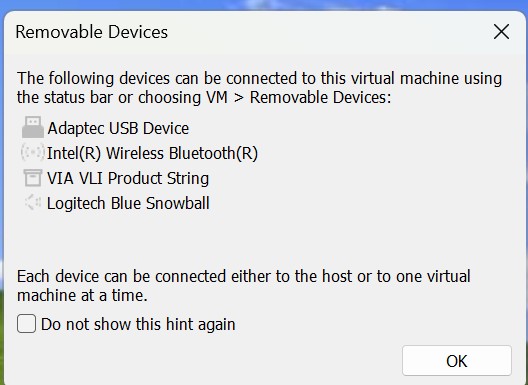
Anyway when the XP instances starts up and I have the USB SCSI device connected I get this option so it seems the device is sort of recognised.

Windows found a USB device in Control Panel with the yellow icon. I then tried to get the drivers from here https://storage.microsemi.com/en-us/downloads/ms/ms_win_xp/productid=usbxchange&dn=usbxchange.html but it just says URL not found on the server.
Basically looking for this file usbxchg_win_v120.exe which when runs create an install folder with a .inf file and some DLL's. Eventually found the drivers, they look fine and created the installation folder.
But when Windows says it has found new hardware and to update drivers, and I point to the folder when the driver is, it just says Cannot install this hardware, because the wizard cannot find the necessary software.
Not sure if it's the XP emulation or the drivers are dodgy
Staying in Wellington. Check out my AirBnB in the Wellington CBD. https://www.airbnb.co.nz/h/wellycbd PM me and mention GZ to get a 15% discount and no AirBnB charges.
lchiu7:
It's a Canonscan FS2710. Not the greatest resolution but good enough for digitising negatives from the past. What makes me want to continue using this is it's only scanner wit a reasonable price that can scan APS cartridges and I have a bunch of these as during the day, I moved my photography from 35mm to APS (silly decision then I guess) given the poorer resolution of APS film, but the panoramic prints that you could do were pretty cool. Of course these days you just take a wide shot and crop.
Looks like Vuescan should work
https://jimdean.id.au/2007/04/18/scanning-film-under-linux/
Ragnor:
lchiu7:
It's a Canonscan FS2710. Not the greatest resolution but good enough for digitising negatives from the past. What makes me want to continue using this is it's only scanner wit a reasonable price that can scan APS cartridges and I have a bunch of these as during the day, I moved my photography from 35mm to APS (silly decision then I guess) given the poorer resolution of APS film, but the panoramic prints that you could do were pretty cool. Of course these days you just take a wide shot and crop.
Looks like Vuescan should work
https://jimdean.id.au/2007/04/18/scanning-film-under-linux/
https://www.hamrick.com/vuescan/canon_fs2710.html
Nope Vuescan doesn't work since it explicitly says it cannot handle USB SCSI devices. I think it can handle the Adaptec AHA-29040 card https://www.amazon.com/Adaptec-AHA-2940-Ultra-Controller-32-bit/dp/B000FD630I which I do have but the problem is I have no MB that can take the wide PCI slot.
Staying in Wellington. Check out my AirBnB in the Wellington CBD. https://www.airbnb.co.nz/h/wellycbd PM me and mention GZ to get a 15% discount and no AirBnB charges.
lchiu7:
Nope Vuescan doesn't work since it explicitly says it cannot handle USB SCSI devices. I think it can handle the Adaptec AHA-29040 card https://www.amazon.com/Adaptec-AHA-2940-Ultra-Controller-32-bit/dp/B000FD630I which I do have but the problem is I have no MB that can take the wide PCI slot.
I specifically got one of my 8th gen replacements boards for the crapbox PCs off aliex because it had legacy PCI on it - I have not tested it yet with the card I have and I believe it uses a PCIe to PCI bridge (not looked too hard into it yet) but an 11 supported board with the slots is available.
richms:
lchiu7:
Nope Vuescan doesn't work since it explicitly says it cannot handle USB SCSI devices. I think it can handle the Adaptec AHA-29040 card https://www.amazon.com/Adaptec-AHA-2940-Ultra-Controller-32-bit/dp/B000FD630I which I do have but the problem is I have no MB that can take the wide PCI slot.
I specifically got one of my 8th gen replacements boards for the crapbox PCs off aliex because it had legacy PCI on it - I have not tested it yet with the card I have and I believe it uses a PCIe to PCI bridge (not looked too hard into it yet) but an 11 supported board with the slots is available.
Alas I have an AMD MB and CPU. I was going to upgrade that to a Ryzen 7 but the current MB needs a bunch of BIOS updates and I wonder now if I should look for a new MB with legacy PCI slots on it.
I wonder if this would do the job. Save me replacing the CPU in my current machine, doing a bunch of BIOS upgrades etc.
https://www.pbtech.co.nz/product/MBDASR12307/ASRock-B550M-WIFI-SE-MATX-motherboard-For-AMD-Ryze
Staying in Wellington. Check out my AirBnB in the Wellington CBD. https://www.airbnb.co.nz/h/wellycbd PM me and mention GZ to get a 15% discount and no AirBnB charges.
lchiu7:
Alas I have an AMD MB and CPU. I was going to upgrade that to a Ryzen 7 but the current MB needs a bunch of BIOS updates and I wonder now if I should look for a new MB with legacy PCI slots on it.
I wonder if this would do the job. Save me replacing the CPU in my current machine, doing a bunch of BIOS upgrades etc.
https://www.pbtech.co.nz/product/MBDASR12307/ASRock-B550M-WIFI-SE-MATX-motherboard-For-AMD-Ryze
Just get something like this:
https://vi.aliexpress.com/item/1005005591218386.html
That gives you two PCI slots plugged into a single PCIe x1 slot. There are lots of different ones of these on Aliexpress and also single PCI slot ones - you can put the PCI cards out the back of the PC, or in a drive bay. The cable from the PCIe adapter to the PCI slots is just a USB 3 cable - you can use any reasonable length of USB 3 cable there if the provided one is too short, as PCIe signals are self clocking serial and actually work well over fairly long distances (unlike the parallel PCI signals). I have one of these out the back of my mother's MythTV box to run two old PCI DVB-T tuner cards. You can also get single PCI low profile ones that sit directly in a PCIe slot, with the low profile PCI card sitting on the PCIe to PCI adapter. I have had no problems at all with mine.
fe31nz:
lchiu7:
Alas I have an AMD MB and CPU. I was going to upgrade that to a Ryzen 7 but the current MB needs a bunch of BIOS updates and I wonder now if I should look for a new MB with legacy PCI slots on it.
I wonder if this would do the job. Save me replacing the CPU in my current machine, doing a bunch of BIOS upgrades etc.
https://www.pbtech.co.nz/product/MBDASR12307/ASRock-B550M-WIFI-SE-MATX-motherboard-For-AMD-Ryze
Just get something like this:
https://vi.aliexpress.com/item/1005005591218386.html
That gives you two PCI slots plugged into a single PCIe x1 slot. There are lots of different ones of these on Aliexpress and also single PCI slot ones - you can put the PCI cards out the back of the PC, or in a drive bay. The cable from the PCIe adapter to the PCI slots is just a USB 3 cable - you can use any reasonable length of USB 3 cable there if the provided one is too short, as PCIe signals are self clocking serial and actually work well over fairly long distances (unlike the parallel PCI signals). I have one of these out the back of my mother's MythTV box to run two old PCI DVB-T tuner cards. You can also get single PCI low profile ones that sit directly in a PCIe slot, with the low profile PCI card sitting on the PCIe to PCI adapter. I have had no problems at all with mine.
That is an interesting idea. I think I can get the card recogised in Windows 10 okay thanks to a hack that has been developed.
Trust trying to work out if it's easier to do this ( and then still have to update the BIOS and CPU on the current MB because I want it to be faster) or bite the bullet and get a new MB that fully supports the Ryzen 7 and has PCIe x16. Cost difference about $160
Staying in Wellington. Check out my AirBnB in the Wellington CBD. https://www.airbnb.co.nz/h/wellycbd PM me and mention GZ to get a 15% discount and no AirBnB charges.
|
|
|