Geekzone: technology news, blogs, forums
Guest
Welcome Guest.
You haven't logged in yet. If you don't have an account you can register now.


Filter this topic showing only the reply marked as answer View this topic in a long page with up to 500 replies per page Create new topic
1 | ... | 18 | 19 | 20 | 21 | 22 | 23 | 24 | 25 | 26 | 27 | 28 | ... | 29
idle
176 posts

Master Geek
+1 received by user: 74


  #1616304 23-Aug-2016 13:29

Got the Anniversary upgrade without a problem. What I did notice, later, was a major lag on using Edge. It was almost unusable, and I have spent some time trying to track down the cause. As part of the upgrade was the availability to use extensions, I had downloaded Last Pass. On deletion of the Last Pass extension, the lag has gone and Edge is again quick and responsive. This has been the case on both desktop (64 bit) and laptop (32bit). Anyone else had problems with extensions?


Jase2985
13735 posts

Uber Geek
+1 received by user: 6217

ID Verified
Lifetime subscriber

  #1616354 23-Aug-2016 15:08
Send private message

i have gone to install it manually


i wish it would stop closing and the opening back on top of everything every 10 seconds :(


mdav056
616 posts

Ultimate Geek
+1 received by user: 160

Subscriber

  #1617060 24-Aug-2016 21:59
Send private message

Now completed my Tosh NB200 Netbook, which was a bit of a mission as it stopped wanting to update the old win 10 in April.  Downloaded to a USB, ran setup.exe, and it went fine (if a little slowly -- ancient Atom, 2 gig memory, and the slowest HDD on the planet).  But now working well, with some lag but not enough to worry me.


gml


richms
29105 posts

Uber Geek
+1 received by user: 10222

Trusted
Lifetime subscriber

  #1617064 24-Aug-2016 22:05
Send private message

USB dac has lost volume control in windows since update. Slider moves but nothing happens. Means my media remotes buttons do nothing now


Richard rich.ms

rmt38
320 posts

Ultimate Geek
+1 received by user: 55
Inactive user


  #1618217 27-Aug-2016 08:43
Send private message

Windows update has never been so broken since the UI got "upgraded" to new retro low quality whitespace based app UI - which coincidentally prevents me from having two different setting areas open at the same time.  Who designs this garbage?  It's the same old story, make a generic product for mobile, tablet and desktop, and the desktop gets some bland semi-useless approximation of what it used to have.


I have a metered connection.  I opened Check for Updates.  It shows three updates as pending and then went straight to downloading without me pressing a button (?) and sat on 0% for two days.  Rebooted, no difference.  Previously, it'd show the pending updates, I'd click download if I had the bandwidth remaining on the current connection, and it'd update.


I set the connection to metered to force it to download, and it starts downloading eventually.  Then it came up with three new pending updates, and the download button.  I click the download button and it shows a spinner beside the button, then the spinner goes away and nothing changes.  Repeat 3 times and eventually perhaps a minute later it switches to downloading.


This is a terrible to look at and use, unreliable, unresponsive experience.  And when something like this happens, there's the windows update diagnostic tool, which never finds anything wrong.  I think it's a placebo button.


Rikkitic
Awrrr
19071 posts

Uber Geek
+1 received by user: 16319

Lifetime subscriber

  #1618257 27-Aug-2016 10:17
Send private message

I feel like I got off lightly. Anniversary actually seems to work pretty well for me, although I don't do anything strenuous with it and I have only allowed it on a single laptop that came with 8.1. The laptop has always had a problem with a freezing touchpad and that hasn't gone away completely, but it seems much better since the update. I have had no other issues with this.


Plesse igmore amd axxept applogies in adbance fir anu typos


Support Geekzone with one-off or recurring donations Donate via PressPatron.
freitasm
BDFL - Memuneh
80661 posts

Uber Geek
+1 received by user: 41083

Administrator
ID Verified
Trusted
Geekzone
Lifetime subscriber

  #1618264 27-Aug-2016 10:29
Send private message

Windows 10 Anniversary Update works well on my laptops. No problems with the OS itself (except the stupid decision to keep VPN two clicks away, when in Windows 7 you could connect to VPNs from the network list in the system tray).


Referral links: Quic Broadband (free setup code: R587125ERQ6VE) | Samsung | AliExpress | Wise | Sharesies 


Support Geekzone by subscribing (browse ads-free), or making a one-off or recurring donation through PressPatron.


freitasm
BDFL - Memuneh
80661 posts

Uber Geek
+1 received by user: 41083

Administrator
ID Verified
Trusted
Geekzone
Lifetime subscriber

  #1618450 27-Aug-2016 20:02
Send private message

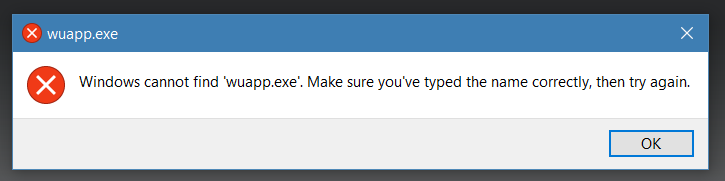
Some developer forgot to remove the Windows Update option from the Internet Explorer menus. If you click that this is what you get:


Referral links: Quic Broadband (free setup code: R587125ERQ6VE) | Samsung | AliExpress | Wise | Sharesies 


Support Geekzone by subscribing (browse ads-free), or making a one-off or recurring donation through PressPatron.


hellonearthisman
1819 posts

Uber Geek
+1 received by user: 52

Trusted

  #1621454 2-Sep-2016 14:49
Send private message

The biggest issues I have had with win10 are:

My Text to speech voices I got with Natural Reader no longer work and the MS voices are not as good a quality.

The 2nd accessibility problem is the default pointer, I changed it to a large red one, so much easier than finding the while on white one MS defaults with. Everytime I reboot my Red pointers are not used and MS white ones are. I have to go to the pointers setting and toggle a setting as it saying im using the red pointers but I'm not, then hit apply to get the red back.

3rd point is the MS apps, they keep getting reinstalled almost at every update and become more difficult to remove.
No MS I don't want to use OneDrive but can't remove it.

Last big grumble is the hijacking of hotkeys. I used to use winkey+v to access my clipboard manager, but MS has take all the win+keys for their own apps, even if that app is removed the hotkey is locked and can't be used by other applications
btw I now use win+shift+v for the clipboard manage but it uses two hands and not one to do.

The file association is a pain too but it can mostly be worked around. Start menu pinned applications sometimes don't have an icon correct ie google keep but a work around fixes than.

I don't look at my network settings so could have that issue too.

Still there are a few really good things too so I will keep using win10 and hope MS fix these little things.

Batman
Mad Scientist
30014 posts

Uber Geek
+1 received by user: 6217

Trusted
Lifetime subscriber

  #1621788 3-Sep-2016 08:45
Send private message

Any way to install the anniversary update without updating drivers?


gzt

gzt
18690 posts

Uber Geek
+1 received by user: 7828

Lifetime subscriber

  #1621798 3-Sep-2016 09:07
Send private message

Which drivers are you concerned about? Maybe turn off driver updates in system > hardware > device installation settings.


Shop on-line at New World now for your groceries (affiliate link).
Batman
Mad Scientist
30014 posts

Uber Geek
+1 received by user: 6217

Trusted
Lifetime subscriber

  #1621803 3-Sep-2016 09:11
Send private message

Doesn't work

UHD

UHD
655 posts

Ultimate Geek
+1 received by user: 298
Inactive user


  #1621873 3-Sep-2016 11:54
Send private message

What is wrong with updating drivers?


Rikkitic
Awrrr
19071 posts

Uber Geek
+1 received by user: 16319

Lifetime subscriber

  #1621875 3-Sep-2016 12:02
Send private message

I can't speak for Windows 10 but I have repeatedly had experiences with other Windows systems where driver updates have stuffed things, or the official driver for something did not work correctly but another one did. If something goes wrong, there is a good chance that the driver is at fault.


Plesse igmore amd axxept applogies in adbance fir anu typos


Batman
Mad Scientist
30014 posts

Uber Geek
+1 received by user: 6217

Trusted
Lifetime subscriber

  #1621880 3-Sep-2016 12:09
Send private message

UHD:

What is wrong with updating drivers?


Because Dell.

1 | ... | 18 | 19 | 20 | 21 | 22 | 23 | 24 | 25 | 26 | 27 | 28 | ... | 29
Filter this topic showing only the reply marked as answer View this topic in a long page with up to 500 replies per page Create new topic


Geekzone Live »

Try automatic live updates from Geekzone directly in your browser, without refreshing the page, with Geekzone Live now.


Are you subscribed to our RSS feed? You can download the latest headlines and summaries from our stories directly to your computer or smartphone by using a feed reader.