|
|
|
JWR:lyonrouge: Does anyone know a web browser that supports Silverlight (apart from IE). The IE in Win8 is incompatible with WHS, so I need an alternate. I've been using a VM but this is impractical for video rendering.
The latest versions of IE, Firefox, Safari and Chrome all support Silverlight.
joker97: I have 2 8.1 systems and both have insomnia problem (does not 'sleep') amongst other things but it is actually faster.
Hate technology
lyonrouge:sbiddle:lyonrouge: Key problems:
• Touchpad opening sidebars from left and right, I can find no way to stop this
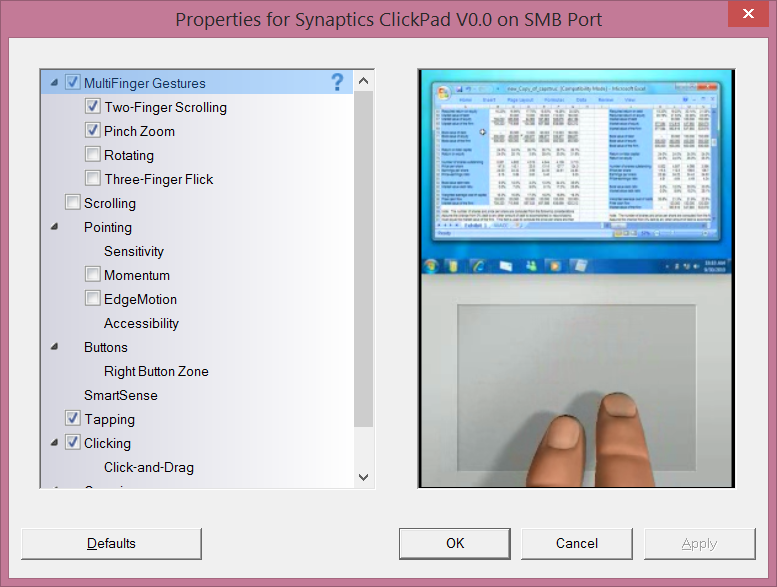
If you have a touchpad that supports multitouch then gestures will be enabled by default. You can disable these in the Synaptics touchpad settings.
This does not appear to be a Synaptics feature.
Have you tried updating the driver or scrolling down? The option should be called edge swipes.
chevrolux:JWR:lyonrouge: Does anyone know a web browser that supports Silverlight (apart from IE). The IE in Win8 is incompatible with WHS, so I need an alternate. I've been using a VM but this is impractical for video rendering.
The latest versions of IE, Firefox, Safari and Chrome all support Silverlight.
Silverlight only works when Chrome is running in the desktop and not in 'Windows 8 mode'.
Can anyone explain why this is? I like to run Chrome as an app rather than in the desktop and every time you get to a site that runs Silverlight Chrome has to be restarted in Desktop mode.
The same happens for Flash videos. WHY?!
joker97: I have 2 8.1 systems and both have insomnia problem (does not 'sleep') amongst other things but it is actually faster.
Hate technology
Benzin: To fix problems with sharepoint sites or other websites that are not working - you can always run in compatibility mode on that website.
In IE:
Alt -> Tools -> Compatibility View -> Add Website you want -> Refresh.
Works for practically all old pages and allows you to pick and choose what pages you want to run in compatibility mode, rather than blanket compatibility mode via Windows compatibility settings.
Benzin:
Regarding touchpad scrolling, it should only have the sidebars turning up if you take your finder and put it from outside of the touchpad onto the touchpad.
If your touchpad is not implementing this correctly and is too sensitive, you'll have to find out if there is an option that disable Edge Swipes. I've seen quite a few vendors that support doing this (as you have to implement it in your driver in order to enable it) but no uniform way of doing it. http://www.eightforums.com/tutorials/20992-touchpad-edge-swipes-enable-disable-windows-8-a.html
From the looks of it you might have to do the registry tweak referenced in the comments.
( hkcu\software\synaptics\synTPEnh\ZoneConFig\TouchPadPS2\ )
Synaptics Website for more information on Edge Swipes: www.synaptics.com/solutions/technology/touchpad
lyonrouge: Note: I've tried the drivers from synaptic and they will not install. I currently have another ticket logged with Sony regarding an updated driver for what I suspect is an EOM hardware issue. Sony have contributed equally to my angst with Win8 as much as MS have.
lyonrouge:Benzin: To fix problems with sharepoint sites or other websites that are not working - you can always run in compatibility mode on that website.
In IE:
Alt -> Tools -> Compatibility View -> Add Website you want -> Refresh.
Works for practically all old pages and allows you to pick and choose what pages you want to run in compatibility mode, rather than blanket compatibility mode via Windows compatibility settings.
In the environment formally known as Metro, no menu displays when Alt (F12 doesn't work either). "old pages" makes me laugh, as it doesn't work with SharePoint 2013. It appears the Win8 developers are not using their own corporate DMS? Developer says, "documentation? just read the code?".
|
|
|