|
|
|
surfisup1000: ... It is like i have installed a new OS, except my old programs are still there. ...
Sideface
Smithy47:
Does anyone know where MS Edge now stores it favourites. It is not in the same place prior to the upgrade.
Thanks
linw:Smithy47:
Does anyone know where MS Edge now stores it favourites. It is not in the same place prior to the upgrade.
Thanks
Here %UserProfile%\AppData\Local\Packages\Microsoft.MicrosoftEdge_8wekyb3d8bbwe\AC\MicrosoftEdge\User\Default\Favorites
Yes, they REALLY didn't want you to find them by accident!
Smithy
redherring: I'm using the media creation tool as I'm going to have a few machines to upgrade. It seems you can't choose home or pro edition any more, does this mean that the ISO will upgrade both, or has it decided for me since I'm running the tool on 8.1 pro?
linw:Smithy47:
Does anyone know where MS Edge now stores it favourites. It is not in the same place prior to the upgrade.
Thanks
Here %UserProfile%\AppData\Local\Packages\Microsoft.MicrosoftEdge_8wekyb3d8bbwe\AC\MicrosoftEdge\User\Default\Favorites
Yes, they REALLY didn't want you to find them by accident!
Smithy47:linw:Smithy47:
Does anyone know where MS Edge now stores it favourites. It is not in the same place prior to the upgrade.
Thanks
Here %UserProfile%\AppData\Local\Packages\Microsoft.MicrosoftEdge_8wekyb3d8bbwe\AC\MicrosoftEdge\User\Default\Favorites
Yes, they REALLY didn't want you to find them by accident!
That's where they were, but in the new version they have gone. It still holds the prior version of favourites but if you change anything it does not happen in that folder.
Thanks.
Referral links: Quic Broadband (free setup code: R587125ERQ6VE) | Samsung | AliExpress | Wise | Sharesies
Support Geekzone by subscribing (browse ads-free), or making a one-off or recurring donation through PressPatron.

Delete cookies?! Are you insane?!
Referral links: Quic Broadband (free setup code: R587125ERQ6VE) | Samsung | AliExpress | Wise | Sharesies
Support Geekzone by subscribing (browse ads-free), or making a one-off or recurring donation through PressPatron.
kiwifidget: Strange networking issue since 10.1 installed.
I can access the internet fine, but cant get to any shared folders on other PC's on the network.
I can ping them, and they show up under "Network", just cant map to them.
One of those PC's has a website which I can access.
I can print to the wifi printer.
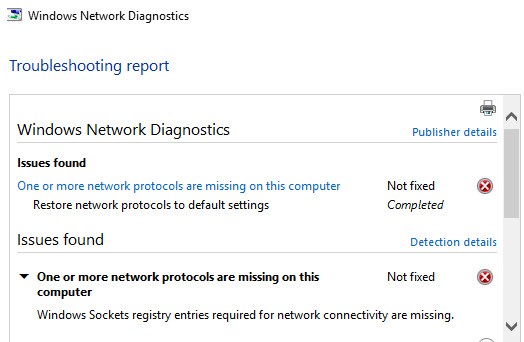
Here is what Windows thinks the problem is:
I've got no idea what to do with that.
Edit : forgot to say other PC's (win7, and Win10 v10240) can access shared files fine.
#include <std_disclaimer>
Any comments made are personal opinion and do not reflect directly on the position my current or past employers may have.
Sideface:surfisup1000: ... It is like i have installed a new OS, except my old programs are still there. ...
That is exactly what you have done - installed a new version of Windows 10.
I think that it was misleading to call this an "upgrade".
hio77:
windows 10 upgrade reinstalled my network drivers. keeping my NIC in its empty state, while killing off my virtual VLAN NICs. Leaving me with no connectivity till i restored it all..
Likely something changed in your upgrade too..
my password protected SMB mounts went dodgy after the install as well, had to remove them and reboot then readd them.
Delete cookies?! Are you insane?!
|
|
|