Geekzone: technology news, blogs, forums
Guest
Welcome Guest.
You haven't logged in yet. If you don't have an account you can register now.


sonyxperiageek

2984 posts

Uber Geek
+1 received by user: 397

Trusted

#100235 5-Apr-2012 18:13
Send private message

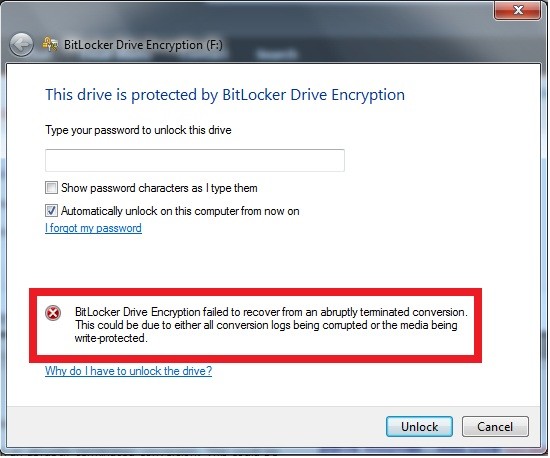
Hello! When I typed in my password for bit locker to unlock it came up with this message: 
 
BitLocker Drive Encryption failed to recover from an abruptly terminated conversion. This could be due to either all conversion logs being corrupted or the media being write-protected.

I have tried on two computers on Win 7 with the same problem.
Yes I have tried BitLocker Repair Tool from Microsoft but with no luck. Hopefully there is another solution apart from deleting 7 years of hard work at school of 16gb! 


Sony


Create new topic
sonyxperiageek

2984 posts

Uber Geek
+1 received by user: 397

Trusted

  #605837 5-Apr-2012 18:16
Send private message


Sony


freitasm
BDFL - Memuneh
80654 posts

Uber Geek
+1 received by user: 41050

Administrator
ID Verified
Trusted
Geekzone
Lifetime subscriber

  #605838 5-Apr-2012 18:26
Send private message

And are you sure this is not write protected?


Referral links: Quic Broadband (free setup code: R587125ERQ6VE) | Samsung | AliExpress | Wise | Sharesies 


Support Geekzone by subscribing (browse ads-free), or making a one-off or recurring donation through PressPatron.


sonyxperiageek

2984 posts

Uber Geek
+1 received by user: 397

Trusted

  #605840 5-Apr-2012 18:27
Send private message

yes. I haven't used it since last time. Just to be sure, how do you make sure it is not write-protected?


Sony


freitasm
BDFL - Memuneh
80654 posts

Uber Geek
+1 received by user: 41050

Administrator
ID Verified
Trusted
Geekzone
Lifetime subscriber

  #605849 5-Apr-2012 18:44
Send private message

Not all drives can be physically write protected. Some have a small switch usually on the side...


Referral links: Quic Broadband (free setup code: R587125ERQ6VE) | Samsung | AliExpress | Wise | Sharesies 


Support Geekzone by subscribing (browse ads-free), or making a one-off or recurring donation through PressPatron.


sonyxperiageek

2984 posts

Uber Geek
+1 received by user: 397

Trusted

  #605850 5-Apr-2012 18:49
Send private message

oh. then not mine.


Sony


gzt

gzt
18684 posts

Uber Geek
+1 received by user: 7826

Lifetime subscriber

  #605907 5-Apr-2012 22:07
Send private message

The bitlocked data you need is on the hard drive or the 16gb usb stick?

What did the bitlocker repair tool report exactly?

[edit: updated]


Support Geekzone with one-off or recurring donations Donate via PressPatron.
sonyxperiageek

2984 posts

Uber Geek
+1 received by user: 397

Trusted

  #606122 6-Apr-2012 14:37
Send private message

on the 16gb memory stick. the bitlocker repair tool just did not install. It said it can't install on this machine.


Sony


sonyxperiageek

2984 posts

Uber Geek
+1 received by user: 397

Trusted

  #672467 14-Aug-2012 20:05
Send private message

update: no luck! just had to format the whole disk drive deleting 7 years of bloody hard work! :(


Sony


ChevronX
280 posts

Ultimate Geek


  #672475 14-Aug-2012 20:19
Send private message

Unfortunate that you lost all that data. Try run a Recurva on the drive? Wondering if that will pierce through Bit-Locker security now that it's been erased.


"The Atlantis base, brings greetings from the pegasus galaxy, you may cut power to the gate!."- Dr Weir (Rising) New Zealand · Luke.Geek.NZ


sonyxperiageek

2984 posts

Uber Geek
+1 received by user: 397

Trusted

  #672491 14-Aug-2012 20:46
Send private message

ok..will try. Do you.mean Recuva?


Sony


ChevronX
280 posts

Ultimate Geek


  #672497 14-Aug-2012 20:54
Send private message

Yep, srry.


"The Atlantis base, brings greetings from the pegasus galaxy, you may cut power to the gate!."- Dr Weir (Rising) New Zealand · Luke.Geek.NZ


Stream your favourite shows now on Apple TV (affiliate link).
Lias
5655 posts

Uber Geek
+1 received by user: 3978

ID Verified
Trusted
Lifetime subscriber

  #672605 15-Aug-2012 08:48
Send private message

Having the only copy of your information on an encrypted flash device is perhaps not the wisest decision you've ever made.

NAND fails, it's not a truly reliable storage mechanism and you should always have backups.


I'm a geek, a gamer, a dad, a Quic user, and an IT Professional. I have a full rack home lab, size 15 feet, an epic beard and Asperger's. I'm a bit of a Cypherpunk, who believes information wants to be free and the Net interprets censorship as damage and routes around it. If you use my Quic signup you can also use the code R570394EKGIZ8 for free setup. Opinions are my own and not the views of my employer.


Ragnor
8279 posts

Uber Geek
+1 received by user: 585

Trusted

  #672671 15-Aug-2012 10:13
Send private message

Lias: Having the only copy of your information on an encrypted flash device is perhaps not the wisest decision you've ever made.

NAND fails, it's not a truly reliable storage mechanism and you should always have backups.


This +1

Having important data stored only on one disk/drive in one physical location is insane.


ChevronX
280 posts

Ultimate Geek


  #672673 15-Aug-2012 10:14
Send private message

Yay for Dropbox


"The Atlantis base, brings greetings from the pegasus galaxy, you may cut power to the gate!."- Dr Weir (Rising) New Zealand · Luke.Geek.NZ


Create new topic


Geekzone Live »

Try automatic live updates from Geekzone directly in your browser, without refreshing the page, with Geekzone Live now.


Are you subscribed to our RSS feed? You can download the latest headlines and summaries from our stories directly to your computer or smartphone by using a feed reader.