Geekzone: technology news, blogs, forums
Guest
Welcome Guest.
You haven't logged in yet. If you don't have an account you can register now.


4grandkids

15 posts

Geek


#170878 29-Mar-2015 15:23
Send private message

Im having trouble with file explorer. When I try to open a music or picture file a popup box says "this file does not have a program associated with it for performing this action..... create an association in default programs control panel" ( previously everything has worked fine, I also ran system restore earlier today and have had no luck)
so I looked into this and have absolutely no idea what im looking at, so if some kind person could explain to me in plain english what to do i would be so grateful.
thanks in advance


Create new topic

Stu

Stu
Hammered
8740 posts

Uber Geek
+1 received by user: 2391

Moderator
ID Verified
Trusted
Lifetime subscriber

  #1272942 29-Mar-2015 16:11
Send private message

Have a look here. I think it should be laid out clear enough for you on that page. Sing out if you get stuck!


People often mistake me for an adult because of my age.


Keep calm, and carry on posting.


Referral Links: Sharesies


Are you happy with what you get from Geekzone? If so, please consider supporting us by subscribing.


No matter where you go, there you are.


4grandkids

15 posts

Geek


  #1273531 30-Mar-2015 16:52
Send private message

Click to see full size
so this is a screenshot of the prob im having. the file is my whole pictures file not an isolated one. since posting the original problem i find i can right click on a folder and click on open to see whats in the folder.

Stu

Stu
Hammered
8740 posts

Uber Geek
+1 received by user: 2391

Moderator
ID Verified
Trusted
Lifetime subscriber

  #1273703 30-Mar-2015 19:59
Send private message

So do you mean trying to open a folder gives this message? 


People often mistake me for an adult because of my age.


Keep calm, and carry on posting.


Referral Links: Sharesies


Are you happy with what you get from Geekzone? If so, please consider supporting us by subscribing.


No matter where you go, there you are.


4grandkids

15 posts

Geek


  #1273708 30-Mar-2015 20:03
Send private message

yes, all the folders in that file express

freitasm
BDFL - Memuneh
80646 posts

Uber Geek
+1 received by user: 41030

Administrator
ID Verified
Trusted
Geekzone
Lifetime subscriber

  #1273709 30-Mar-2015 20:05
Send private message

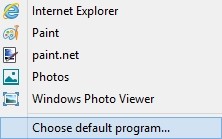
If you right-click a file and select Open With you will have a list of applications to use. Or you can select "Choose default program" and select an app for that - Windows Media Player for example...


Referral links: Quic Broadband (free setup code: R587125ERQ6VE) | Samsung | AliExpress | Wise | Sharesies 


Support Geekzone by subscribing (browse ads-free), or making a one-off or recurring donation through PressPatron.


1101
3141 posts

Uber Geek
+1 received by user: 1143


  #1273977 31-Mar-2015 09:44
Send private message

I saw the same thing last week on a PC.
Was caused buy the links to "my pictures" etc/whatever being moved or wrong (on that PC)

Right click "my documents" , properties, restore defaults


Shop now on AliExpress (affiliate link).
4grandkids

15 posts

Geek


  #1274619 31-Mar-2015 16:56
Send private message

i am able to open the files by left clicking as usual, its the folders which wont open with a left click anymore. If i right click a folder and then select open they will open then.

timmmay
20858 posts

Uber Geek
+1 received by user: 5350

Trusted
Lifetime subscriber

  #1274627 31-Mar-2015 17:06
Send private message

I think it might be best to have one of your kids or a computer savvy friend come and help you out. It's probably something relatively simple but without seeing what you're doing it's difficult to know how to help. We all get caught out by strange things like this from time to time.

4grandkids

15 posts

Geek


  #1274642 31-Mar-2015 17:14
Send private message

in regard to what do i need a teenager for.? Im not a techie but i do have common sense.

andrewNZ
2487 posts

Uber Geek
+1 received by user: 1461
Inactive user


  #1274655 31-Mar-2015 17:35
Send private message

Does the same thing happen if you navigate to that folder in c drive?

timmmay
20858 posts

Uber Geek
+1 received by user: 5350

Trusted
Lifetime subscriber

  #1274734 31-Mar-2015 20:05
Send private message

4grandkids: in regard to what do i need a teenager for.? Im not a techie but i do have common sense.


Computers don't always make sense!


Shop now for Dyson appliances (affiliate link).
4grandkids

15 posts

Geek


  #1274745 31-Mar-2015 20:12
Send private message

perhaps you would be happier somewhere else a long long long way away from me.

4grandkids

15 posts

Geek


  #1274747 31-Mar-2015 20:13
Send private message

microsoft nonhelp desk seem to think the registry has been changed.


freitasm
BDFL - Memuneh
80646 posts

Uber Geek
+1 received by user: 41030

Administrator
ID Verified
Trusted
Geekzone
Lifetime subscriber

  #1274785 31-Mar-2015 20:33
Send private message

It's possible.

Have you ran a full system scan for malware? Here are two links to free scanners:


You can run these any time, even if you already have an anti-virus.


Referral links: Quic Broadband (free setup code: R587125ERQ6VE) | Samsung | AliExpress | Wise | Sharesies 


Support Geekzone by subscribing (browse ads-free), or making a one-off or recurring donation through PressPatron.


gbwelly
1263 posts

Uber Geek
+1 received by user: 776


  #1274909 1-Apr-2015 08:15
Send private message

4grandkids: Click to see full size
so this is a screenshot of the prob im having. the file is my whole pictures file not an isolated one. since posting the original problem i find i can right click on a folder and click on open to see whats in the folder.


Try the .reg files available at this site:

http://www.eightforums.com/tutorials/8486-default-file-associations-restore-windows-8-a.html

If it's just the libraries you can't get into you would want the .library-ms reg file. Download it to your desktop and double click it to install. If it's all folders, not just libraries then you would want the 'Folder' reg file.


Create new topic


Geekzone Live »

Try automatic live updates from Geekzone directly in your browser, without refreshing the page, with Geekzone Live now.


Are you subscribed to our RSS feed? You can download the latest headlines and summaries from our stories directly to your computer or smartphone by using a feed reader.