Geekzone: technology news, blogs, forums
Guest
Welcome Guest.
You haven't logged in yet. If you don't have an account you can register now.


stuartjmz

228 posts

Master Geek
+1 received by user: 9


#177413 1-Aug-2015 18:28
Send private message

I'm creating a new topic for clarity:

I've tried using the MediaCreation tool from this link 
https://www.microsoft.com/en-us/software-download/windows10

on both my Win 7 64Pro and my Win 8.1 Home machines. In both cases, the exe downloads, but trying to open it (as either user or "Run as Admin") does nothing other than bring up the UAC dialog box 


Selecting "Yes" sees the dialog box disappear, and that's it. Nothing else happens at all. Task manager shows no new applications or processes started. What am I doing wrong? 

View this topic in a long page with up to 500 replies per page Create new topic
 1 | 2 | 3
mdav056
616 posts

Ultimate Geek
+1 received by user: 160

Subscriber

  #1356742 1-Aug-2015 18:39
Send private message

Yes, same is happening on my compute stick and my ASUS tablet.  And both the $Windows files have downloaded onto my desktop, but it isn't offering me to update.  I read someplace that MS was concentrating on desktops and laptops first -- maybe this is why (but, so why not offering on my desktop?). 


gml


stuartjmz

228 posts

Master Geek
+1 received by user: 9


  #1356777 1-Aug-2015 19:44
Send private message

I've tried turning UAC off, but that didn't change the outcome either so I turned it back on. 

mdav056
616 posts

Ultimate Geek
+1 received by user: 160

Subscriber

  #1356804 1-Aug-2015 20:31
Send private message

Ah, clarity on the ASUS VivoTab.  I am now getting a message that Win10 can't run on this tablet because the Intel Graphics Media Accelerator is incompatible with Win 10.  I wonder why it didn't happen to mention this when I booked the Win 10 update. Guess I have to await an update from Intel... going looking now.


gml


stuartjmz

228 posts

Master Geek
+1 received by user: 9


  #1356807 1-Aug-2015 20:36
Send private message

mdav056: Ah, clarity on the ASUS VivoTab.  I am now getting a message that Win10 can't run on this tablet because the Intel Graphics Media Accelerator is incompatible with Win 10.  I wonder why it didn't happen to mention this when I booked the Win 10 update. Guess I have to await an update from Intel... going looking now.


Pleased you got some clarification. laughing

Both my devices got the tick from the Get Windows 10 app, so I don't know why nothing's happening at all. 

stuartjmz

228 posts

Master Geek
+1 received by user: 9


  #1356883 1-Aug-2015 23:20
Send private message

It seems odd that the Media Creation Tool won't even run, at all. I've tried running as administrator, running as administrator via CLI, in different user profiles, on different machines, and with UAC enabled and disabled. I've deleted the exe and re-downloaded, in case of a corrupt download. Every time, just silent termination. If anyone reading this has any suggestions at all, I'm all ears!

stuartjmz

228 posts

Master Geek
+1 received by user: 9


  #1356886 1-Aug-2015 23:32
Send private message

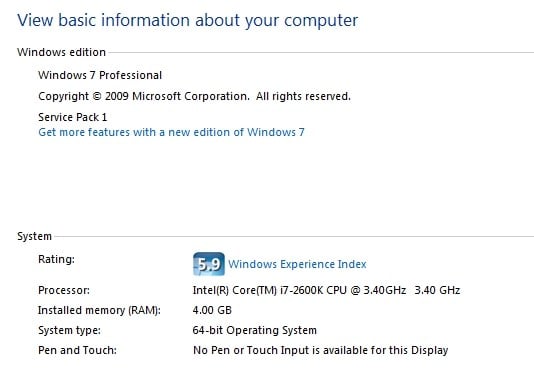
This is getting weirder and weirder. Here is a screenshot from "Computer>Properties"


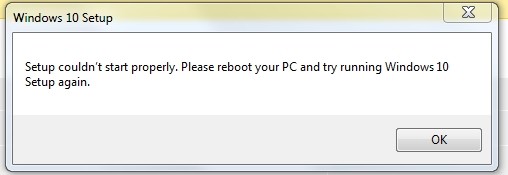
So, very definitely 64-bit. But in desperation, I tried downloading the 32-bit version of the MediaCreation tool. When I tried to run it, I got this:


An error message, yes, but more than I ever got when I tried to run the 64-bit version. Prior to downloading the 32-bit version I had already rebooted and tried running the 64-bit tool, with no change in the zero outcome, and I obviously don't want to run the 32-bit tool on my 64-bit system. But why would the 32-bit version "work" better than the 64-bit, at least to the extent of generating an error message? 


Shop now at Mighty Ape (affiliate link).
Brumfondl
1198 posts

Uber Geek
+1 received by user: 524

Trusted
Subscriber

  #1356887 1-Aug-2015 23:33
Send private message

stuartjmz: It seems odd that the Media Creation Tool won't even run, at all. I've tried running as administrator, running as administrator via CLI, in different user profiles, on different machines, and with UAC enabled and disabled. I've delketed the exe and re-downloaded, in case of a corrupt download. Every time, just silent termination. If anyone reading this has any suggestions at all, I'm all ears! 


You mention 'both my devices' in a previous post. Have you tried the tool on both?


Brumfondl
1198 posts

Uber Geek
+1 received by user: 524

Trusted
Subscriber

  #1356888 1-Aug-2015 23:33
Send private message

stuartjmz: It seems odd that the Media Creation Tool won't even run, at all. I've tried running as administrator, running as administrator via CLI, in different user profiles, on different machines, and with UAC enabled and disabled. I've delketed the exe and re-downloaded, in case of a corrupt download. Every time, just silent termination. If anyone reading this has any suggestions at all, I'm all ears! 


You mention 'both my devices' in a previous post. Have you tried the tool on both?


stuartjmz

228 posts

Master Geek
+1 received by user: 9


  #1356890 1-Aug-2015 23:36
Send private message

Brumfondl:
stuartjmz: It seems odd that the Media Creation Tool won't even run, at all. I've tried running as administrator, running as administrator via CLI, in different user profiles, on different machines, and with UAC enabled and disabled. I've delketed the exe and re-downloaded, in case of a corrupt download. Every time, just silent termination. If anyone reading this has any suggestions at all, I'm all ears! 


You mention 'both my devices' in a previous post. Have you tried the tool on both?


Yes. My Win 7 64 Pro PC and my wife's 8.1 Home laptop. All steps have been attempted on both machines, with the same complete lack of success. The exe simply won't run. 

tardtasticx
3084 posts

Uber Geek
+1 received by user: 483


  #1356892 1-Aug-2015 23:42
Send private message

I had this happen on my first gen Surface Pro, running the tool again seemed to bring up the original instance of it after a few tries if that's of any help. 

stuartjmz

228 posts

Master Geek
+1 received by user: 9


  #1356893 1-Aug-2015 23:42
Send private message

I just tried downloading the 32-bit tool on to my wife's 8.1 (also a 64-bit OS) and got the same result as on my Win 7 box - it generated an error message, something the 64-bit version doesn't do.


Shop now for Dyson appliances (affiliate link).
Brumfondl
1198 posts

Uber Geek
+1 received by user: 524

Trusted
Subscriber

  #1356895 1-Aug-2015 23:46
Send private message

Are you running some sort of anti-virus that is on both machines?


stuartjmz

228 posts

Master Geek
+1 received by user: 9


  #1356896 1-Aug-2015 23:47
Send private message

Brumfondl: Are you running some sort of anti-virus that is on both machines?


Only MSE. It would be ironic if that were the problem. :) 

stuartjmz

228 posts

Master Geek
+1 received by user: 9


  #1356898 1-Aug-2015 23:57
Send private message

tardtasticx: I had this happen on my first gen Surface Pro, running the tool again seemed to bring up the original instance of it after a few tries if that's of any help. 


Thanks for the suggestion. After I read this, I tried repeatedly double-clicking the exe, hoping one instance might start, but sadly it did not.

Brumfondl
1198 posts

Uber Geek
+1 received by user: 524

Trusted
Subscriber

  #1356899 1-Aug-2015 23:59
Send private message

Hmmm, maybe try running Malwarebytes AntiMalware on one of the machines and see it anything comes up? I get the feeling there is something running on both machines that is causing your issue and I kind of doubt it is anything good.


 1 | 2 | 3
View this topic in a long page with up to 500 replies per page Create new topic


Geekzone Live »

Try automatic live updates from Geekzone directly in your browser, without refreshing the page, with Geekzone Live now.


Are you subscribed to our RSS feed? You can download the latest headlines and summaries from our stories directly to your computer or smartphone by using a feed reader.