Geekzone: technology news, blogs, forums
Guest
Welcome Guest.
You haven't logged in yet. If you don't have an account you can register now.


Ellipsis

142 posts

Master Geek


#19237 10-Feb-2008 22:52
Send private message

Hi there,

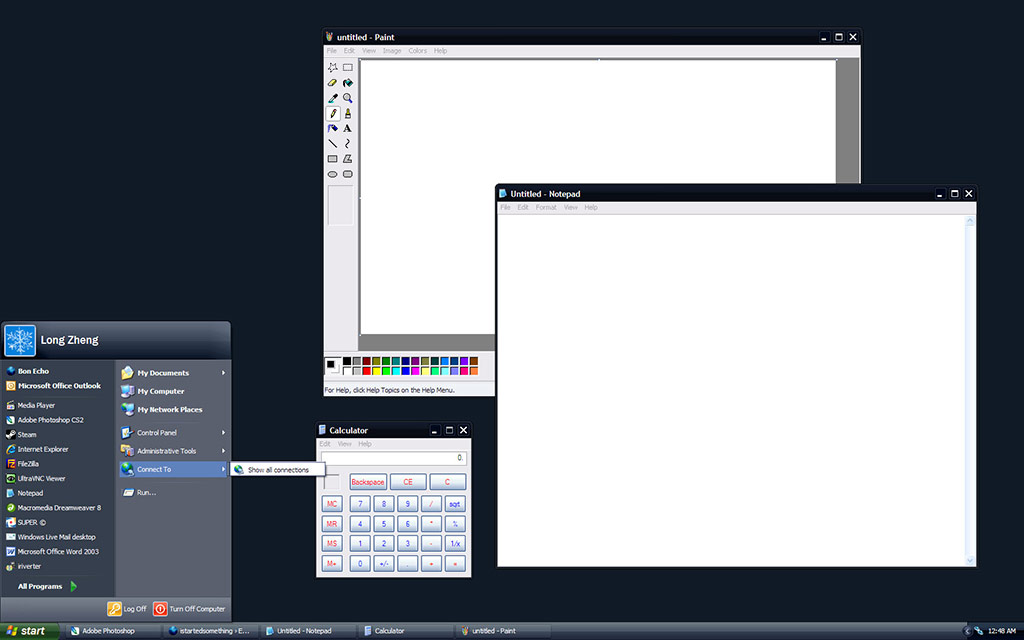
does anyone know how to get the program icons on the start menu as small as the ones on here
http://www.istartedsomething.com/wp-content/uploads/2006/10/noir1.jpg

Create new topic
freitasm
BDFL - Memuneh
80655 posts

Uber Geek
+1 received by user: 41053

Administrator
ID Verified
Trusted
Geekzone
Lifetime subscriber

#109768 10-Feb-2008 22:58
Send private message

Right-click the Orb, select Properties | Start Menu (Customize), scroll down to the bottom of the list and uncheck "Use large icons".


Referral links: Quic Broadband (free setup code: R587125ERQ6VE) | Samsung | AliExpress | Wise | Sharesies 


Support Geekzone by subscribing (browse ads-free), or making a one-off or recurring donation through PressPatron.



Ellipsis

142 posts

Master Geek


  #109769 10-Feb-2008 22:59
Send private message

Ah. Thanks!!

paradoxsm
3000 posts

Uber Geek

Trusted

  #109772 10-Feb-2008 23:22
Send private message

I want that cool dark XP theme!


Ellipsis

142 posts

Master Geek


weblordpepe
460 posts

Ultimate Geek
Inactive user


  #110155 12-Feb-2008 19:45
Send private message

holy crap this is awesome

kiwis
837 posts

Ultimate Geek
+1 received by user: 12


  #110330 13-Feb-2008 10:26
Send private message

I've just installed this as well. Nice look and feel to it!!

Create new topic


Geekzone Live »

Try automatic live updates from Geekzone directly in your browser, without refreshing the page, with Geekzone Live now.


Are you subscribed to our RSS feed? You can download the latest headlines and summaries from our stories directly to your computer or smartphone by using a feed reader.