Geekzone: technology news, blogs, forums
Guest
Welcome Guest.
You haven't logged in yet. If you don't have an account you can register now.


surfisup1000

5288 posts

Uber Geek
+1 received by user: 2159


#195773 3-May-2016 13:23
Send private message

Tried to create a simple contact  'group' for my partner who is coaching the girls netball this year. 


Done this tons of times in the past, but not recently in the windows 10 era, where contacts are now 'people'. 


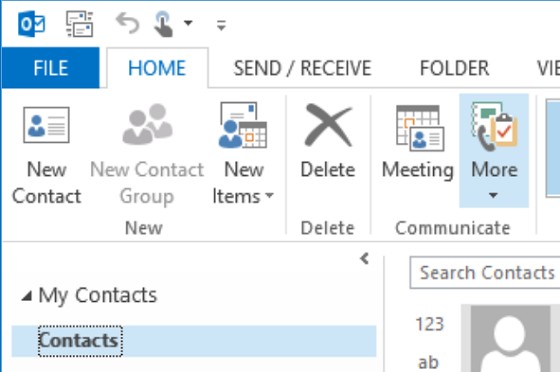
It is now impossible... cannot add contact groups  to outlook 2016 because the option is greyed out -- apparently because it is linked to the online account. 


I eventually figure out how to create a contact group online (that is extremely difficult in itself-- try creating a contact group on the web outlook... then try to add another contact to the group......nearly impossible -- figured out that outlook ignores contact groups when searching!!


So, I get the contact group created online, but, outlook is not loading it!!!!! But, the reason given for outlook 2016 contacts being greyed out is because it uses the online contacts... but , outlook 2016 does not load them!!!!!


Figure that maybe the new windows 10 mail app is better...configure that...even worse. No contact groups at all, not even greyed out. 


Microsoft, you suck!!  In your eagerness to making everything share with everything, nothing works. 


p.s, rhetorical rant.  please no replies haha. 



Create new topic
Hammerer
2480 posts

Uber Geek
+1 received by user: 802

Lifetime subscriber

  #1546048 3-May-2016 13:57
Send private message

If you ignore replies, you'll never find out how to do things you can't work out how to do.


I've had no problems creating contact groups in Outlook 2013 and 2016. I can do this for my linked Microsoft account. I can search and find the group too.


https://support.office.com/en-us/article/Create-and-edit-a-Contact-Group-formerly-distribution-lists-88ff6c60-0a1d-4b54-8c9d-9e1a71bc3023?ui=en-US&rs=en-US&ad=US&fromAR=1


The difference might be that I'm creating my groups for Outlook and not for each individual email account. I suspect that you're selecting the online account and trying to make the group.


surfisup1000

5288 posts

Uber Geek
+1 received by user: 2159


  #1546064 3-May-2016 14:32
Send private message

Probably you're right, but, I pulled all my hair out so I quit . 


But, this outlook 2016 was just configured as simply as possible....started it, entered hotmail user/password and everything was created automatically. 


You would just expect to be able to create groups right? ... but, unlike yours...this is what i get...


Greyed out. I am not selecting any particular account, just using defaults.


I created the group online (a mission in itself), but still not showing when I search for the group name in outlook 2016. 


surfisup1000

5288 posts

Uber Geek
+1 received by user: 2159


  #1546069 3-May-2016 14:34
Send private message

p.s, the strange thing is, that the group members appear in the search when I type the group name into outlook 2016, but not the group itself. 


Nuts.   I have to then select each group member individually, but what is the point of setting up a group in the first instance? 


[p.p.s, interestingly, the online outlook app seems to be finding the group now, before it was not, i wonder if it takes a while to index, but why do they not include a group view which just shows groups????]  


This stuff used to just  work. Thus my frustrations (and under a little time pressure haha. 


Hammerer
2480 posts

Uber Geek
+1 received by user: 802

Lifetime subscriber

  #1546111 3-May-2016 15:44
Send private message

I'm no Outlook expert, but I wonder if your Outlook account was first created from a mobile device like a phone. My understanding is that it would be created with Exchange ActiveSync rather than MAPI which then introduces the group issue you have.


Do you see this record when you look in File > Account Settings > Address Books tab:


Name: Outlook Address Book


Type: MAPI


Maybe you don't have a local .PST file which appears to be the prerequisite for adding groups for the same reason:


I see this record in File > Account Settings > Data Files tab:


Name: Outlook


Location: C:\Users\{username}\Documents\Outlook Files\Outlook.pst


Create new topic


Geekzone Live »

Try automatic live updates from Geekzone directly in your browser, without refreshing the page, with Geekzone Live now.


Are you subscribed to our RSS feed? You can download the latest headlines and summaries from our stories directly to your computer or smartphone by using a feed reader.