Geekzone: technology news, blogs, forums
Guest
Welcome Guest.
You haven't logged in yet. If you don't have an account you can register now.


jhenson

3 posts

Wannabe Geek


#201596 25-Aug-2016 23:07
Send private message

I have a preinstalled Windows 8.1. My Laptop keeps rebooting with INACCESSIBLE_BOOT_DEVICE error and doesnot starts my windows. I have tried every trick in the book - such as used all advance repair option which provides in the start, chkdsk /f/r and nor the legacy support doesn't even allow to boot from a cd/dvd. I need urgent help unable to use the Laptop for last 3 months. Really fedup.



Filter this topic showing only the reply marked as answer Create new topic
michaelmurfy
meow
13579 posts

Uber Geek
+1 received by user: 10910

Moderator
ID Verified
Trusted
Lifetime subscriber

  #1617640 26-Aug-2016 02:13
Send private message

My money is on the hard drive inside your laptop is on the way out / pretty much gone. Take it in under warranty (if exists).


Michael Murphy | https://murfy.nz
Referral Links: Quic Broadband (use R122101E7CV7Q for free setup)

Are you happy with what you get from Geekzone? Please consider supporting us by subscribing.
Opinions are my own and not the views of my employer.


jhenson

3 posts

Wannabe Geek


  #1617645 26-Aug-2016 06:08
Send private message

Guess what?


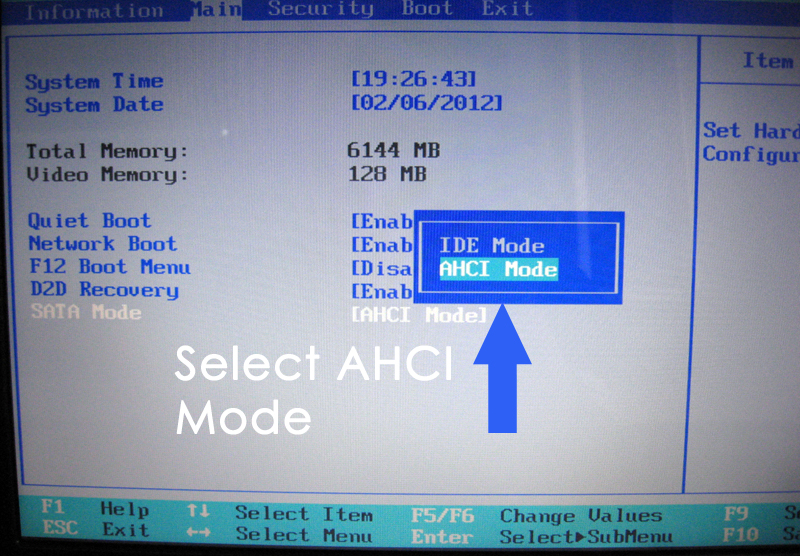
After much digging around all i had to do was switch to AHCI Mode from BIOS as suggested at http://appuals.com/best-fix-steps-to-fix-inaccessible_boot_device/


I am not sure why it previously worked when the IDE was selected but as soon as i changed to AHCI and rebooted it started to detect the disk.


afe66
3181 posts

Uber Geek
+1 received by user: 1678

Lifetime subscriber

  #1617731 26-Aug-2016 10:27
Send private message

Time for a data backup I think....


A.


ripdog
548 posts

Ultimate Geek
+1 received by user: 373
Inactive user


  #1617736 26-Aug-2016 10:40
Send private message

It's ALWAYS time for a data backup! If you have anything better than ADSL, crashplan is good in my experience.


NZSpides
155 posts

Master Geek
+1 received by user: 76


  #1617791 26-Aug-2016 11:49
Send private message

Go and visit www.grc.com and have a look at spinrite.


I've tried it and it does work.


And it even helps ssd's


robcreid
243 posts

Master Geek
+1 received by user: 86


  #1617872 26-Aug-2016 13:50
Send private message

jhenson:


Guess what?


After much digging around all i had to do was switch to AHCI Mode from BIOS as suggested at http://appuals.com/best-fix-steps-to-fix-inaccessible_boot_device/


I am not sure why it previously worked when the IDE was selected but as soon as i changed to AHCI and rebooted it started to detect the disk.


Well done on persevering and sorting it out.


Did you do a BIOS update before the problem happened? 


I've seen at least one instance where someone did a BIOS update and were following instructions that told them to reset to BIOS factory defaults which set them back to IDE mode rather then AHCI which they had previously been using.


Shop now for Dyson appliances (affiliate link).
jhenson

3 posts

Wannabe Geek


  #1618091 26-Aug-2016 20:12
Send private message

I am not sure if i updated my BIOS but i remember that i was trying to change my "start up" settings a few days ago.


Filter this topic showing only the reply marked as answer Create new topic


Geekzone Live »

Try automatic live updates from Geekzone directly in your browser, without refreshing the page, with Geekzone Live now.


Are you subscribed to our RSS feed? You can download the latest headlines and summaries from our stories directly to your computer or smartphone by using a feed reader.