Geekzone: technology news, blogs, forums
Guest
Welcome Guest.
You haven't logged in yet. If you don't have an account you can register now.


woodson

234 posts

Master Geek
+1 received by user: 14


#208118 27-Jan-2017 11:41
Send private message

I've tried changing the extension to .zip, then opening the folder and I find a preview.jpg file which I then change to .pdf and all should be well. Whilst I can open the .jpg file and see a document, it's not the full document. If I change the preview file to .pdf it won't open in Acrobat - any ideas?



Filter this topic showing only the reply marked as answer Create new topic
lxsw20
3689 posts

Uber Geek
+1 received by user: 2174

Subscriber

  #1710591 27-Jan-2017 11:51
Send private message

Dont know of a way to do it with Windows except the method you already tried. An iPhone/iPad with Pages can convert to docx if you have one around.


woodson

234 posts

Master Geek
+1 received by user: 14


  #1710592 27-Jan-2017 11:53
Send private message

I'll give it a shot, thanks!  :)


Yabanize
2351 posts

Uber Geek
+1 received by user: 583


  #1710629 27-Jan-2017 12:05
Send private message

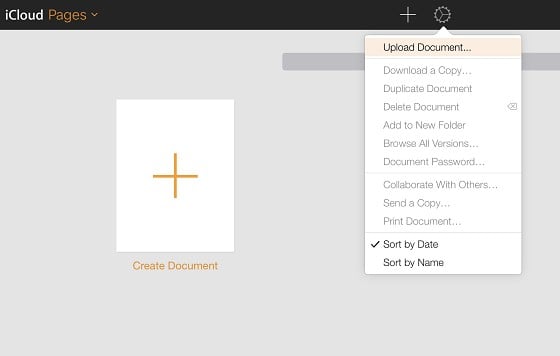
Go to http://icloud.com and log in using an Apple ID, Choose Pages (You can use a web version of pages on iCloud.com)


Choose Upload a document


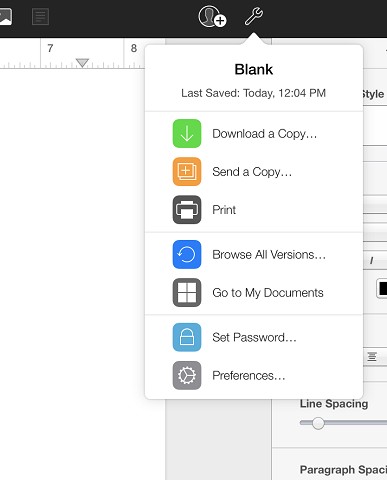
Then, once you are viewing the document, you can Download a copy, as PDF or word


woodson

234 posts

Master Geek
+1 received by user: 14


  #1710636 27-Jan-2017 12:22
Send private message

You, sir, are a legend.  :)


Filter this topic showing only the reply marked as answer Create new topic


Geekzone Live »

Try automatic live updates from Geekzone directly in your browser, without refreshing the page, with Geekzone Live now.


Are you subscribed to our RSS feed? You can download the latest headlines and summaries from our stories directly to your computer or smartphone by using a feed reader.