Geekzone: technology news, blogs, forums
Guest
Welcome Guest.
You haven't logged in yet. If you don't have an account you can register now.


kebhow

17 posts

Geek
+1 received by user: 2


#214483 14-May-2017 12:19
Send private message

I bought a refurbished Lenovo laptop about a year ago with Windows 10 installed. It could install updates just fine for the first few months, but after that every update downloaded and then installed resulted in an error. It would download an update succesfully, installed it, and when it restarts it would say update could not be installed, undoing changes. It would then reboot normally without the new update, and after a while it would do the same download-install-undoing changes cycle all over again.


I have tried using the windows upgrade assistant, but it also encountered an error after installing the update. Have also tried googling extensively online and tried a lot of tips & tricks to no avail. Thanks to this, my windows version is probably a year behind the most recent update, and I am afraid it would have some security flaws that has since been fixed.


Any suggestion to try and resolve this ?


This is my current Windows Update History. The list of failed updates should have been far longer, but windows always supersede the older update with newer or cumulative updates.


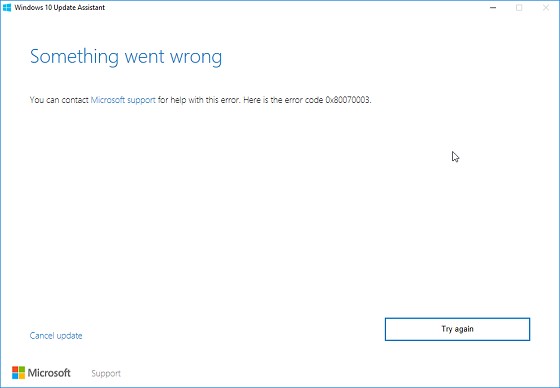
And this is the result I get using the windows 10 update assistant


Create new topic
jamesrt
1679 posts

Uber Geek
+1 received by user: 961

ID Verified
Trusted
Lifetime subscriber

  #1781921 14-May-2017 13:42
Send private message


Rikkitic
Awrrr
19157 posts

Uber Geek
+1 received by user: 16482

Lifetime subscriber

  #1781923 14-May-2017 13:48
Send private message

I also encountered something similar. I was eventually able to fix it by installing one of the main updates manually. After that (and a couple more tries) the remaining updates installed correctly. 


Plesse igmore amd axxept applogies in adbance fir anu typos


kebhow

17 posts

Geek
+1 received by user: 2


  #1782074 14-May-2017 19:25
Send private message

jamesrt: Have you tried the steps in the Microsoft KB?

https://support.microsoft.com/en-us/help/910336/windows-update-error-0x80070002-or-0x80070003


I tried the steps on the link, have done most of those before. I followed it through but got stuck on the DISM (step 5). I entered the command into command prompt but it could not execute it. The link suggested to use a running Windows installation as the repair source. This I do not have, since the laptop came with windows already installed.


Oblivian
7374 posts

Uber Geek
+1 received by user: 2143

ID Verified

  #1782083 14-May-2017 19:41
Send private message

kebhow:


jamesrt: Have you tried the steps in the Microsoft KB?

https://support.microsoft.com/en-us/help/910336/windows-update-error-0x80070002-or-0x80070003


I tried the steps on the link, have done most of those before. I followed it through but got stuck on the DISM (step 5). I entered the command into command prompt but it could not execute it. The link suggested to use a running Windows installation as the repair source. This I do not have, since the laptop came with windows already installed.


Create a windows 10 install USB using the official MS tool then? In theory it should offer to upgrade as major version. Backup everthing of course.


https://www.microsoft.com/en-us/software-download/windows10


OldGeek
993 posts

Ultimate Geek
+1 received by user: 410

ID Verified
Lifetime subscriber

  #1782089 14-May-2017 19:51
Send private message

Another possibility is to get MS to do the work.  With Windows Update issues this is free.  You can initiate this here:


https://partner.support.services.microsoft.com/en-nz/contact/menu/software/windows/setup/


I have found that the techs that call you back are happy to remote into your PC and attempt a fix.  They follow a stringent permissions requirement which includes downloading MS software that allows them to remote in.  You can then watch what they do and stop it if you feel uncomfortable with what you see.


Create new topic


Geekzone Live »

Try automatic live updates from Geekzone directly in your browser, without refreshing the page, with Geekzone Live now.


Are you subscribed to our RSS feed? You can download the latest headlines and summaries from our stories directly to your computer or smartphone by using a feed reader.
