Geekzone: technology news, blogs, forums
Guest
Welcome Guest.
You haven't logged in yet. If you don't have an account you can register now.


gumdigger

429 posts

Ultimate Geek
+1 received by user: 3


#216725 10-Jul-2017 12:02
Send private message

Hi

In a situtation where a Windows 7 Pro machine is BSOD - spent several hours fixing it but no luck. My goal is to restore the installed programs to a fresh install.
So i took a Acronis *.tib full backup image, converted tovmdk - The VM blue screens with the same code.
Acronis Universal restore sounded promising but failed - i get no universal restore option while restoring, Acronis reckons this could be because Acronisdoesnt recognize the OS.
So does anyone know how i can backup installed applications from Machine A (which is not bootable) to Machine B (fresh install of windows)


Create new topic
1101
3141 posts

Uber Geek
+1 received by user: 1143


  #1817784 10-Jul-2017 12:46
Send private message

You cant . Not as you want to do

In general Installed programs cant be copied to another PC, cant restore JUST the programs to a fresh Win install

There are some exceptions, but programs usually have to be re-installed .
you can restore the files from installed programs to a new PC/reloaded PC, chances are they wont run.


gumdigger

429 posts

Ultimate Geek
+1 received by user: 3


  #1817791 10-Jul-2017 12:56
Send private message

can i upgrade to windows 10 without booting into windows. hoping the upgrade might fix the bsod

jonb
1796 posts

Uber Geek
+1 received by user: 545

Trusted

  #1818780 10-Jul-2017 13:11
Send private message

The windows 10 install usb doesn't need to load windows first, could be worth a try yes.


gumdigger

429 posts

Ultimate Geek
+1 received by user: 3


  #1819173 10-Jul-2017 20:55
Send private message

jonb:


The windows 10 install usb doesn't need to load windows first, could be worth a try yes.


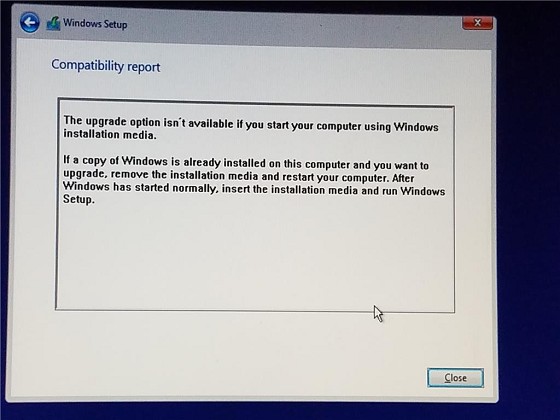
prepared win10 usb media using the official tool and get the following message when i choose the upgrade option


ANglEAUT
altered-ego
2436 posts

Uber Geek
+1 received by user: 842

Trusted
Lifetime subscriber

  #1819266 10-Jul-2017 23:59
Send private message

gumdigger: Hi

In a situtation where a Windows 7 Pro machine is BSOD - spent several hours fixing it but no luck. My goal is to restore the installed programs to a fresh install.
So i took a Acronis *.tib full backup image, converted tovmdk - The VM blue screens with the same code.
Acronis Universal restore sounded promising but failed ....


If the cause of the BSOD happened before the the Acronis backup, simply converting to a VM won't fix the underlying issue. If you regularly backed up the machine with Acronis before the BSOD, try an older backup.


Why do you need "those specific" programs re-installed? Original installation media can be found on-line. You could load the Registry of the dead PC to read the license keys for your installed software..


A fresh install is always better than a recovered system.


Please keep this GZ community vibrant by contributing in a constructive & respectful manner.


1101
3141 posts

Uber Geek
+1 received by user: 1143


  #1819360 11-Jul-2017 08:51
Send private message

gumdigger: can i upgrade to windows 10 without booting into windows. hoping the upgrade might fix the bsod


Yes, but it will more like a new install . You will need to re-install all programs etc.
If you want a true in place upgrade, that keeps most of the programs, the upgrade needs to be run from a running Windows


Your best option is to do a clean wipe & install . That can fix alot of issues.


BSOD can also be hardware related though . Do some RAM tests and Hard Drive tests first .


Create new topic


Geekzone Live »

Try automatic live updates from Geekzone directly in your browser, without refreshing the page, with Geekzone Live now.


Are you subscribed to our RSS feed? You can download the latest headlines and summaries from our stories directly to your computer or smartphone by using a feed reader.