Geekzone: technology news, blogs, forums
Guest
Welcome Guest.
You haven't logged in yet. If you don't have an account you can register now.


freitasm

BDFL - Memuneh
80653 posts

Uber Geek
+1 received by user: 41045

Administrator
ID Verified
Trusted
Geekzone
Lifetime subscriber

#240936 3-Oct-2018 12:12
Send private message

Installed this on my desktop now... And you know things aren't well tested when you see Edge showing the wrong message (April update?) on first start:
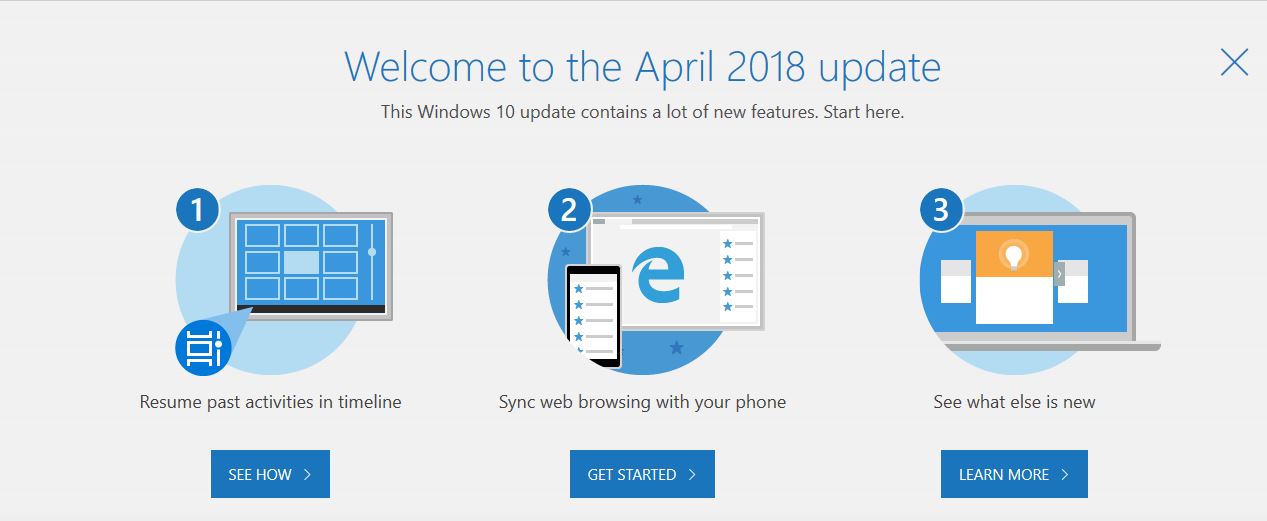


Apart from that, it started - which is a good sign, instead of looping or losing settings. 


Referral links: Quic Broadband (free setup code: R587125ERQ6VE) | Samsung | AliExpress | Wise | Sharesies 


Support Geekzone by subscribing (browse ads-free), or making a one-off or recurring donation through PressPatron.



View this topic in a long page with up to 500 replies per page Create new topic
 1 | 2 | 3 | 4 | 5 | 6 | ... | 9
Behodar
11099 posts

Uber Geek
+1 received by user: 6082

Trusted
Lifetime subscriber

  #2100725 3-Oct-2018 12:33
Send private message

Downloading now. Hopefully it'll actually install on my machine, unlike 1803 (which says it's installing, then reboots back into 1709 without any error messages).


Edit: 1809 installed successfully!


maoriboy
1034 posts

Uber Geek
+1 received by user: 562

Trusted

  #2100726 3-Oct-2018 12:33
Send private message

I'll be reading this with interest smile


freitasm

BDFL - Memuneh
80653 posts

Uber Geek
+1 received by user: 41045

Administrator
ID Verified
Trusted
Geekzone
Lifetime subscriber

  #2100730 3-Oct-2018 12:37
Send private message

So far, so good. The new Phone app syncs Photos and SMS ok with my Android device, but since it requires Windows 10 October 2018 I can see I will continue to use Android Messages on browser until such a time my work Surface is upgraded. Also interesting the SMS sync is still listed as "Preview" in the Windows app.


Referral links: Quic Broadband (free setup code: R587125ERQ6VE) | Samsung | AliExpress | Wise | Sharesies 


Support Geekzone by subscribing (browse ads-free), or making a one-off or recurring donation through PressPatron.



freitasm

BDFL - Memuneh
80653 posts

Uber Geek
+1 received by user: 41045

Administrator
ID Verified
Trusted
Geekzone
Lifetime subscriber

  #2100734 3-Oct-2018 12:40
Send private message

Also the Phone app shows you the SMS but does not allow you to delete them... Useless if you mostly use your phone to receive SMS with 2FA codes and don't want all those messages left behind on phone.


Referral links: Quic Broadband (free setup code: R587125ERQ6VE) | Samsung | AliExpress | Wise | Sharesies 


Support Geekzone by subscribing (browse ads-free), or making a one-off or recurring donation through PressPatron.


cyril7
9075 posts

Uber Geek
+1 received by user: 2499

ID Verified
Trusted
Subscriber

  #2100757 3-Oct-2018 13:03
Send private message

April 2018 update delivered in Oct 2018, 95 delivered in 98, nothing new


Cyril


Jogre
182 posts

Master Geek
+1 received by user: 40


  #2100758 3-Oct-2018 13:04
Send private message

freitasm:


Also the Phone app shows you the SMS but does not allow you to delete them... Useless if you mostly use your phone to receive SMS with 2FA codes and don't want all those messages left behind on phone.


MSNZ GPO blocks Phone App setting :( 


I like;


- Dark Theme supported by all Windows Apps (so important so first on my list!)


- Storage Sense integration with OneDrive Files on Demand (cleared out 26GB of docs that I haven't used in the last 60 days+


- Clipboard History (Win+V). I originally scoffed but when you're copy-pasting multiple items it becomes incredibly handy!


- SwiftKey support for touch-enabled devices. I low-key showed this off during a meeting this morning which had a few people scratching heads as to how I was doing it.


Many more to come.


Jono Green


Microsoft New Zealand


Shop now for Dyson appliances (affiliate link).
amiga500
1484 posts

Uber Geek
+1 received by user: 422
Inactive user


  #2100763 3-Oct-2018 13:08
Send private message

The craziest part of the Windows 10 'rolling release' saga is that it annoys the people who use Windows to make a living.  It's those people Microsoft should be looking after by making Windows 10 rock solid & only introducing new features maybe every 18 months to 2 years.


freitasm

BDFL - Memuneh
80653 posts

Uber Geek
+1 received by user: 41045

Administrator
ID Verified
Trusted
Geekzone
Lifetime subscriber

  #2100765 3-Oct-2018 13:10
Send private message

Of those, the one I am really keen on is the Clipboard History.


I still can't understand why some of those features that sound so basic require a full system update instead of patches. When Microsoft says "Windows-as-a-Service" I would expect a more continuous stream of features, not full updates that sound more like the old Service Packs.


Referral links: Quic Broadband (free setup code: R587125ERQ6VE) | Samsung | AliExpress | Wise | Sharesies 


Support Geekzone by subscribing (browse ads-free), or making a one-off or recurring donation through PressPatron.


freitasm

BDFL - Memuneh
80653 posts

Uber Geek
+1 received by user: 41045

Administrator
ID Verified
Trusted
Geekzone
Lifetime subscriber

  #2100895 3-Oct-2018 17:13
Send private message

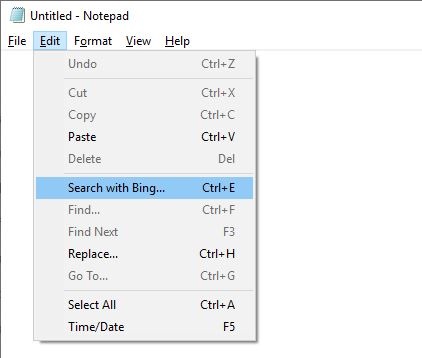
I understand Notepad now supports Linux-style LF, which is good.


But then Microsoft wasted time with other feature: "Search with Bing" menu option - seriously?


Referral links: Quic Broadband (free setup code: R587125ERQ6VE) | Samsung | AliExpress | Wise | Sharesies 


Support Geekzone by subscribing (browse ads-free), or making a one-off or recurring donation through PressPatron.


msukiwi
2443 posts

Uber Geek
+1 received by user: 2126

Lifetime subscriber

  #2100903 3-Oct-2018 17:41
Send private message

Well I have just completed the 1809 update.


Once again the audio settings have been screwed up!


Defaulted the speakers to a random USB sound device, instead of the motherboard speaker port!


This update also hanged various other audio input devices!


My Logitech wireless keyboard no longer works after this update! Luckily I have an emergency USB one.


Funny, the mouse part of the Logitech Combo works OK. (Yes the keyboard is turned on and I have changed the batteries)


Don't know yet what else this update has broken.


msukiwi
2443 posts

Uber Geek
+1 received by user: 2126

Lifetime subscriber

  #2101007 3-Oct-2018 19:44
Send private message

The affected keyboard is a K270.


And NO, rebooting has not solved it either!


Shop now for Lenovo laptops and other devices (affiliate link).
Sideface
9649 posts

Uber Geek
+1 received by user: 15598

Trusted
DR
Lifetime subscriber

  #2101021 3-Oct-2018 20:16
Send private message

msukiwi:


Well I have just completed the 1809 update.


Once again the audio settings have been screwed up!


Defaulted the speakers to a random USB sound device, instead of the motherboard speaker port!  [snip]


+1


Ditto on 2 new PCs


Sideface


msukiwi
2443 posts

Uber Geek
+1 received by user: 2126

Lifetime subscriber

  #2101027 3-Oct-2018 20:36
Send private message

Have keyboard working again.


Had to install Logitech setpoint s/which seemed to suck an extra 30% even tho it was not showing in taskmaster!


Exited the Logitech S/W (That seems to keep "running" even tho you exited it! It is hidden on the taskbar)


CPU usage is now normal, and NO "Logitech NO Updates" message every 10 seconds!


Sheesh!


amiga500
1484 posts

Uber Geek
+1 received by user: 422
Inactive user


  #2101032 3-Oct-2018 20:42
Send private message

msukiwi:


The affected keyboard is a K270.


And NO, rebooting has not solved it either!


I have one of those too. I flip-flopped & got a 1803 image and put it onto my spare hard drive & did all the updates. So I won't be using Windows 10 until the K270 issue is sorted. I do have a spare wired PS2 one though. At the moment the drive is sitting there with SATA and power cable disconnected!


gehenna
8667 posts

Uber Geek
+1 received by user: 3883

Moderator
Trusted
Lifetime subscriber

  #2101042 3-Oct-2018 21:02
Send private message

amiga500:


The craziest part of the Windows 10 'rolling release' saga is that it annoys the people who use Windows to make a living.  It's those people Microsoft should be looking after by making Windows 10 rock solid & only introducing new features maybe every 18 months to 2 years.


Go with the LTSB version instead then?


 1 | 2 | 3 | 4 | 5 | 6 | ... | 9
View this topic in a long page with up to 500 replies per page Create new topic


Geekzone Live »

Try automatic live updates from Geekzone directly in your browser, without refreshing the page, with Geekzone Live now.


Are you subscribed to our RSS feed? You can download the latest headlines and summaries from our stories directly to your computer or smartphone by using a feed reader.