Geekzone: technology news, blogs, forums
Guest
Welcome Guest.
You haven't logged in yet. If you don't have an account you can register now.


gordonisnz

113 posts

Master Geek
+1 received by user: 10


#272029 6-Jun-2020 11:14
Send private message

Ive got a small problem with a NEW Pc - running WIN 10. 
WINDOWS 10 Home - Version 10.0.17763 Build 17763


Ive bought a new PC and it it going REALLY slow..  Last night, i was down to 10 Mbps using https://www.spark.co.nz/help/internet/troubleshoot/broadband-speed/ in my browser


THOUGH if i use the speed-test app., I was running at 60-70 Mbps. This app was running on the SAME screen (at different times - Minutes after the 1st test) 


Spark modem HG659b - though I hadnt had this problem on my old PC. & all my other things using wifi are fast (ipad / monbile phone / smart TV - netflix).


Is there anything i can check, to see what may be causing the slow-down ?


Using the website now - 11:10 AM saturday, https://www.spark.co.nz/help/internet/troubleshoot/broadband-speed/  - Im running at 34 MBps  - My mobile phone is running at a similar speed 37 MBPS now.


PS - even if i change screens (check settings) that do not use internet - it sometimes takes 5-10 minutes to see the new screen.


View this topic in a long page with up to 500 replies per page Create new topic
 1 | 2
Jase2985
13730 posts

Uber Geek
+1 received by user: 6202

ID Verified
Lifetime subscriber

  #2499470 6-Jun-2020 11:19
Send private message

why is your version of windows so old?


i would start with updating that and you might get some better drivers


nathan
5695 posts

Uber Geek
+1 received by user: 1630
Inactive user


  #2499486 6-Jun-2020 11:26
Send private message

Define slow

What is slow?

Your internet is slow?

Is it slow on other devices too?

k1w1k1d
1711 posts

Uber Geek
+1 received by user: 1305


  #2499488 6-Jun-2020 11:31
Send private message

As advised W10 17763 is old, released in October 2018.


Are you testing through a cable or WiFi?


What are the specs of the PC?


What else is running at the same time as you are testing?


PC may be downloading huge updates in the background?


gordonisnz

113 posts

Master Geek
+1 received by user: 10


  #2499530 6-Jun-2020 11:39
Send private message

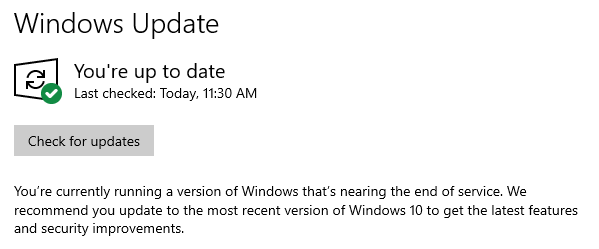
Ive checked for updates & rebooted (several times).. But my version/build number is not changing. 


Is there something im missing ? (I guess we can press a button & get the latest version ? )


EDIT:Found: Feature update to Windows 10, version 1909


Downloading 


lNomNoml
1842 posts

Uber Geek
+1 received by user: 521

ID Verified

  #2499531 6-Jun-2020 11:40
Send private message

gordonisnz:


Ive checked for updates & rebooted (several times).. But my version/build number is not changing. 


Is there something im missing ? (I guess we can press a button & get the latest version ? )


Use the update now option: https://www.microsoft.com/en-us/software-download/windows10


gzt

gzt
18679 posts

Uber Geek
+1 received by user: 7809

Lifetime subscriber

  #2499659 6-Jun-2020 13:31
Send private message

Ive bought a new PC and it it going REALLY slow..

Your post mainly talks about speed test results. Results will vary depending on other people and devices in your house using the net at the same time as your test.


Shop on-line at New World now for your groceries (affiliate link).
sqishy
530 posts

Ultimate Geek
+1 received by user: 193


  #2499660 6-Jun-2020 13:34
Send private message

I think best way forward is to build a bootable Win 10 USB drive and do a clean install.


gzt

gzt
18679 posts

Uber Geek
+1 received by user: 7809

Lifetime subscriber

  #2499671 6-Jun-2020 14:49
Send private message

sqishy: I think best way forward is to build a bootable Win 10 USB drive and do a clean install.

1. There's no need these days. Windows 10 has a recovery option in Settings to do exactly this.
2. Sometimes not a good idea if the machine has odd drivers etc only available in the OEM image. Rarer now, still happens.

gordonisnz

113 posts

Master Geek
+1 received by user: 10


  #2499689 6-Jun-2020 15:33
Send private message

Thanks - took a few hours to upgrade, but im now on 10.0.19041 - seems faster but it has only been a few minutes. I'll test tonight & tomorrow & see how it is.


gzt

gzt
18679 posts

Uber Geek
+1 received by user: 7809

Lifetime subscriber

  #2499723 6-Jun-2020 16:53
Send private message

I'd recommend restarting your 659b if you have not done so for a few months. Power off, count to five, power on again.

scuwp
3927 posts

Uber Geek
+1 received by user: 2510


  #2499729 6-Jun-2020 17:08
Send private message

Unless I missed it you didn't say what spec your computer is.  I have a couple of lower spec/older laptops that grind to a halt almost when windows is updating in the background.   Suggest setting your update schedule for when you are not using the computer, and let it run all the updates. 


Weird that you say it's a "new" computer yet the OS is so old? 


Lazy is such an ugly word, I prefer to call it selective participation


Move to New Zealand's best fibre broadband service (affiliate link). Free setup code: R587125ERQ6VE. Note that to use Quic Broadband you must be comfortable with configuring your own router.

gzt

gzt
18679 posts

Uber Geek
+1 received by user: 7809

Lifetime subscriber

  #2499779 6-Jun-2020 17:20
Send private message

scuwp: "new" computer yet the OS is so old?

One year since 17763 was the current release. This is not terribly old. It's unlikely the machine is this year's model tho.

What is the make and model?

Ruphus
469 posts

Ultimate Geek
+1 received by user: 181


  #2499859 6-Jun-2020 19:56
Send private message

Windows 10 1809 is not "old" and is still in support for consumers until November of this year. Windows 10 1909 is effectively a minor patch for 1903 which brought very little to the table. I wouldn't be rushing out to install 2004 with all the known issues reported so far. Especially as Microsoft is advising, "We recommend that you do not attempt to manually update using the Update now button or the Media Creation Tool until this issue has been resolved." for most of the issues.


shanes
270 posts

Ultimate Geek
+1 received by user: 84

Lifetime subscriber

  #2499870 6-Jun-2020 21:07
Send private message

Ruphus:


I wouldn't be rushing out to install 2004 with all the known issues reported so far. Especially as Microsoft is advising, "We recommend that you do not attempt to manually update using the Update now button or the Media Creation Tool until this issue has been resolved." for most of the issues.


Oh dear... I updated my laptop updated to 2004 on Thursday.


Although so good so far.


freitasm
BDFL - Memuneh
80646 posts

Uber Geek
+1 received by user: 41030

Administrator
ID Verified
Trusted
Geekzone
Lifetime subscriber

  #2499932 6-Jun-2020 22:16
Send private message

Asking again: what is "slow"? Internet speed or PC operation? Testing on WiFi or Ethernet?


Referral links: Quic Broadband (free setup code: R587125ERQ6VE) | Samsung | AliExpress | Wise | Sharesies 


Support Geekzone by subscribing (browse ads-free), or making a one-off or recurring donation through PressPatron.


 1 | 2
View this topic in a long page with up to 500 replies per page Create new topic


Geekzone Live »

Try automatic live updates from Geekzone directly in your browser, without refreshing the page, with Geekzone Live now.


Are you subscribed to our RSS feed? You can download the latest headlines and summaries from our stories directly to your computer or smartphone by using a feed reader.