
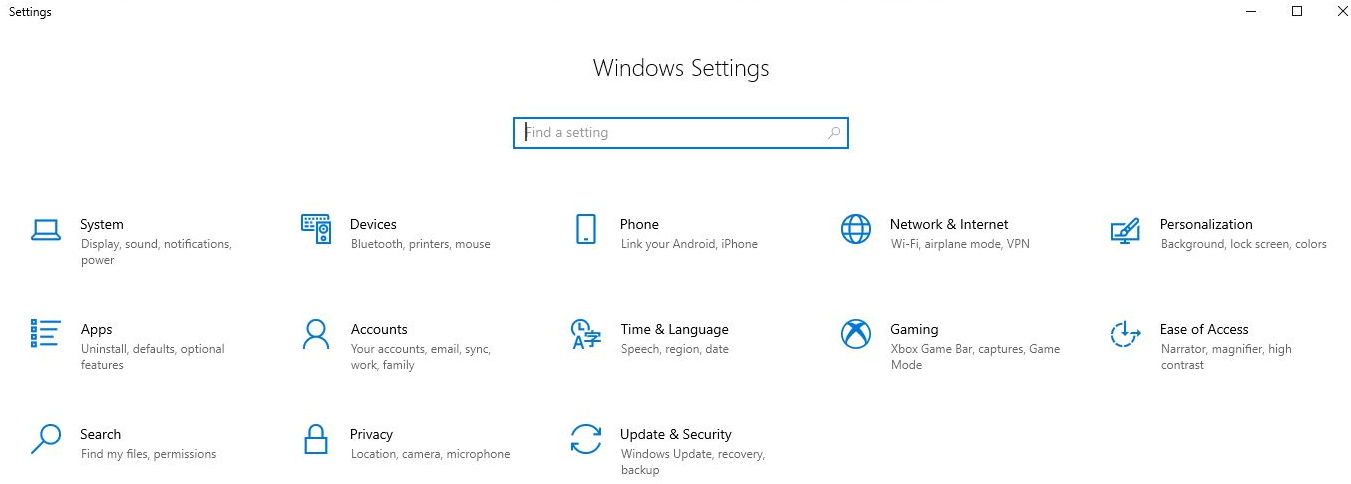
I can't find a good explanation of why Settings shows different things on two Windows machines: one with my account information on top, another without. Is there a setting (Privacy?) somewhere that controls this?
Exhibit A:
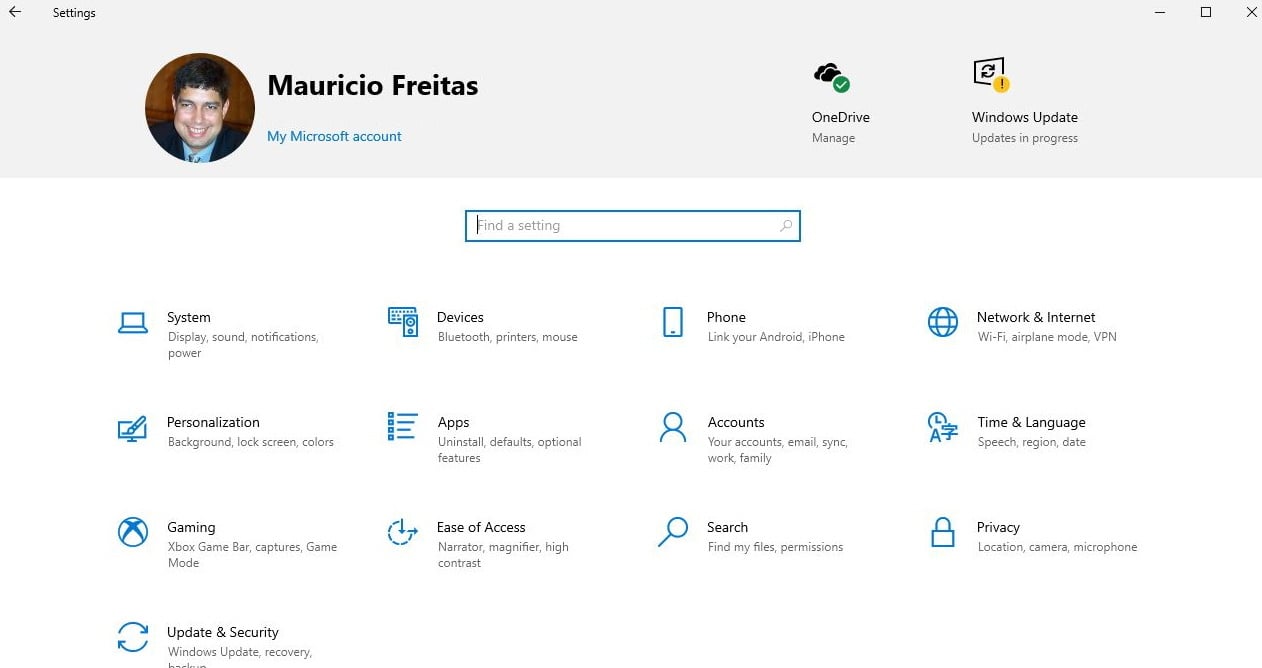
Exhibit B:


 Administrator
 ID Verified
 Trusted
 Geekzone
 Lifetime subscriber
Referral links: Quic Broadband (free setup code: R587125ERQ6VE) | Samsung | AliExpress | Wise | Sharesies
Support Geekzone by subscribing (browse ads-free), or making a one-off or recurring donation through PressPatron.

LEGAL video, movies and TV download and streaming options in New Zealand



|
|
 ID Verified Lifetime subscriber

 Lifetime subscriber

Administrator ID Verified Trusted Geekzone Lifetime subscriber
Referral links: Quic Broadband (free setup code: R587125ERQ6VE) | Samsung | AliExpress | Wise | Sharesies
Support Geekzone by subscribing (browse ads-free), or making a one-off or recurring donation through PressPatron.
LEGAL video, movies and TV download and streaming options in New Zealand
 Subscriber
Nothing is impossible for the man who doesn't have to do it himself - A. H. Weiler
 Moderator Trusted Lifetime subscriber
Administrator ID Verified Trusted Geekzone Lifetime subscriber
Moderator Trusted Lifetime subscriber
Administrator ID Verified Trusted Geekzone Lifetime subscriber
Referral links: Quic Broadband (free setup code: R587125ERQ6VE) | Samsung | AliExpress | Wise | Sharesies
Support Geekzone by subscribing (browse ads-free), or making a one-off or recurring donation through PressPatron.
LEGAL video, movies and TV download and streaming options in New Zealand
 ID Verified Trusted
<#
.DISCLAIMER
Anything I post is my own and not the views of my past/present/future employer.
#>
 ID Verified Lifetime subscriber
Gordy
My first ever AM radio network connection was with a 1MHz AM crystal(OA91) radio receiver.
 Trusted Lifetime subscriber
ID Verified Lifetime subscriber
Trusted Lifetime subscriber
ID Verified Lifetime subscriber
Gordy
My first ever AM radio network connection was with a 1MHz AM crystal(OA91) radio receiver.
Administrator ID Verified Trusted Geekzone Lifetime subscriber
Referral links: Quic Broadband (free setup code: R587125ERQ6VE) | Samsung | AliExpress | Wise | Sharesies
Support Geekzone by subscribing (browse ads-free), or making a one-off or recurring donation through PressPatron.
LEGAL video, movies and TV download and streaming options in New Zealand
 Trusted
CPU: AMD 5900x | RAM: GSKILL Trident Z Neo RGB F4-3600C16D-32GTZNC-32-GB | MB: Asus X570-E | GFX: EVGA FTW3 Ultra RTX 3080Ti| Monitor: LG 27GL850-B 2560x1440
Quic: https://account.quic.nz/refer/473833 R473833EQKIBX
Administrator ID Verified Trusted Geekzone Lifetime subscriber
Referral links: Quic Broadband (free setup code: R587125ERQ6VE) | Samsung | AliExpress | Wise | Sharesies
Support Geekzone by subscribing (browse ads-free), or making a one-off or recurring donation through PressPatron.
LEGAL video, movies and TV download and streaming options in New Zealand
ID Verified Lifetime subscriber
Gordy
My first ever AM radio network connection was with a 1MHz AM crystal(OA91) radio receiver.
 ID Verified Trusted Lifetime subscriber
________
Antoniosk
|
|
|


