Geekzone: technology news, blogs, forums
Guest
Welcome Guest.
You haven't logged in yet. If you don't have an account you can register now.


Spoodleydog

9 posts

Wannabe Geek


#293559 30-Jan-2022 08:15
Send private message

Hi


I have been going round in circles and already done a search for online help (The Windows Forums are f#*kin useless) but the only answers seem to go round in circles and involve removing accounts and re-adding which does  nothing to fix the problem! 


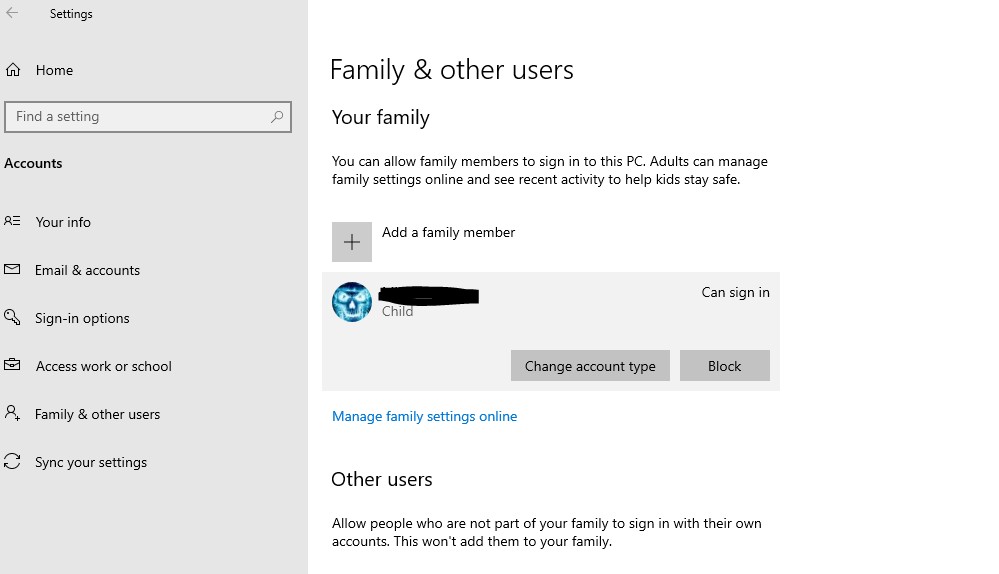
So the problem is I have got an old laptop (HP Elite Book with Win 10 Pro 64 Bit) that I want kids to be able to use. I have set up Microsoft Family and added an account. It sends an email to my daughter and she has accepted and Joined the family. I can see her account in the User settimgs on the laptop and also in the MS Family online. This is what it looks like:


When I go to connect a device this is the instruction:
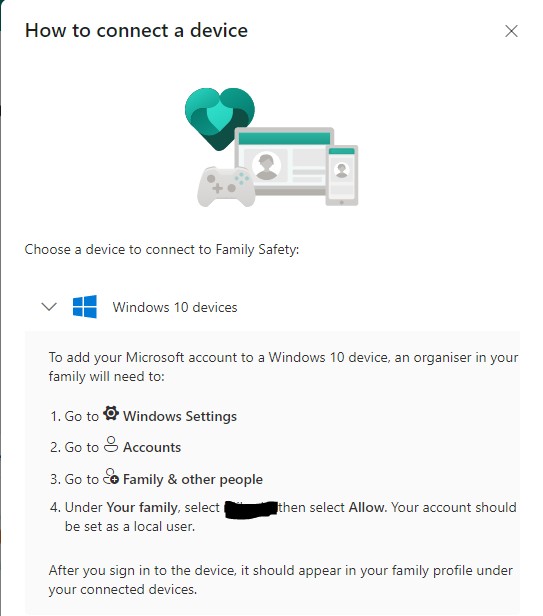


Yes my account is set as organiser but there is no "Allow" option given. Only a "Can Sign In". I have signed her in to the device but it still doesn't appear. She is set up as a "member" and has a standard user account. Have also tried setting her up with a local account instead - still no difference. 


Has anyone here got a suggestion? Windows updates all up to date etc. 


Thanks heaps!!


Create new topic
freitasm
BDFL - Memuneh
80646 posts

Uber Geek
+1 received by user: 41030

Administrator
ID Verified
Trusted
Geekzone
Lifetime subscriber

  #2858301 30-Jan-2022 08:32
Send private message

Allow and Can Sign In are the same thing.

Make sure only Edge is available as parental controls won't work on other browsers.


Referral links: Quic Broadband (free setup code: R587125ERQ6VE) | Samsung | AliExpress | Wise | Sharesies 


Support Geekzone by subscribing (browse ads-free), or making a one-off or recurring donation through PressPatron.


freitasm
BDFL - Memuneh
80646 posts

Uber Geek
+1 received by user: 41030

Administrator
ID Verified
Trusted
Geekzone
Lifetime subscriber

  #2858302 30-Jan-2022 08:33
Send private message

Also parental controls are per account, not device.


Referral links: Quic Broadband (free setup code: R587125ERQ6VE) | Samsung | AliExpress | Wise | Sharesies 


Support Geekzone by subscribing (browse ads-free), or making a one-off or recurring donation through PressPatron.


Create new topic


Geekzone Live »

Try automatic live updates from Geekzone directly in your browser, without refreshing the page, with Geekzone Live now.


Are you subscribed to our RSS feed? You can download the latest headlines and summaries from our stories directly to your computer or smartphone by using a feed reader.
