Geekzone: technology news, blogs, forums
Guest
Welcome Guest.
You haven't logged in yet. If you don't have an account you can register now.


alisam

878 posts

Ultimate Geek
+1 received by user: 83


#302397 20-Nov-2022 12:12
Send private message

First click. Select 'No'.
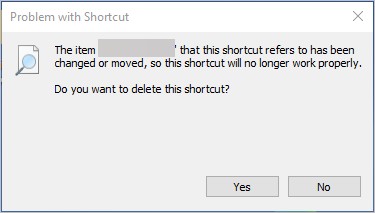


Second click, my LibreOffice Calc document opens.


Cannot find a reason for it to do this (looked on-line)


FYI: The shortcut is to a document on a Synology NAS (mapped to a drive)


PC: Dell Inspiron 16 5640 (Windows 11 Home), Dell Inspiron 7591 2n1 (Windows 11 Pro), HP ProBook 470G1 (Windows 10 Pro), Intel NUC7I5BNH (Zorin)
Net: Grandstream 1 x GWN7062 Router, 1 x GWN7665 Access Point
Storage: Synology DS216play NAS, 2 x 6TB
Media: 3 x Amazon FireTV. Echo, Dot, Spot
TV: 2 x Samsung H6400 55" LED TV, Panasonic TH-P50G10Z 50" Plasma TV
Mobile: Samsung Galaxy A52 5G
Wearable: Gear S3 Frontier


Create new topic
Oblivian
7345 posts

Uber Geek
+1 received by user: 2117

ID Verified

  #2998787 20-Nov-2022 14:16
Send private message

That would suggest your SMB share is not immediately established or prior to being required (likely at boot you get 'not all network drives could connect' or similar message)

But on demand. And the 2nd time, it's acknowledged the network source now exists after the map has been sent creds.


alisam

878 posts

Ultimate Geek
+1 received by user: 83


  #2999022 21-Nov-2022 06:14
Send private message

Oblivian: That would suggest your SMB share is not immediately established or prior to being required (likely at boot you get 'not all network drives could connect' or similar message)

But on demand. And the 2nd time, it's acknowledged the network source now exists after the map has been sent creds.


This does appear to be the issue.


Once the desktop appears I can see from Explorer in Quick Access, my drive (T:) to the NAS is not connected (but all others are shown under 'This PC'.).


On the second click, the above icon disappears and the T: drive shows up under 'This PC'.


I'll remap and see what happens after a re-boot.


PC: Dell Inspiron 16 5640 (Windows 11 Home), Dell Inspiron 7591 2n1 (Windows 11 Pro), HP ProBook 470G1 (Windows 10 Pro), Intel NUC7I5BNH (Zorin)
Net: Grandstream 1 x GWN7062 Router, 1 x GWN7665 Access Point
Storage: Synology DS216play NAS, 2 x 6TB
Media: 3 x Amazon FireTV. Echo, Dot, Spot
TV: 2 x Samsung H6400 55" LED TV, Panasonic TH-P50G10Z 50" Plasma TV
Mobile: Samsung Galaxy A52 5G
Wearable: Gear S3 Frontier


alisam

878 posts

Ultimate Geek
+1 received by user: 83


  #2999024 21-Nov-2022 06:23
Send private message

All good now (did a couple of reboots).


Many thanks.


PC: Dell Inspiron 16 5640 (Windows 11 Home), Dell Inspiron 7591 2n1 (Windows 11 Pro), HP ProBook 470G1 (Windows 10 Pro), Intel NUC7I5BNH (Zorin)
Net: Grandstream 1 x GWN7062 Router, 1 x GWN7665 Access Point
Storage: Synology DS216play NAS, 2 x 6TB
Media: 3 x Amazon FireTV. Echo, Dot, Spot
TV: 2 x Samsung H6400 55" LED TV, Panasonic TH-P50G10Z 50" Plasma TV
Mobile: Samsung Galaxy A52 5G
Wearable: Gear S3 Frontier


Create new topic


Geekzone Live »

Try automatic live updates from Geekzone directly in your browser, without refreshing the page, with Geekzone Live now.


Are you subscribed to our RSS feed? You can download the latest headlines and summaries from our stories directly to your computer or smartphone by using a feed reader.