Geekzone: technology news, blogs, forums
Guest
Welcome Guest.
You haven't logged in yet. If you don't have an account you can register now.


StevieT

706 posts

Ultimate Geek
+1 received by user: 34


#311579 28-Jan-2024 12:38
Send private message

How do I change this behaviour?


Before, for eg clicking on a link in Outlook opened the URL in Firefox. Now it opens in Edge.


Tried changing default app settings. (Windows 11 Pro 23H2)


Filter this topic showing only the reply marked as answer Create new topic
gehenna
8667 posts

Uber Geek
+1 received by user: 3883

Moderator
Trusted
Lifetime subscriber

  #3187675 28-Jan-2024 12:48
Send private message

open firefox and set it as the default browser.


jamesrt
1663 posts

Uber Geek
+1 received by user: 941

ID Verified
Trusted
Lifetime subscriber

  #3187676 28-Jan-2024 12:50
Send private message

I believe this is a recent change to Outlook.

Try this:

https://services.dartmouth.edu/TDClient/1806/Portal/KB/ArticleDet?ID=153144

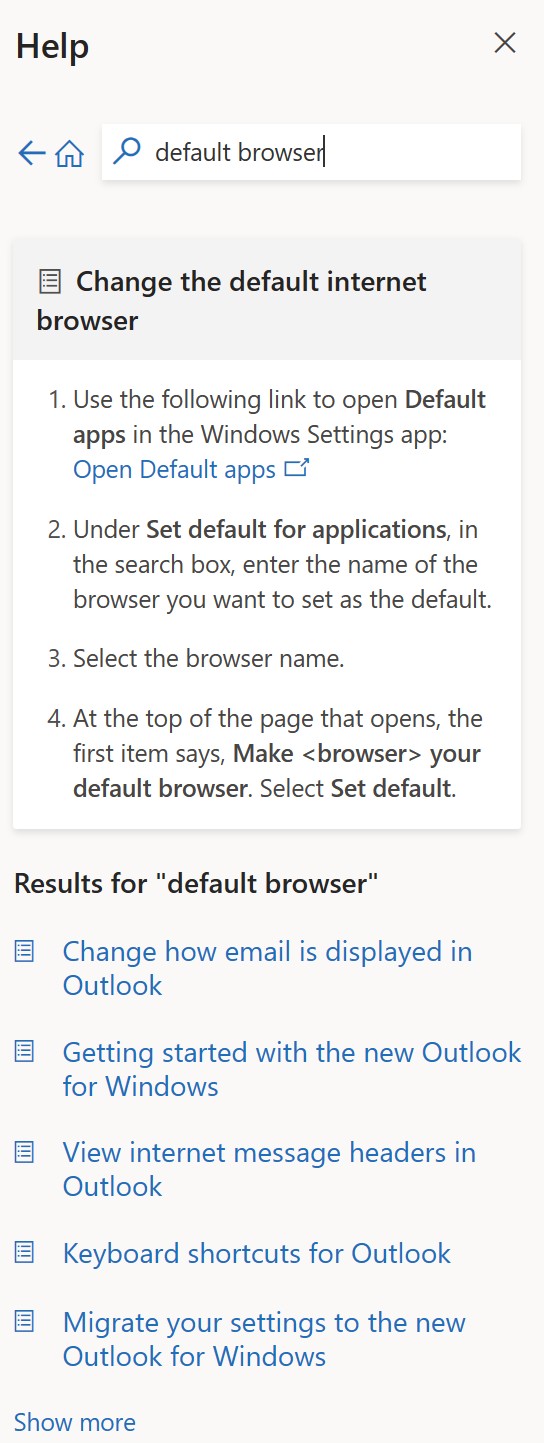
[Instructions on changing the outlook setting which I google searched]

gzt

gzt
18672 posts

Uber Geek
+1 received by user: 7808

Lifetime subscriber

  #3187677 28-Jan-2024 12:50
Send private message

As I recall there is an additional file type app open setting for urls that needs to be changed. You could reinstall Firefox again as I recall doing that guides you to change the default or does it automatically.


jamesrt
1663 posts

Uber Geek
+1 received by user: 941

ID Verified
Trusted
Lifetime subscriber

  #3187678 28-Jan-2024 12:51
Send private message

gehenna:

open firefox and set it as the default browser.


Outlook preference now overrides the default browser setting - Microsoft keeping it inside their ecosystem, I guess.

gehenna
8667 posts

Uber Geek
+1 received by user: 3883

Moderator
Trusted
Lifetime subscriber

  #3187679 28-Jan-2024 12:52
Send private message

I can was just looking through the new Outlook on my Surface and can't see the default browser option anymore.


gehenna
8667 posts

Uber Geek
+1 received by user: 3883

Moderator
Trusted
Lifetime subscriber

  #3187680 28-Jan-2024 12:54
Send private message

It's handled at system level now I suppose


Want to support Geekzone and browse the site without the ads? Subscribe to Geekzone now (monthly, annual and lifetime options).
Oblivian
7345 posts

Uber Geek
+1 received by user: 2117

ID Verified

  #3187683 28-Jan-2024 12:59
Send private message

Some form of internal change the last week or two. Outlinks from teams does it.

When it was opening edge for me out of teams, edge itself gave a popup indicating the default hot click was changed, and did I wan't to override this fantastic new idea and change to another browser

Well yes, yes I would.

askelon
942 posts

Ultimate Geek
+1 received by user: 233

ID Verified

  #3187687 28-Jan-2024 13:04
Send private message

Its a pain.. In Outlook go to Options > Advanced > Open Hyperlinks from Outlook in: Default Browser.  Then just make sure you have your browser set as the default as per normal.  


Oblivian
7345 posts

Uber Geek
+1 received by user: 2117

ID Verified

  #3187690 28-Jan-2024 13:15
Send private message

A few threads sparking up on reddit but no hard link to a release notice if it was edge, office or just a cloud code change.

There are conveniently a heap of new updates to edge link policy changes and new options around it.
Coincidence, I think not.

StevieT

706 posts

Ultimate Geek
+1 received by user: 34


  #3187696 28-Jan-2024 13:40
Send private message

askelon:


Its a pain.. In Outlook go to Options > Advanced > Open Hyperlinks from Outlook in: Default Browser.  Then just make sure you have your browser set as the default as per normal.  


That did the trick - thanks!!


ANglEAUT
altered-ego
2436 posts

Uber Geek
+1 received by user: 841

Trusted
Lifetime subscriber

  #3187724 28-Jan-2024 15:38
Send private message

jamesrt: Outlook preference now overrides the default browser setting - Microsoft keeping it inside their ecosystem, I guess.


Gmail has been doing this for a while & MS Teams now has the same behaviour. There is a setting inside the app to specify which browser to use.


gehenna: I can was just looking through the new Outlook on my Surface and can't see the default browser option anymore.


Which Outlook are you looking at? Outlook Classic (installed with MS Office) or the Modern Outlook app that replaces the old Outlook Express / Mail & is installed with the OS?


Please keep this GZ community vibrant by contributing in a constructive & respectful manner.


Filter this topic showing only the reply marked as answer Create new topic


Geekzone Live »

Try automatic live updates from Geekzone directly in your browser, without refreshing the page, with Geekzone Live now.


Are you subscribed to our RSS feed? You can download the latest headlines and summaries from our stories directly to your computer or smartphone by using a feed reader.