Geekzone: technology news, blogs, forums
Guest
Welcome Guest.
You haven't logged in yet. If you don't have an account you can register now.


yorick

36 posts

Geek


#97039 9-Feb-2012 16:44
Send private message

I'm not great at networking stuff so I've probably missed something obvious, but I have a Lexmark Optra S printer.  It has no ethernet connection but I want to hook it up to the network so the wife can use it rather using the obscenely expensive to run Canon Inkjet thing.  So I got a TP-Link print server and hooked it up.  And this is where it gets odd.  I can ping the print server, I changed the ip address to match our subnet (10.0... etc, default was 192.168.etc) via my browser.  But for some odd reason when I try to get the printer setup in YAST (I use OpenSuSE 11.4) it can't locate it.  Anyone have any ideas? 
Firewall is switched off.    
Main machine has a fixed ip 10.1.1.3, print server is 10.1.1.4, samba is running.

Hair on right hand side of head is thin from scratching.

Cheers
Yo

Create new topic
cyril7
9073 posts

Uber Geek
+1 received by user: 2499

ID Verified
Trusted
Subscriber

  #579359 9-Feb-2012 17:02
Send private message

Hi, what subnet did you give the printer

Cyril


farcus
1626 posts

Uber Geek
+1 received by user: 437


  #579366 9-Feb-2012 17:27
Send private message

have you disabled the suse firewall while you set up the printer?

For anything network related in Suse this is a great one stop shop . . .

http://opensuse.swerdna.org/

edit: sorry - I see you do have the firewall switched off.
But see how you go with Swerdna's guides.
If you still have no luck then ask Swerdna in the Opensuse forums - he is a moderator.

ObidiahSlope
260 posts

Ultimate Geek
+1 received by user: 66


  #579383 9-Feb-2012 18:07
Send private message

Please post the output of this command;

lpstat -p

Is this printer a Postscript printer? I have found that printing on Linux is a gamble if the printer is not a Postscript printer.

If you are contemplating getting a printer in a Linux environment it is so much easier if you are dealing with a Postscript printer. Yes they cost more,.but the just-works factor makes the extra cost worthwhile.

Some Brother printers emulate Postscript which works just as well.


Obsequious hypocrite


farcus
1626 posts

Uber Geek
+1 received by user: 437


  #579388 9-Feb-2012 18:18
Send private message

ObidiahSlope:

Is this printer a Postscript printer? I have found that printing on Linux is a gamble if the printer is not a Postscript printer.


If it is either an Optra S 1250, Optra S 1855 or an Optra SE 3455 then it is a postscript printer and Opensuse will handle it just fine without the need to install any other packages.

farcus
1626 posts

Uber Geek
+1 received by user: 437


  #579394 9-Feb-2012 18:47
Send private message

what print server do you have?
According to TPLinks documentation only TL-PS110P is compatible with the Lexmark Optra S series.

TL-PS110U & TL-WPS510U are indicated as incompatible with the Optra S series.

yorick

36 posts

Geek


  #579398 9-Feb-2012 18:51
Send private message

ObidiahSlope: Please post the output of this command;

lpstat -p


Just sees my HP printer that's connected to the printer port


Is this printer a Postscript printer? I have found that printing on Linux is a gamble if the printer is not a Postscript printer.

If you are contemplating getting a printer in a Linux environment it is so much easier if you are dealing with a Postscript printer. Yes they cost more,.but the just-works factor makes the extra cost worthwhile.

Some Brother printers emulate Postscript which works just as well.


Yep, all the Optras are postscript and this has been hooked directly to the comp in the past and I've had it for about five years and I've always used SuSE while I've had it.  

Just going to screw with CUPS admin, see if that helps.


Stream your favourite shows now on Apple TV (affiliate link).
farcus
1626 posts

Uber Geek
+1 received by user: 437


  #579403 9-Feb-2012 19:03
Send private message

assuming you have attempted using the connection wizard in Yast2?


yorick

36 posts

Geek


  #579414 9-Feb-2012 19:29
Send private message

farcus: assuming you have attempted using the connection wizard in Yast2?


Indeed, that's one of the reasons I'm a SuSE fan.  YAST is the best GUI admin tool in the UNIXverse.  Normally I never have to go near a terminal.  Not having any luck however. Not even using CUPS admin.

yorick

36 posts

Geek


  #579557 10-Feb-2012 09:06
Send private message

farcus: what print server do you have?
According to TPLinks documentation only TL-PS110P is compatible with the Lexmark Optra S series.

TL-PS110U & TL-WPS510U are indicated as incompatible with the Optra S series.


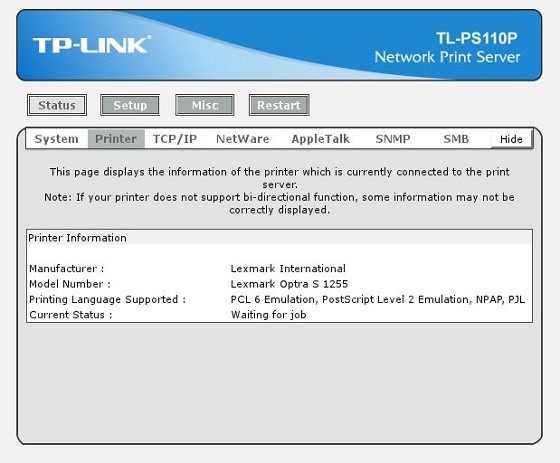
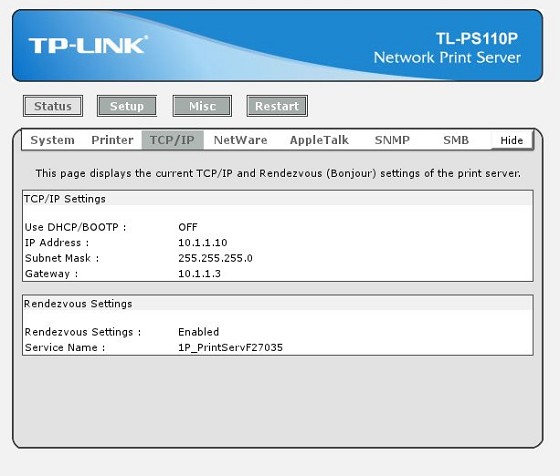
Yep TL-PS110P.  As you can see below in the administration part of the print server, THAT has located the printer no problem


all the network settings stuff is as below and obviously that's reachable simply because I can get these screenshots.


Annoyingly, I have Win 7 running in a Virtualbox instance on this machine and that prints no problem.  So that would seem to narrow it down to CUPS.

farcus
1626 posts

Uber Geek
+1 received by user: 437


  #579829 10-Feb-2012 15:43
Send private message

sorry - I'm not too familiar with using a print server in Opensuse.
I always try to buy HP printers for use in linux / opensuse because of the active development of HPLIP. They just work.
I have a wireless printer connected to my router and the setup wizard bundled with HPLIP just connects it up without problem.

Having said that though - cups in opensuse is modified quite a bit from upstream as I understand it.
It could be worth updating cups to that from the printing build repo.
Might also be worth taking a close look at smb.conf

Aside from that - you should get pretty good support in the opensuse forums - particularly if you message Swerdna as I mentioned previously. He is the Opensuse networking go to man.

yorick

36 posts

Geek


  #580051 11-Feb-2012 00:27
Send private message

[SOLVED]

Brilliant, I was aiming at the print server IP address incorrectly.

instead of http:... etc, I used: socket://10.1.1.10:9100

and all is good.

Cheers
Yo  

Create new topic


Geekzone Live »

Try automatic live updates from Geekzone directly in your browser, without refreshing the page, with Geekzone Live now.


Are you subscribed to our RSS feed? You can download the latest headlines and summaries from our stories directly to your computer or smartphone by using a feed reader.