


HI,
I'm a first time forum poster here, so am hoping the image will attach to the post. I am new to Linux - got into it when my laptop Win7 crashed 6months ago, started with and stayed with Kubuntu and have been learning about Terminal etc as I go. I knew a little bit of DOS back in the day, and have worked my way through from Win95 generations onwards as a home user with a bit of driver installation and re-installation and partition work as I went.
The initial problem:
I've been trying to restore Windows Vista on an Acer Veriton using a LiveUSB Kubuntu16.04 i386 DVD to get me access to the drives etc.
C:drive doesn't appear in Dolphin, but does appear as a /dev/sda2 when looking with >lsblk and >fdisk -l
Initially Windows booted up to the Repair point and I asked for repair attempt off the Vista DVD, which it attempted for hours, but it never rebooted properly again after this, and I've only been able to view the drives via the linux live disk now.
my guess so far is the the C:Drive has lost its partition table. I'd hoping to be able to restore the partition/s or bootsector so that I can re-run the windows repair dvd again and recover back to Vista. The History: 1.
I have run;
>ntfsfix /dev/sda2 (for C:drive) which said various volume and bootsector errors and finished with 'you should run chkdsk >ntfsfix /dev/sda3 (for D:drive) which said partition processed successfully.
2. I then ran Boot-Repair (repository at ppa:yannubuntu/boot-repair) output at http://paste2.org/g0CPyhjA
I don't know much of what the output means, but the pastebin output indicates to me that sda2 was an unknown partition type.
3.
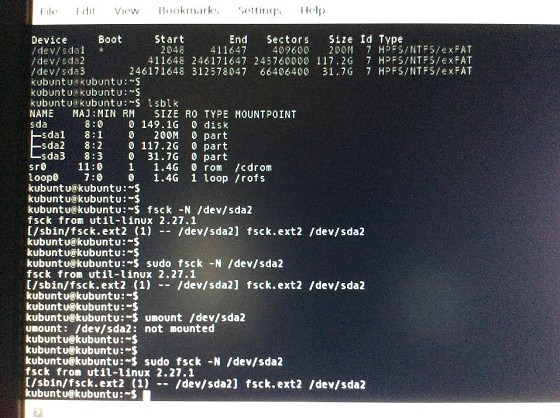
Now I have run >fsck -N /dev/sda2 and sda3, but the fsck doesn't seem to be working properly compared with what I see on many websites/forums. Yes I know the -N switch means it won't actually carry out any repair, but I was expecting better dialogue back that what I'm getting.
I unmounted the drives first. I would like to get some response out of the fsck -N switch before I move on to proper fsck repair so that I know what it's problem is and what it is going to try to do.
fsck screenshot attached. The Problem Now: fsck output not what I'm expecting. I'm only getting... [/sbin/fsck.ext2 (1) -- /dev/sda2] fsck.ext2 /dev/sda2 and i'm not sure what that even means, I assume it is just naming the package that it is attempting to use before it goes off and does it. takes about 10-20 seconds before the cursour reappears. Am I doing it right...? Hey if it says it's broken then at least I'll know where it's at, but it just doesn't seem to tell me anything. It looks like it has tried to treat it as an Ext2 partition, but I'm wanting it to treat it as a WindowsVista (NTFS?) partition(?). Do I need to add another package elsewhere?
Anyone know if I'm doing the fsck correctly? Any help or knowledge gain appreciated.




 ID Verified
