Geekzone: technology news, blogs, forums
Guest
Welcome Guest.
You haven't logged in yet. If you don't have an account you can register now.


garbonzai

317 posts

Ultimate Geek
+1 received by user: 51


#208747 26-Feb-2017 11:56
Send private message

Just installed Linux Mint 18, 2 days ago to have a play with Linux,


Is setup dual boot with Win 10 and all works ok, have most software setup that I need but can not cast to chromecast.


Have tried both chrome browsers, logged in and out, but google cast will not show up at all when search in extensions, when I try a short cut to link from help forum,


the extension is there, but is grayed out and can not install.


Any help would be great, I have googled and googled and spent a lot of time on this, bearing in mind I have only had Linux 2 days and don't know much.


Thanks


Create new topic
garbonzai

317 posts

Ultimate Geek
+1 received by user: 51


  #1726441 26-Feb-2017 12:05
Send private message

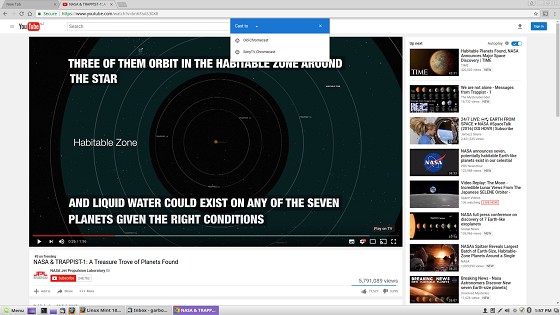
Here's a better Picture, note "Add to Chrome" is grayed out.


michaelmurfy
meow
13579 posts

Uber Geek
+1 received by user: 10910

Moderator
ID Verified
Trusted
Lifetime subscriber

  #1726443 26-Feb-2017 12:08
Send private message

That's because it is now built into Chrome:


There has been no need for the cast extension since last year.


Michael Murphy | https://murfy.nz
Referral Links: Quic Broadband (use R122101E7CV7Q for free setup)

Are you happy with what you get from Geekzone? Please consider supporting us by subscribing.
Opinions are my own and not the views of my employer.


garbonzai

317 posts

Ultimate Geek
+1 received by user: 51


  #1726462 26-Feb-2017 12:39
Send private message

 Thank you michaelmurphy, much appreciated, Dooch I use Firefox as my browser, so don't know Chrome well, but use it just to cast in windows.


Now my next problem, the cast option brings up the cast window, but neither of my chromecasts show up at all????


Have disabled the firewall but did not make a difference.


michaelmurfy
meow
13579 posts

Uber Geek
+1 received by user: 10910

Moderator
ID Verified
Trusted
Lifetime subscriber

  #1726465 26-Feb-2017 12:47
Send private message

Ensure your Chrome version is up-to-date first:


In a Linux terminal run:
sudo apt update && sudo apt upgrade


Then fully restart Chrome or even the PC. It either happens if your Chrome version is out of date or if the Chromecast is not on the same physical network (for example, if you're using a router as a secondary access point).


Michael Murphy | https://murfy.nz
Referral Links: Quic Broadband (use R122101E7CV7Q for free setup)

Are you happy with what you get from Geekzone? Please consider supporting us by subscribing.
Opinions are my own and not the views of my employer.


garbonzai

317 posts

Ultimate Geek
+1 received by user: 51


  #1726514 26-Feb-2017 14:00
Send private message

 Awesome, all working now, Thanks for your help.


Create new topic


Geekzone Live »

Try automatic live updates from Geekzone directly in your browser, without refreshing the page, with Geekzone Live now.


Are you subscribed to our RSS feed? You can download the latest headlines and summaries from our stories directly to your computer or smartphone by using a feed reader.