Geekzone: technology news, blogs, forums
Guest
Welcome Guest.
You haven't logged in yet. If you don't have an account you can register now.


pctek

807 posts

Ultimate Geek
+1 received by user: 157
Inactive user


#231929 20-Mar-2018 19:01
Send private message

For instance, on Trademe (although it does this on any website)


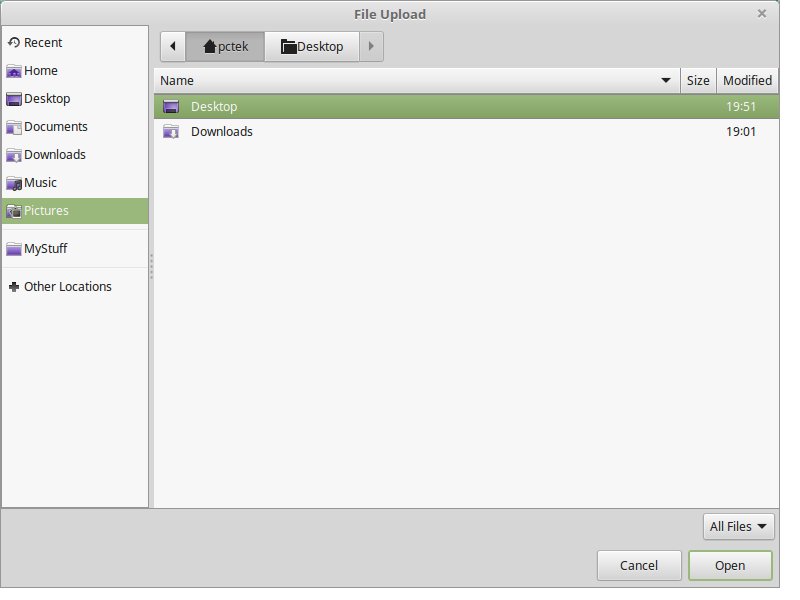
You get to the bit where you select a photo to upload, clicking the upload on website, I get the folder popup come up in Linux, but I cannot select any other folders other than Desktop or Downloads.


I can see other folders, but if I select any others I see nothing, not even the sub folders within them.


Why is this and how do I fix it?



Create new topic
afe66
3181 posts

Uber Geek
+1 received by user: 1678

Lifetime subscriber

  #1980672 20-Mar-2018 19:22
Send private message

Click to see full size


I can upload into my gallery ok on mint 18.3 (installed on  64gb scan disk usb stick on acer aspire s7)


ie in firefox click on browse then upload.


Is your mint install up to date ?


A.


pctek

807 posts

Ultimate Geek
+1 received by user: 157
Inactive user


  #1980676 20-Mar-2018 19:43
Send private message

18.3 also.


Clock browse. I get a folder showing....right?


But.


The only 2 folders that show anything in them are as I said. Click MyStuff, click Pictures, Click whatever other folder (mine or other default Linux folders) nothing....literally. No fles show, pictures ot=r other. No sub folders, no nothing.


It's like its the file viewer thng...Nemo I think it is?


afe66
3181 posts

Uber Geek
+1 received by user: 1678

Lifetime subscriber

  #1980683 20-Mar-2018 20:01
Send private message

So can you see any files on your mint install ? ie is Nemo working itself


When I click on Nemo using the short cut on the task bar at the bottom left of the Mint desktop, it opens my Home directory which shows the default 8 directories. ie Desktop, Documents, Music, Pictures, Videos, Downloads. (and to the left in a panel there is "My computer", "Devices", "Network"


Then clicking on any of there directory icons opens them showing the contents just like file explorer on windows.


pctek

807 posts

Ultimate Geek
+1 received by user: 157
Inactive user


  #1980684 20-Mar-2018 20:04
Send private message

afe66:


So can you see any files on your mint install ? ie is Nemo working itself


When I click on Nemo using the short cut on the task bar at the bottom left of the Mint desktop, it opens my Home directory which shows the default 8 directories. ie Desktop, Documents, Music, Pictures, Videos, Downloads. (and to the left in a panel there is "My computer", "Devices", "Network"


Then clicking on any of there directory icons opens them showing the contents just like file explorer on windows.


Yes.


Using it normally on my desktop is fine.


The issue occurs when I click Upload. I can upload from Downloads or Desktop. And that's it.


Not Music, Not Picture, not any other folder at all.


See.....


afe66
3181 posts

Uber Geek
+1 received by user: 1678

Lifetime subscriber

  #1980687 20-Mar-2018 20:04
Send private message

Click to see full size


Im in Cinnamon.


(Are you using Mate out of curiousity)


pctek

807 posts

Ultimate Geek
+1 received by user: 157
Inactive user


  #1980688 20-Mar-2018 20:05
Send private message

Normal use below:


Click to see full size


Shop now on Samsung phones, tablets, TVs and more (affiliate link).
afe66
3181 posts

Uber Geek
+1 received by user: 1678

Lifetime subscriber

  #1980691 20-Mar-2018 20:14
Send private message

So can you can upload  jpg to geekzone gallery.


By default the screen capture utility on mint save to Pictures, so did you successfully upload that desktop image from my pictures ?


pctek

807 posts

Ultimate Geek
+1 received by user: 157
Inactive user


  #1980694 20-Mar-2018 20:20
Send private message

No.


I can upload any file BUT ONLY if the file is located in either Downloads or Desktop.


pctek

807 posts

Ultimate Geek
+1 received by user: 157
Inactive user


  #1980696 20-Mar-2018 20:23
Send private message

The file, whatever format it is, MUST be saved in Desktop or Downloads ONLY for me to be able to select it, after clicking Upload, no matter what website I try it on.


I did the screenshots and saved to downloads so that I could upload them. But that is a pain, I don't save files there, I save them in a sub folder of MyStuff or Pictures.


If whatever format file is in there, I cannot select those folders to choose one.


pctek

807 posts

Ultimate Geek
+1 received by user: 157
Inactive user


  #1980697 20-Mar-2018 20:25
Send private message

Because clicking on any other folder produces no result. It does not change to viewing the contents of that folder. The bit up top of Nemo remains the last folder it allowed me to us - Desktop or Downloads.


It's like clicking on another folder, you get the same result as if you just clicked on a random piece of the folder (not a selection)


See what I mean?


pctek

807 posts

Ultimate Geek
+1 received by user: 157
Inactive user


  #1980698 20-Mar-2018 20:26
Send private message

Cinnamon Mint Sarah


Shop now at Mighty Ape (affiliate link).
afe66
3181 posts

Uber Geek
+1 received by user: 1678

Lifetime subscriber

  #1980699 20-Mar-2018 20:26
Send private message

I'm bit stumped, sorry.


Story time.


Create new topic


Geekzone Live »

Try automatic live updates from Geekzone directly in your browser, without refreshing the page, with Geekzone Live now.


Are you subscribed to our RSS feed? You can download the latest headlines and summaries from our stories directly to your computer or smartphone by using a feed reader.