Geekzone: technology news, blogs, forums
Guest
Welcome Guest.
You haven't logged in yet. If you don't have an account you can register now.


alisam

878 posts

Ultimate Geek
+1 received by user: 83


#319196 1-Apr-2025 11:02
Send private message

Over the past several years or more, I have played around with ChromeOS Flex, Linux Mint (twice), Ubuntu and finally another attempt to get Ubuntu working with the windows programs (or equivalent) I need. An example of this is 'Moneydance' (the difficult was using a shared folder on my NAS, because I have other machines using Moneydance).


I am happy with what I have achieved so far, and you will see some of my recent posts in this Linux Forum.


But, I am suffering from Linux 'overload'. It has been internet searching virtually constantly and cutting and pasting 'apt' commands for Terminal.


A couple of days ago I tried to get OneDrive working in Ubuntu. It did partially work, but all the files were read-only and I eventually gave up and installed a 7 day trial from 'Insync' (which makes Linux life so much easier).


I may and try getting this working: GitHub - abraunegg/onedrive: OneDrive Client for Linux, but it will probably take me hours to install and setup.


Today, all I wanted to do was put a shortcut on the desktop to access my bank. Using Ubuntu 24.04, it is very difficult. Simply dragging a URL to the desktop just does not work from must browsers (I did read somewhere that it had been disabled). I saw a post about how to do it using Brave and I installed that. But the result (even though it works) on the desktop is pretty basic. Note: I also have a bookmark in the Edge Browser. Another option was to edit the .desktop folder and put an entry in there, but there is more than one location to consider).


One final 'moan' is that some software requires the 'backend' and then if you want to look at something pretty you need to install a GUI frontend.


By all means, (gently) shout me down. I just think of the 'newbies' attempting to replace the Windows operating system with Linux (or for them to coexist via a dual boot).




PC: Dell Inspiron 16 5640 (Windows 11 Home), Dell Inspiron 7591 2n1 (Windows 11 Pro), HP ProBook 470G1 (Windows 10 Pro), Intel NUC7I5BNH (Zorin)
Net: Grandstream 1 x GWN7062 Router, 1 x GWN7665 Access Point
Storage: Synology DS216play NAS, 2 x 6TB
Media: 3 x Amazon FireTV. Echo, Dot, Spot
TV: 2 x Samsung H6400 55" LED TV, Panasonic TH-P50G10Z 50" Plasma TV
Mobile: Samsung Galaxy A52 5G
Wearable: Gear S3 Frontier


View this topic in a long page with up to 500 replies per page Create new topic
 1 | 2 | 3
elpenguino
3577 posts

Uber Geek
+1 received by user: 2938


  #3359440 1-Apr-2025 11:48
Send private message

I would tend to agree. Everything to do with Linux becomes hard.


I am in the target demographic for migration to Linux but when I have tried in the past, I became very frustrated with how difficult simple tasks were. Many people have complaints about Windows but I don't find myself in the command shell very often.


I have some old Windows 10 laptops and I'm intending to convert one to Linux but I don't expect it to become a daily driver.


Most of the posters in this thread are just like chimpanzees on MDMA, full of feelings of bonhomie, joy, and optimism. Fred99 8/4/21


d3Xt3r
697 posts

Ultimate Geek
+1 received by user: 132

Trusted

  #3359442 1-Apr-2025 12:08
Send private message

A lot of your Linux experience comes down to your choice of distro and DE. IMO, Ubuntu (and the GNOME desktop environment) is no longer the poster child of Linux, hasn't been for a long time. Just ask any seasoned Linux veteran — they will recommend against using Ubuntu.


A newbie-friendly, KDE + Fedora based distro, is what I'd recommend for most users, such as Ultramarine (newbie friendly Fedora, which I recommend for most users), Aurora (unbreakable immutable distro based on Fedora Atomic, recommended for users with simple needs), or Bazzite (another immutable distro based on Fedora Atomic, recommended for gamers). And for the geeks, I'd recommend CachyOS (Arch-based distro with lots of performance optimisations). 


Your desktop URL example works just fine under KDE btw, with Zen Browser (a browser based on Firefox. I would also recommend against using any Chromium-based browsers (Edge, Brave etc) to improve web diversity and break the Chromium monopoly). 


For OneDrive, you could've used OneDriveGUI, which supplies a single .AppImage file which you can simply double-click to run — no need to touch the terminal or do anything complicated.


The "problem" with Linux is a lack of a definitive starter guide for newbies, so I would recommend newbies (who do not have the tech skills or patience) to reach out to a friendly neighbourhood Linux veteran to help them in their Linux journey.


I've set up Linux for my elderly mum for example, and she's been using it happily for close to a decade — and she's someone who's used every version of Windows from 3.1 to Win 8. She does everything that most average home PC users use their PC for, so if my mum can use Linux without issues, so can anyone else (as long as their needs aren't complex, or tied to specific proprietary software/hardware). The main roadblock to Linux is installing it and setting it up, which is why I recommend reaching out to a Linux veteran for help.


Back in the day, we used to have local LUGs (Linux User Groups) in all major cities/regions. The LUGs were great because you could ask on the mailing list for help, and find a local Linux geek in your area. They also used to hold regular meetups every month which anyone could attend, and held events like Software Freedom Day / install fests, where you could bring along your PC and people would help you. Sadly, all the LUGs died out for various reasons. Not sure if this is a NZ-specific thing or a global thing, but the LUGs sure would've been nice to have around now, with the Win10 EoL looming around.


alisam

878 posts

Ultimate Geek
+1 received by user: 83


  #3359473 1-Apr-2025 12:55
Send private message

d3Xt3r:


A lot of your Linux experience comes down to your choice of distro and DE. IMO, Ubuntu (and the GNOME desktop environment) is no longer the poster child of Linux, hasn't been for a long time. Just ask any seasoned Linux veteran — they will recommend against using Ubuntu.


Thank you for taking the time to write a detailed reply.


Like most of us Linux wannabes we have the luxury of several months to check out different distros.


PC: Dell Inspiron 16 5640 (Windows 11 Home), Dell Inspiron 7591 2n1 (Windows 11 Pro), HP ProBook 470G1 (Windows 10 Pro), Intel NUC7I5BNH (Zorin)
Net: Grandstream 1 x GWN7062 Router, 1 x GWN7665 Access Point
Storage: Synology DS216play NAS, 2 x 6TB
Media: 3 x Amazon FireTV. Echo, Dot, Spot
TV: 2 x Samsung H6400 55" LED TV, Panasonic TH-P50G10Z 50" Plasma TV
Mobile: Samsung Galaxy A52 5G
Wearable: Gear S3 Frontier


KiwiSurfer
1722 posts

Uber Geek
+1 received by user: 993

ID Verified
Lifetime subscriber

  #3359481 1-Apr-2025 13:30
Send private message

Debian is an old distro but still has a large install base perhaps more on the server/headless end of the market -- however it's become very good as a desktop IMHO. It is the base distro of some of the more 'popular' names like Ubuntu etc. A lot of the stuff Ubuntu et al adds or changes are problematic -- going back to Debian brings you back to a distro which does things in a sensible way IMHO.


I've distro hopped and have ended up sticking with Debian for both servers and desktops. It is a no-frills distro which has a huge package collection (and in fact it is this package collection that becomes the base for other distros packages such as Ubuntu, Raspberry Pi OS, etc). It is also incredibly stable due to their slow but steady release cycle. They release a new major version every ~2 years and in between they will only backport bug/security fixes. Aopposed to the rolling distros which changes things very frequently -- good if you like being on the bleeding edge but bad if you just want your computer to work.


Installing it is quite easy with a simple GUI or TUI interface similar to what you'd find when installing Windows/macOS/etc. Just one tip: make sure you select the Desktop Environment option so it automatically installs the GNOME desktop environment during the initial setup. Reboot and on your first boot you'll be at a GUI login prompt and logging in brings you to a fully featured desktop with an array of useful applications more or less on par with what you'd find on Windows/MacOS.


Agree Ubuntu is awful these days. They've made several interesting decisions -- what put me off them is their obsession with a new software packaging system called snap.


Arch is another nice distro but I do find their rolling schedule makes it difficult to keep up with changes. I ran an Arch desktop for a few months some years ago and breaking changes would happen every few months and every day there would be 10+ different packages requiring updates. Contrast to Debian which has a clean break every 2 years and in between there are only a handful of software updates every month focusing on security patches.


For new users I'd recommend Debian. For experienced one Debian is great also -- but Arch is also a nice distro to learn how things work under the hood.


cddt
1965 posts

Uber Geek
+1 received by user: 1904


  #3359485 1-Apr-2025 13:58
Send private message

I would tend to agree, I find it quite unbelievable when people post things like "when Win 10 support ends, I'm moving to Linux". If they were going to do it, they would have done it already. 


Personally though, I moved all my personal devices (desktop, laptop, HTPC, server) from Windows to Linux in 2017 and have been using Linux exclusively since then. So I'm one of the success stories... 


There is a steep learning curve, but once I made some progress, I can no longer imagine going back to a Windows world. 


My referral links: BigPipeMercury


wellygary
8810 posts

Uber Geek
+1 received by user: 5287


  #3359489 1-Apr-2025 13:59
Send private message

d3Xt3r:


A lot of your Linux experience comes down to your choice of distro and DE. IMO, Ubuntu (and the GNOME desktop environment) is no longer the poster child of Linux, hasn't been for a long time. Just ask any seasoned Linux veteran — they will recommend against using Ubuntu.


Which is the point you lose 80% of the people ever thinking about using Linux.. for most users "choice" is a PITA  


MS and Mac survive because you don't have to make choices, 


You got to the shop, buy X machine and it comes with Y OS... 


And. with more and more things being browser based, the need to actually install a programme for most users is getting less and less


HP


Shop now for HP laptops and other devices (affiliate link).
KiwiSurfer
1722 posts

Uber Geek
+1 received by user: 993

ID Verified
Lifetime subscriber

  #3359493 1-Apr-2025 14:21
Send private message

wellygary:


And. with more and more things being browser based, the need to actually install a programme for most users is getting less and less


If that was true, then your OS would matter less and less. Firefox, Chrome, et al al run fine on Linux on par with Windows/macOS... Seems like an argument for the idea that is it easy to switch to Linux TBH.


SpartanVXL
1498 posts

Uber Geek
+1 received by user: 666


  #3359515 1-Apr-2025 16:19
Send private message

There will be a dip in windows 10, but only for those who decide to finally upgrade to win11. The rest will stay on win10 until they are forced off, much like xp.


Very few will make the effort to switch to linux, only some gamers might decide to use SteamOS if Valve release something this year. 


Dual booting with win11 is a bit more pain with secure boot as well, not sure many distros officially support it.


alisam

878 posts

Ultimate Geek
+1 received by user: 83


  #3359537 1-Apr-2025 17:20
Send private message

To move from Windows 10, the most important program that must under Linux is 'Moneydance' (moneydance.com).


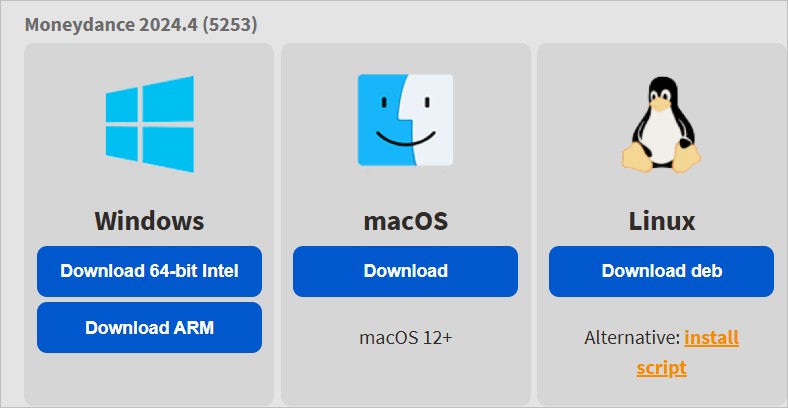
The only download from their web site is 'debian'.


So, I would look at a Linux distro that can run Debian and be better than Ubuntu.


It is non-negotiable for my 'other half' if a perfectly good laptop cannot run Moneydance.


I personally need OneDrive access across Windows and Linux.


So, unless someone can suggest another Debian based distro, then I have to stick to Ubuntu. If a successful with Ubuntu, all well and good. Otherwise, I will (very, very reluctantly) buy a laptop, capable of running Windows 11 (with an eye on Windows 12).


PC: Dell Inspiron 16 5640 (Windows 11 Home), Dell Inspiron 7591 2n1 (Windows 11 Pro), HP ProBook 470G1 (Windows 10 Pro), Intel NUC7I5BNH (Zorin)
Net: Grandstream 1 x GWN7062 Router, 1 x GWN7665 Access Point
Storage: Synology DS216play NAS, 2 x 6TB
Media: 3 x Amazon FireTV. Echo, Dot, Spot
TV: 2 x Samsung H6400 55" LED TV, Panasonic TH-P50G10Z 50" Plasma TV
Mobile: Samsung Galaxy A52 5G
Wearable: Gear S3 Frontier


TwoSeven
1712 posts

Uber Geek
+1 received by user: 304

Subscriber

  #3359542 1-Apr-2025 17:44
Send private message

I just open a WSL window on win 11 and use ubuntu there - the apps I use seem to run ok.  Apart from an old mac I use for development - multi-platform works fine on Win-11.


Software Engineer
   (the practice of real science, engineering and management)
A.I.  (Automation rebranded)
Gender Neutral
   (a person who believes in equality and who does not believe in/use stereotypes. Examples such as gender, binary, nonbinary, male/female etc.)


 ...they/their/them...


lxsw20
3689 posts

Uber Geek
+1 received by user: 2174

Subscriber

  #3359543 1-Apr-2025 17:51
Send private message

Clearly this year is the year of the linux desktop


Stream your favourite shows now on Apple TV (affiliate link).
alisam

878 posts

Ultimate Geek
+1 received by user: 83


  #3359555 1-Apr-2025 18:57
Send private message

lxsw20:


Clearly this year is the year of the linux desktop


Clearly, I disagree. Installation and Setup is challenging.


Installing apps (programs to me as I am old school) is challenging. How a novice is going to understand Linux 'rpm' [no idea yet], 'snap', 'flatpak' or a Debian Software Package file (deb) in a short space of time. I have spent 2 weeks just trying to get Ubuntu working by editing fstab, adding files to the .desktop folder and using Terminal on a frequent basis.


Don't get me wrong. I am determined to get Linux (Ubuntu or whatever) working so that my other half will accept it.


I want to use Linux.


PC: Dell Inspiron 16 5640 (Windows 11 Home), Dell Inspiron 7591 2n1 (Windows 11 Pro), HP ProBook 470G1 (Windows 10 Pro), Intel NUC7I5BNH (Zorin)
Net: Grandstream 1 x GWN7062 Router, 1 x GWN7665 Access Point
Storage: Synology DS216play NAS, 2 x 6TB
Media: 3 x Amazon FireTV. Echo, Dot, Spot
TV: 2 x Samsung H6400 55" LED TV, Panasonic TH-P50G10Z 50" Plasma TV
Mobile: Samsung Galaxy A52 5G
Wearable: Gear S3 Frontier


lxsw20
3689 posts

Uber Geek
+1 received by user: 2174

Subscriber

  #3359566 1-Apr-2025 19:18
Send private message

Heh you've missed the sarcasm. Its been the year of the linux desktop for about the last 20 years.


alisam

878 posts

Ultimate Geek
+1 received by user: 83


  #3359567 1-Apr-2025 19:20
Send private message

lxsw20:


Heh you've missed the sarcasm. Its been the year of the linux desktop for about the last 20 years.


Thanks for the clarification.


PC: Dell Inspiron 16 5640 (Windows 11 Home), Dell Inspiron 7591 2n1 (Windows 11 Pro), HP ProBook 470G1 (Windows 10 Pro), Intel NUC7I5BNH (Zorin)
Net: Grandstream 1 x GWN7062 Router, 1 x GWN7665 Access Point
Storage: Synology DS216play NAS, 2 x 6TB
Media: 3 x Amazon FireTV. Echo, Dot, Spot
TV: 2 x Samsung H6400 55" LED TV, Panasonic TH-P50G10Z 50" Plasma TV
Mobile: Samsung Galaxy A52 5G
Wearable: Gear S3 Frontier


Radiotron
187 posts

Master Geek
+1 received by user: 36


  #3359570 1-Apr-2025 19:29
Send private message

A longtime Linux user here - started with Slackware in 1996. Still have 15 stable bare metal on a Thinkpad, and -current lurks in a VM. 
Installation is far easier than ever, if going for something like Mint. My "away" machine is a Dell Latitude that's exclusively Mint. That was the "not for tinkering, just needs to be useful" install. Set it and forget it, and run Update Manager once in a while.
Two machines running W10 natively, one is upgradeable to 11, the other not, but it's just a streamer that never goes anywhere, so it can have 10 until it dies or gets replaced. 
I'm in the "whatever works for the intended use" camp. 
Some application choices dictate having some Windows in the house, however away from that, Mint is easy to install and configure, especially if it's a dedicated install with no need for dual booting. 
No harder than Windows to add applications IMHO. 
And Slackware is still around if I want to tinker under the hood.
The supposed end of support for W10 isn't likely to change much in the way of user numbers in penguin-land, people will hang on to 10, or replace hardware and go with what they know. 


In order to get the right answer, one must ask the right question


 1 | 2 | 3
View this topic in a long page with up to 500 replies per page Create new topic


Geekzone Live »

Try automatic live updates from Geekzone directly in your browser, without refreshing the page, with Geekzone Live now.


Are you subscribed to our RSS feed? You can download the latest headlines and summaries from our stories directly to your computer or smartphone by using a feed reader.