Geekzone: technology news, blogs, forums
Guest
Welcome Guest.
You haven't logged in yet. If you don't have an account you can register now.


View this topic in a long page with up to 500 replies per page Create new topic
1 | 2 | 3 | 4 | 5 | 6 | 7 | 8
danepak

1124 posts

Uber Geek
+1 received by user: 85


  #2744287 14-Jul-2021 21:37
Send private message

If I sell the laptop as spares, I would be keen on formatting the hard drive.
Might be a stupid question, but is it possible to do this somehow? It’s a 1GB SSD.


wlgspotter
334 posts

Ultimate Geek
+1 received by user: 40

ID Verified
Lifetime subscriber

  #2744332 15-Jul-2021 07:12
Send private message

I can feel your pain @danepak, and now fear my mid 2014 13" Retina MBP don't have much longer left...


I have, ever since the the upgrade to Mac OS Big Sur last year, exhibited more and more of the "Computer Restarted because of an error" message you've shown in your original post, but so far, touch wood, everytime it restarts OK.  There were times when it seemingly gets stock at the Apple Startup Logo, but so far is always start-up and shows me the login screen after that.  There were occassions where it seems to be stuck on the Apple Logo, despite leaving it for 30 or so mins, but a power cycle would usually fix it.


More recently I have been getting message about "Servicing Battery", which I kind of expect since I'm hitting close to 880 cycles now.


Will see how much longer mine lasts - fingers crossed.


Hopefully you can find a way to reformat your HDD @danepak


danepak

1124 posts

Uber Geek
+1 received by user: 85


  #2744349 15-Jul-2021 08:12
Send private message

Thanks mate.
Reg the battery - I had a new one installed back in 2019 as well.
I’ve spent quite a bit of money on this device.
I also experienced the screen peel issue and Apple wouldn’t do anything about it, due to the age.
Makes me wonder about the quality…
Nevertheless, I’m using a work PC (which serves me well) and although I’ve got a work iPhone, I’m done with Apple, unless my job requires me to use it.

My previous job had a repair division as well. The guy who did repairs said that Apple was overpriced low quality. Might just be his opinion, but based solely on my experience with this laptop, I have to agree with him.
Having said that - lots of people will have great experiences with Apple products.


wlgspotter
334 posts

Ultimate Geek
+1 received by user: 40

ID Verified
Lifetime subscriber

  #2744352 15-Jul-2021 08:17
Send private message

danepak: Thanks mate.
Reg the battery - I had a new one installed back in 2019 as well.
I’ve spent quite a bit of money on this device.
I also experienced the screen peel issue and Apple wouldn’t do anything about it, due to the age.
Makes me wonder about the quality…
Nevertheless, I’m using a work PC (which serves me well) and although I’ve got a work iPhone, I’m done with Apple, unless my job requires me to use it.

My previous job had a repair division as well. The guy who did repairs said that Apple was overpriced low quality. Might just be his opinion, but based solely on my experience with this laptop, I have to agree with him.
Having said that - lots of people will have great experiences with Apple products.


I did think of replacing the battery, but a quick check revealed it costs almost $400 - $500 to get it done so I think I'll leave it.  I did manage to get a laptop powerbank with a USB-C to MagSafe2 cable which can charge my MBP if I had to use it on battery for an extended time - it works for me. 


alasta
6891 posts

Uber Geek
+1 received by user: 3365

Trusted
Subscriber

  #2744361 15-Jul-2021 08:34
Send private message

danepak: My previous job had a repair division as well. The guy who did repairs said that Apple was overpriced low quality. Might just be his opinion, but based solely on my experience with this laptop, I have to agree with him.
Having said that - lots of people will have great experiences with Apple products.


In my experience poor quality and reliability is generally the norm across the computer industry. This is why I budget for frequent replacement of my laptop & iPhone, and I avoid buying products like watches and hifi made by Apple or other computer manufacturers. 


MaxineN
Max
2056 posts

Uber Geek
+1 received by user: 1675

ID Verified
Trusted
Subscriber

  #2744366 15-Jul-2021 08:55
Send private message

danepak: If I sell the laptop as spares, I would be keen on formatting the hard drive.
Might be a stupid question, but is it possible to do this somehow? It’s a 1GB SSD.


Command and the R key until you see the beach ball or Apple logo. Hope it boots into recovery mode (against all odds knowing the errors you're getting) and you should be able to re-install and wipe all data.


Also if I'm interested if you do decide to sell it :)


Ramblings from a mysterious lady who's into tech. Warning I may often create zingers.


Shop now for Dyson appliances (affiliate link).
SpartanVXL
1498 posts

Uber Geek
+1 received by user: 666


  #2744543 15-Jul-2021 12:19
Send private message

alasta:

danepak: My previous job had a repair division as well. The guy who did repairs said that Apple was overpriced low quality. Might just be his opinion, but based solely on my experience with this laptop, I have to agree with him.
Having said that - lots of people will have great experiences with Apple products.


In my experience poor quality and reliability is generally the norm across the computer industry. This is why I budget for frequent replacement of my laptop & iPhone, and I avoid buying products like watches and hifi made by Apple or other computer manufacturers. 


I can second this. Very few individual models (not brands) will have a reputation for being reliable. Often they don’t get shipped here or are so popular they get sold out.

It makes it so you can’t just buy off the shelf. Research and reviews over a few months are almost a necessity when buying to avoid issues.

This applies to laptops, pc parts, phones, monitors etc. The CGA is also pretty lacklustre as a lot of minor defects are passed as wear-tear and major defects over the limited warranties force you to jump through hoops or go straight to tribunal.

1024kb
1197 posts

Uber Geek
+1 received by user: 519

ID Verified
Lifetime subscriber

  #2744554 15-Jul-2021 13:11
Send private message

You'll get a surprisingly good price for your MacBook as is - there's always people looking for MacBook parts. Your screen, upper shell (because of the keyboard), bottom tray, MagSafe charger & SSD all attract strong buyer interest, especially the 1TB SSD which is a rare option.

A real flyer here, but it's easy to do - try booting from a Windows 10 USB installer - hold the Option key to select USB boot. If it boots, then your problem isn't a dead system board (I don't think it is - no computer wants to do anything with a dead motherboard) & you'll be able to format your SSD too. If not, well, it wasn't a huge effort to try anyway.


Megabyte - so geek it megahertz

danepak

1124 posts

Uber Geek
+1 received by user: 85


  #2744792 15-Jul-2021 21:18
Send private message

1024kb: You'll get a surprisingly good price for your MacBook as is - there's always people looking for MacBook parts. Your screen, upper shell (because of the keyboard), bottom tray, MagSafe charger & SSD all attract strong buyer interest, especially the 1TB SSD which is a rare option.

A real flyer here, but it's easy to do - try booting from a Windows 10 USB installer - hold the Option key to select USB boot. If it boots, then your problem isn't a dead system board (I don't think it is - no computer wants to do anything with a dead motherboard) & you'll be able to format your SSD too. If not, well, it wasn't a huge effort to try anyway.


Thanks @1024kb

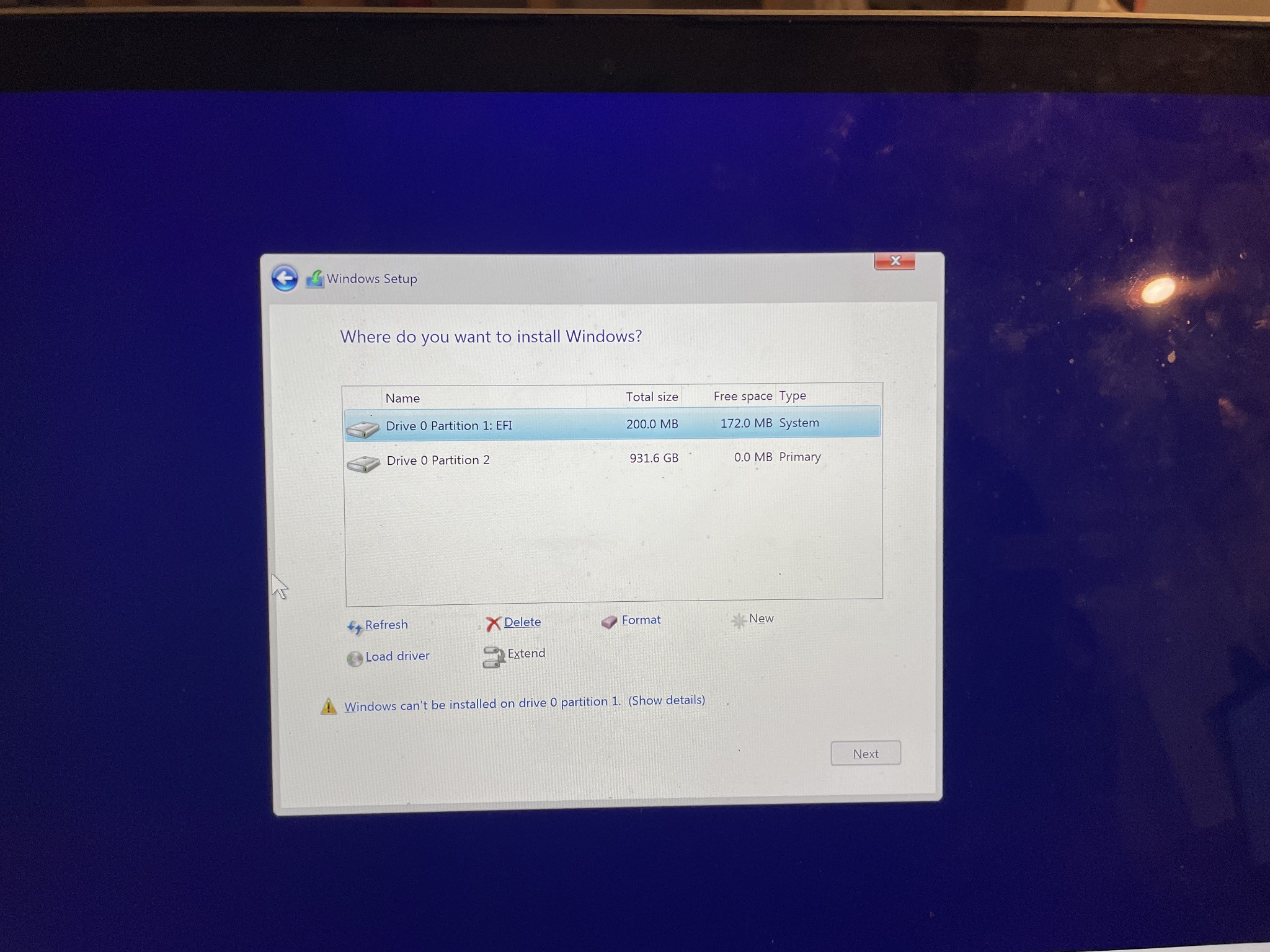
OK, I’ve managed to get this far, but nervous about the next move…

By the way, getting this far, is it a good sign?
Or is the laptop most likely still unusable?

So what do I choose from here?


MaxineN
Max
2056 posts

Uber Geek
+1 received by user: 1675

ID Verified
Trusted
Subscriber

  #2744794 15-Jul-2021 21:22
Send private message

danepak:
1024kb: You'll get a surprisingly good price for your MacBook as is - there's always people looking for MacBook parts. Your screen, upper shell (because of the keyboard), bottom tray, MagSafe charger & SSD all attract strong buyer interest, especially the 1TB SSD which is a rare option.

A real flyer here, but it's easy to do - try booting from a Windows 10 USB installer - hold the Option key to select USB boot. If it boots, then your problem isn't a dead system board (I don't think it is - no computer wants to do anything with a dead motherboard) & you'll be able to format your SSD too. If not, well, it wasn't a huge effort to try anyway.


Thanks @1024kb

OK, I’ve managed to get this far, but nervous about the next move…

By the way, getting this far, is it a good sign?
Or is the laptop most likely still unusable?

So what do I choose from here?


Delete both partitions and just hit next.


Let Windows do it's thing. Actually curious if it will boot into Windows!


Ramblings from a mysterious lady who's into tech. Warning I may often create zingers.


danepak

1124 posts

Uber Geek
+1 received by user: 85


  #2744803 15-Jul-2021 21:35
Send private message

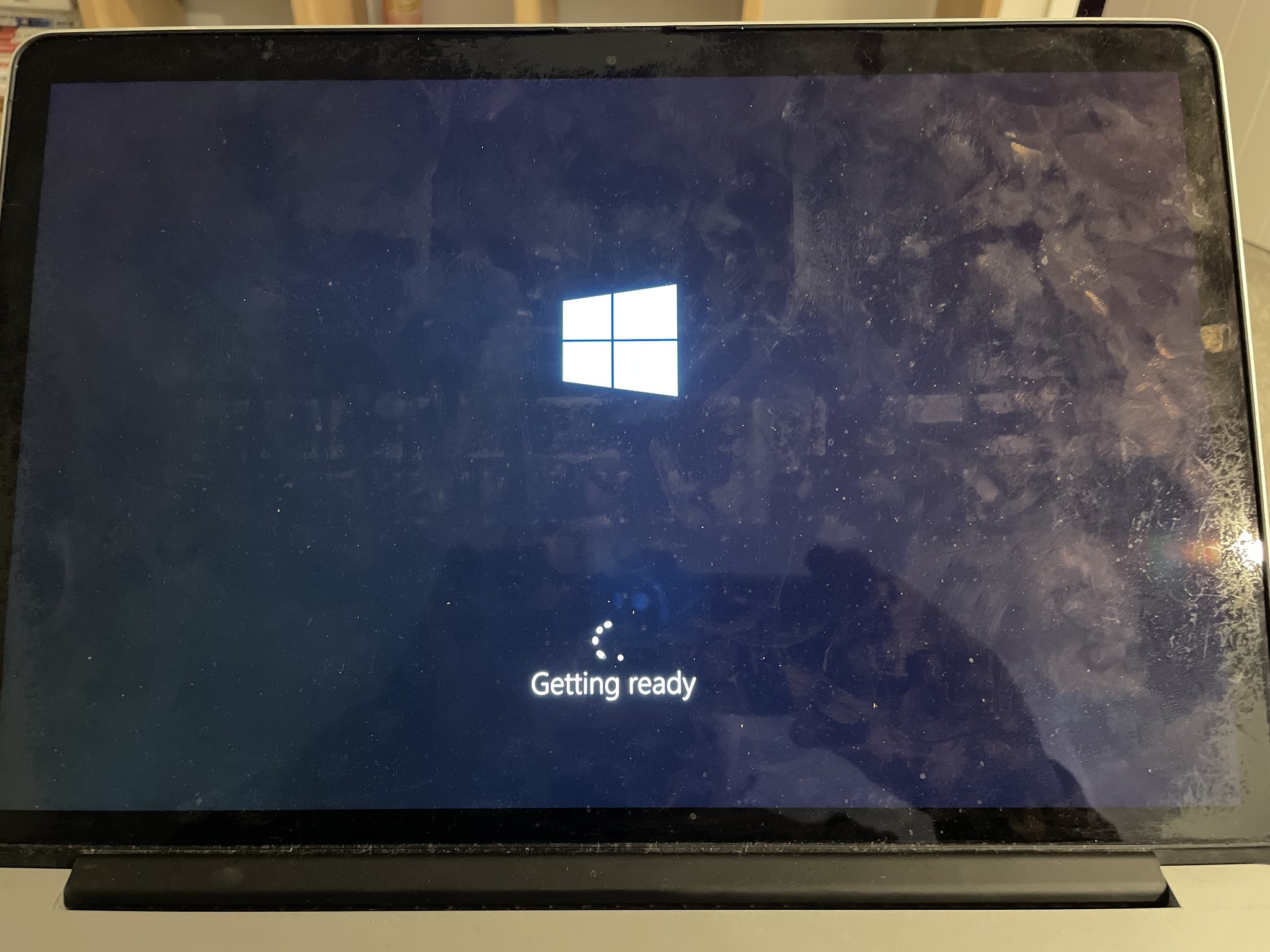
It’s been running through the install process.

Been stuck on this screen for a couple of minutes.
I assume the USB stays in?


Shop now for Dell laptops and other devices (affiliate link).
MaxineN
Max
2056 posts

Uber Geek
+1 received by user: 1675

ID Verified
Trusted
Subscriber

  #2744804 15-Jul-2021 21:36
Send private message

USB drive can be taken out after installation.


Ramblings from a mysterious lady who's into tech. Warning I may often create zingers.


danepak

1124 posts

Uber Geek
+1 received by user: 85


  #2744808 15-Jul-2021 21:41
Send private message

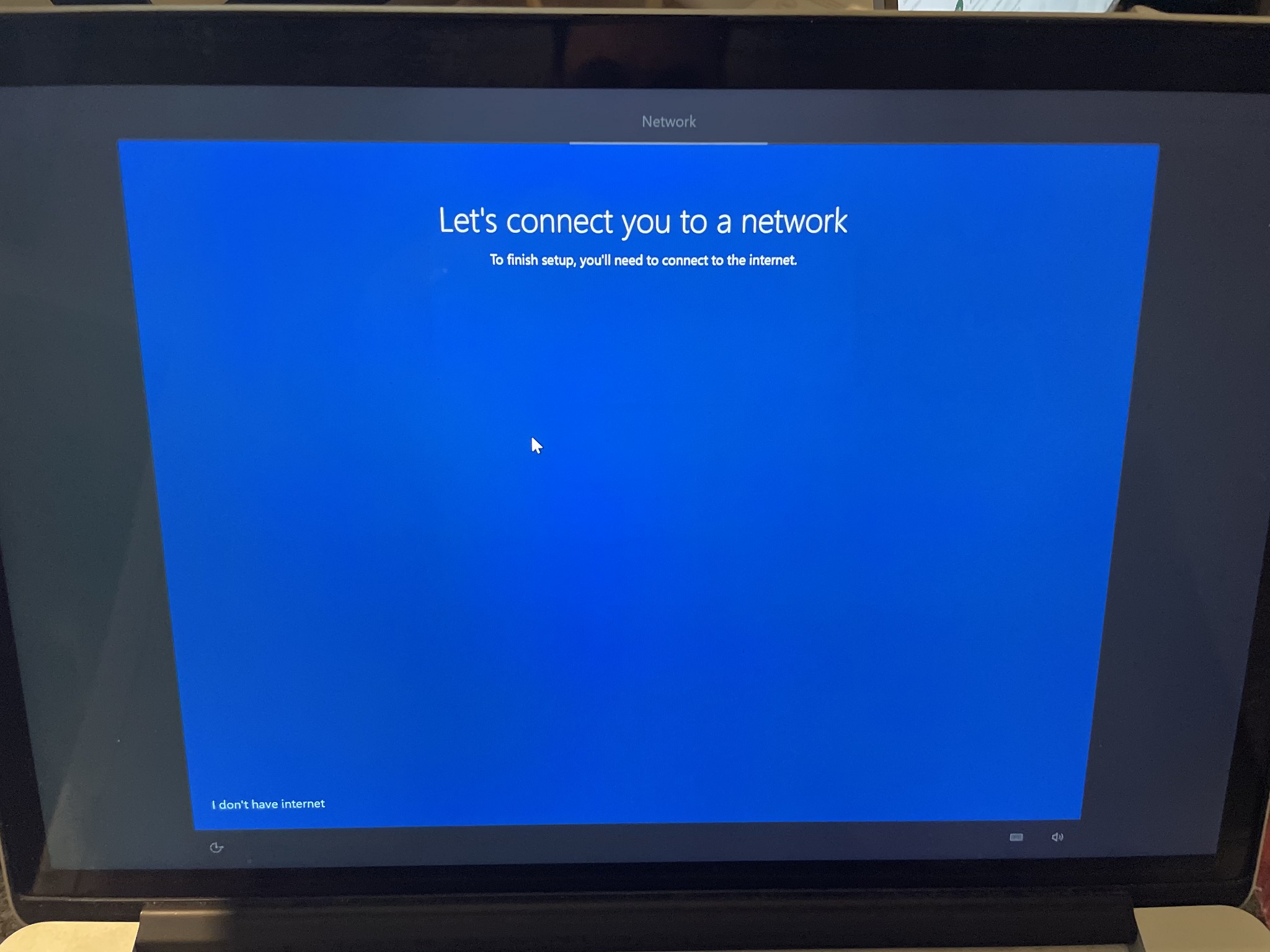
OK, I’m sort of stuck here.
Doesn’t display any networks (although I certainly do have WiFi here).


baabits
56 posts

Master Geek
+1 received by user: 31

ID Verified
Lifetime subscriber

  #2744810 15-Jul-2021 21:43
Send private message

I have an early 2013 MacBook Pro that had similar issues. I bought it while I was in Japan. i7, 16GB, 256GB SSD, NVIDIA 600 series GPU I think.


One day it kept hanging on boot and while it hung it got very hot. Apple Store in Tokyo said that the logic board had failed and it would be 150,000 yen (about $2k) to get repaired. 


As a last ditch effort I created a Mojave USB drive, completely wiped the internal SSD and reinstalled from that- everything worked fine after, so you might still be in luck.


I've upgraded to an M1 mac since then but ol' reliable is still alive and kicking today :)


Best of luck, don't give up hope!


baabits
56 posts

Master Geek
+1 received by user: 31

ID Verified
Lifetime subscriber

  #2744811 15-Jul-2021 21:44
Send private message

danepak: OK, I’m sort of stuck here.
Doesn’t display any networks (although I certainly do have WiFi here).


Win 10 probably doesn't have your Wi-Fi drivers- you'll need to either download them on another PC and install them or plug in through an ethernet adapter.


There's a tool for grabbing bootcamp drivers here: https://github.com/timsutton/brigadier


1 | 2 | 3 | 4 | 5 | 6 | 7 | 8
View this topic in a long page with up to 500 replies per page Create new topic


Geekzone Live »

Try automatic live updates from Geekzone directly in your browser, without refreshing the page, with Geekzone Live now.


Are you subscribed to our RSS feed? You can download the latest headlines and summaries from our stories directly to your computer or smartphone by using a feed reader.