Geekzone: technology news, blogs, forums
Guest
Welcome Guest.
You haven't logged in yet. If you don't have an account you can register now.


danepak

1124 posts

Uber Geek
+1 received by user: 85


#274567 29-Aug-2020 09:18
Send private message

Yikes!
My MacBook Pro from 2013 is not happy.
Doesn’t want to load anymore.
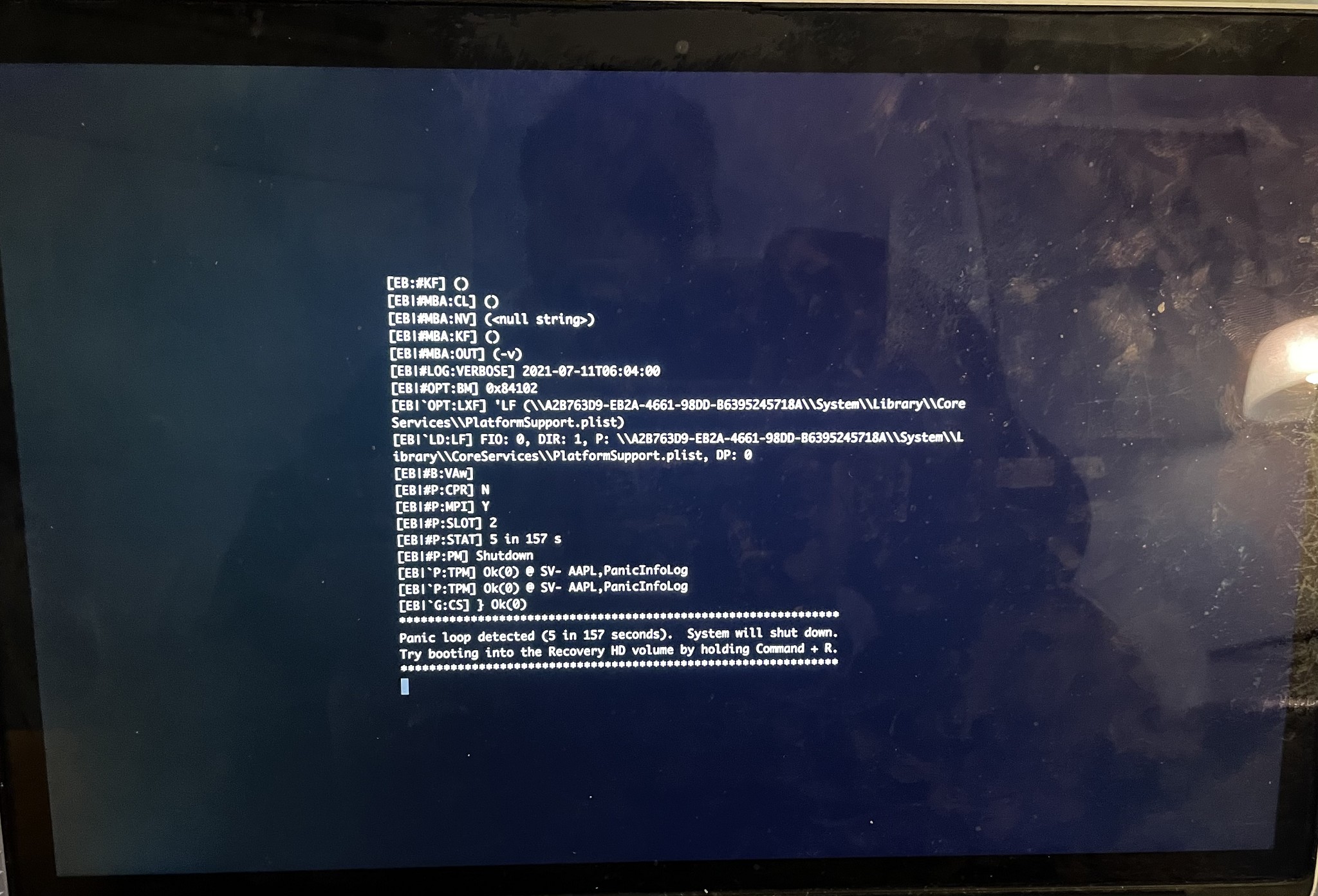
I keep getting a black screen with white text, stating that the computer restarted because of a problem.
Then it tries to load, but returns to this screen.
I managed to do an SMC Reset once, followed by a PRAM Reset. That actually worked, but I couldn’t start any programmes (Chrome, Safari, Firefox, Time Machine or anything else). The spinning wheel just turned up and I had no option but to close it down again.
And now I’m back at the issue with the ‘computer restarted because of a problem’ screen.
And I can’t do the SMC Reset anymore.
Any help is much appreciated.




View this topic in a long page with up to 500 replies per page Create new topic
 1 | 2 | 3 | 4 | 5 | 6 | ... | 8
Prudle
67 posts

Master Geek
+1 received by user: 25

ID Verified
Lifetime subscriber

  #2565646 16-Sep-2020 07:58
Send private message

Can you boot off an external drive with Mac OS on it? (to see if it's the HD) - is it an SSD or HD?


If you're comfortable opening it up, you might check to see the HD connector and ram are seated nicely....


Behodar
11101 posts

Uber Geek
+1 received by user: 6090

Trusted
Lifetime subscriber

  #2565647 16-Sep-2020 08:02
Send private message

Boot with Cmd-V held down so that it goes into verbose mode, then post a picture of the crash.


danepak

1124 posts

Uber Geek
+1 received by user: 85


  #2565649 16-Sep-2020 08:10
Send private message

Apparently the logic board has died.


michaelmurfy
meow
13581 posts

Uber Geek
+1 received by user: 10914

Moderator
ID Verified
Trusted
Lifetime subscriber

  #2565701 16-Sep-2020 09:31
Send private message

danepak: Apparently the logic board has died.


I doubt that given it is doing a kernel panic. This looks more like a software issue. Can you try / answer the above?


Michael Murphy | https://murfy.nz
Referral Links: Quic Broadband (use R122101E7CV7Q for free setup)

Are you happy with what you get from Geekzone? Please consider supporting us by subscribing.
Opinions are my own and not the views of my employer.


engedib
254 posts

Ultimate Geek
+1 received by user: 93


  #2565713 16-Sep-2020 09:58
Send private message

I have seen this with macbooks where the very thin cable which goes to the SATA drive broken. It is bent at least 4 places and over time it stops working, it is a very bad design.


https://www.ifixit.com/Guide/MacBook+Pro+13-Inch+Unibody+Mid+2012+Hard+Drive+Cable+Replacement/10379


New cable + SSD drive sorted it.


Mehrts
1112 posts

Uber Geek
+1 received by user: 984

Trusted

  #2567065 17-Sep-2020 17:23
Send private message

Prudle:


check to see the HD connector and ram are seated nicely....


Sorry, but I have to laugh at this, as the RAM is soldered to the MB in these models 😅


Shop now for Lenovo laptops and other devices (affiliate link).
bendud
324 posts

Ultimate Geek
+1 received by user: 98

ID Verified
Lifetime subscriber

  #2577852 2-Oct-2020 11:09
Send private message

From 2011 the 15' MBP in particular had a soldering issue for the second GPU (i.e. not the internal Intel HD3000 but the external Radeon GPU). 


When this went on the blink the machine would usually hang on boot. Sometimes as above, sometimes as coloured bands on the screen.


There's a software fix that boots via Linux and disables the external GPU; the machine now runs on the internal Intel graphics chip. It needs a USB stick and gives you a usable MBP again (my sister is still running a 2011 MBP given to me as 'broken' 4 years on).


There is also a single resistor removal fix with a small soldering iron, which although nerve-wracking for those of us who haven't soldered anything on or off for decades nonetheless works a treat. It stops the MBP looking for the external GPU so it just uses the internal one. Took a day of psyching myself up and about 30seconds with a soldering iron and a rapidly beating heart.


Further details here: 


https://realmacmods.com/macbook-2011-radeon-gpu-disable/


HTH


b


From the Antarctic Riviera

dryburn
440 posts

Ultimate Geek
+1 received by user: 92


  #2577875 2-Oct-2020 11:53
Send private message

Thanks bendud! I have an old macbook pro that had the same issue, going to try that tonight


1024kb
1197 posts

Uber Geek
+1 received by user: 519

ID Verified
Lifetime subscriber

  #2577962 2-Oct-2020 12:48
Send private message

I recently had my 2013 MBP DG repaired. The symptoms weren't the same as yours, mine would just collapse every time I put any strain on the graphics.

The problem was a faulty power rail to the Nvidia chip which my good friend Sergio fixed fast & very affordably. If you don't want to do this surgery yourself, I highly recommend him. PM for the contact deets.


Megabyte - so geek it megahertz

Behodar
11101 posts

Uber Geek
+1 received by user: 6090

Trusted
Lifetime subscriber

  #2578029 2-Oct-2020 14:14
Send private message

bendud:


From 2011 the 15' MBP in particular had a soldering issue for the second GPU (i.e. not the internal Intel HD3000 but the external Radeon GPU). 


As far as I can tell, no 2013 models had a Radeon so I think this is a different problem.


bendud
324 posts

Ultimate Geek
+1 received by user: 98

ID Verified
Lifetime subscriber

  #2578030 2-Oct-2020 14:15
Send private message

Good detective work :-)


thanks


b


From the Antarctic Riviera


Shop now for Lenovo laptops and other devices (affiliate link).
1024kb
1197 posts

Uber Geek
+1 received by user: 519

ID Verified
Lifetime subscriber

  #2578137 2-Oct-2020 14:59
Send private message

Mehrts:

Prudle:


check to see the HD connector and ram are seated nicely....


Sorry, but I have to laugh at this, as the RAM is soldered to the MB in these models 😅


Uhmm, yeah nah. 2011 with the ATi graphics problem is the last of the non-soldered RAM & HDD machines. Anything pre-Retina is upgradeable.


Megabyte - so geek it megahertz

danepak

1124 posts

Uber Geek
+1 received by user: 85


  #2742362 11-Jul-2021 11:20
Send private message

Behodar:

Boot with Cmd-V held down so that it goes into verbose mode, then post a picture of the crash.


@Behodar - I’ve only come around to trying this now.
A lot of code turned up on the screen, but it loaded the laptop afterwards.
Everything seems fine now…but I’m too scared to reboot!

Thanks for your help 🙂

danepak

1124 posts

Uber Geek
+1 received by user: 85


  #2742583 11-Jul-2021 18:46
Send private message

danepak:
Behodar:

Boot with Cmd-V held down so that it goes into verbose mode, then post a picture of the crash.


@Behodar - I’ve only come around to trying this now.
A lot of code turned up on the screen, but it loaded the laptop afterwards.
Everything seems fine now…but I’m too scared to reboot!

Thanks for your help 🙂


@michaelmurfy and @Behodar:
Issue is back. I’ve managed to get a photo of the error.


Behodar
11101 posts

Uber Geek
+1 received by user: 6090

Trusted
Lifetime subscriber

  #2742589 11-Jul-2021 18:54
Send private message

No idea about that one, I'm afraid.


 1 | 2 | 3 | 4 | 5 | 6 | ... | 8
View this topic in a long page with up to 500 replies per page Create new topic


Geekzone Live »

Try automatic live updates from Geekzone directly in your browser, without refreshing the page, with Geekzone Live now.


Are you subscribed to our RSS feed? You can download the latest headlines and summaries from our stories directly to your computer or smartphone by using a feed reader.