Geekzone: technology news, blogs, forums
Guest
Welcome Guest.
You haven't logged in yet. If you don't have an account you can register now.


lyonrouge

1993 posts

Uber Geek
+1 received by user: 20

Trusted
Lifetime subscriber

#113962 3-Feb-2013 09:40
Send private message

I have two copies of iTunes that I have authorised to the same Apple ID. I use one as a server and it has all our digital copies of movies. I have another that I only use for Syncronisation (i.e. no more that 64GB of content on it). I'm currently putting the digital copy that I want on the iPad into the second iTunes instance and redeeming the code again, I was wondering if I can just copy it from the other iTunes across the LAN?

This is more important for digital copies that are not actually on optical media and head off to the cloud to download it all over again.

Filter this topic showing only the reply marked as answer Create new topic
freitasm
BDFL - Memuneh
80659 posts

Uber Geek
+1 received by user: 41073

Administrator
ID Verified
Trusted
Geekzone
Lifetime subscriber

  #754964 3-Feb-2013 09:47
Send private message

You can copy movies you bought and watch on authorised devices. Movie and TV rentals can only be played on the device where you first rented the content.


Referral links: Quic Broadband (free setup code: R587125ERQ6VE) | Samsung | AliExpress | Wise | Sharesies 


Support Geekzone by subscribing (browse ads-free), or making a one-off or recurring donation through PressPatron.


lyonrouge

1993 posts

Uber Geek
+1 received by user: 20

Trusted
Lifetime subscriber

  #754966 3-Feb-2013 09:53
Send private message

These are digital copies that came with some of my BluRay discs. I can have the same movie in both iTunes instances my putting in the disk, entering the code, entering the Apple ID credentials (I assume that because I have the code already associated to the Apple ID it allows me to copy it again).

Once on the iTunes that is used for Syncronisation, I can put it on the iPad. It works but is laborious and was hoping for an easier way.

lyonrouge

1993 posts

Uber Geek
+1 received by user: 20

Trusted
Lifetime subscriber

  #755076 3-Feb-2013 14:32
Send private message

I'm sure that in the past, iTunes would show the libarary of another iTunes on the network, I wonder if this was removed in the latest version?


lyonrouge

1993 posts

Uber Geek
+1 received by user: 20

Trusted
Lifetime subscriber

  #755100 3-Feb-2013 15:52
Send private message

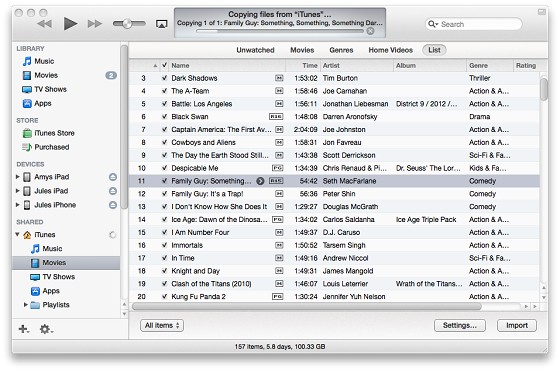
Answer : Turn on Home Sharing, then the other iTunes libraries appear in the shared section. Select the content and select Import.


Filter this topic showing only the reply marked as answer Create new topic


Geekzone Live »

Try automatic live updates from Geekzone directly in your browser, without refreshing the page, with Geekzone Live now.


Are you subscribed to our RSS feed? You can download the latest headlines and summaries from our stories directly to your computer or smartphone by using a feed reader.