Geekzone: technology news, blogs, forums
Guest
Welcome Guest.
You haven't logged in yet. If you don't have an account you can register now.


lyonrouge

1993 posts

Uber Geek
+1 received by user: 20

Trusted
Lifetime subscriber

#116169 20-Apr-2013 10:59
Send private message

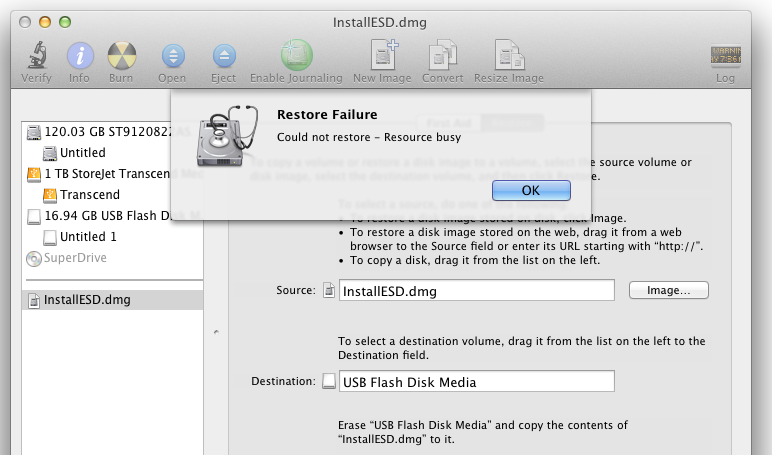
I have tried two differed USB keys and I get the same message. Rebooted, closed all applications, removed and reconnected and always teh same message.


Filter this topic showing only the reply marked as answer Create new topic
Behodar
11101 posts

Uber Geek
+1 received by user: 6087

Trusted
Lifetime subscriber

  #802721 20-Apr-2013 11:44
Send private message

Try unmounting (not ejecting!) the flash drive first.


gzt

gzt
18684 posts

Uber Geek
+1 received by user: 7826

Lifetime subscriber

  #802725 20-Apr-2013 12:18
Send private message

The normal path for this escapes me but if the above fails you could try performing the same action without the installesd.dmg item selected. Is it possible to select the usb and from there select the image as source and do it that way? also worth a go.

lyonrouge

1993 posts

Uber Geek
+1 received by user: 20

Trusted
Lifetime subscriber

  #802751 20-Apr-2013 13:14
Send private message

Answer was, drag and drop the partition, not the drive as the destination.

Filter this topic showing only the reply marked as answer Create new topic


Geekzone Live »

Try automatic live updates from Geekzone directly in your browser, without refreshing the page, with Geekzone Live now.


Are you subscribed to our RSS feed? You can download the latest headlines and summaries from our stories directly to your computer or smartphone by using a feed reader.