Geekzone: technology news, blogs, forums
Guest
Welcome Guest.
You haven't logged in yet. If you don't have an account you can register now.


antaeusa

221 posts

Master Geek


#154452 28-Oct-2014 17:20
Send private message

Hi All,

Has anyone had this problem where I am unable to see the logon screen on my external screen which is connected via Display Port? Once I logon then I can see everything on my external screen. This only started happening after I'd upgraded to Yosemite. I have to logon on my Macbook Pro (Physically) then I can see as per normal.

Thank you.

Peace,
Andrew

Create new topic

D.W

D.W
747 posts

Ultimate Geek
+1 received by user: 91


  #1163817 28-Oct-2014 17:38
Send private message

I'm running a Macbook Pro + Yosemite with U2713HM connected via DisplayPort and my logon screen is displaying OK on the external screen. Sorry not much help but identifies it's not a global problem at least.


antaeusa

221 posts

Master Geek


  #1163828 28-Oct-2014 17:49
Send private message

D.W: I'm running a Macbook Pro + Yosemite with U2713HM connected via DisplayPort and my logon screen is displaying OK on the external screen. Sorry not much help but identifies it's not a global problem at least.


Ahh.. is there a particular display setting you got? I have got Mirror displays..

RunningMan
9186 posts

Uber Geek
+1 received by user: 4840


  #1163854 28-Oct-2014 18:27
Send private message

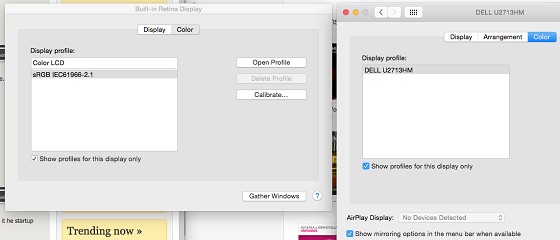
Try going to display prefs, uncheck mirroring (to see 2 displays), then drag the menu bar over to your external monitor. That should make it the primary display. Re-enable mirroring and see how you go.


antaeusa

221 posts

Master Geek


  #1163971 28-Oct-2014 21:22
Send private message

Tried that doesn't seem to be working, I still have to logon using my MacBook Pro then I can see the screen on my external monitor..strange.

RunningMan
9186 posts

Uber Geek
+1 received by user: 4840


  #1165985 31-Oct-2014 15:40
Send private message

Is there an apple logo or similar in the middle of the screen (the little one in display prefs) that you can drag from one to the other to make it he startup monitor?

D.W

D.W
747 posts

Ultimate Geek
+1 received by user: 91


  #1165995 31-Oct-2014 16:01
Send private message

antaeusa:
D.W: I'm running a Macbook Pro + Yosemite with U2713HM connected via DisplayPort and my logon screen is displaying OK on the external screen. Sorry not much help but identifies it's not a global problem at least.


Ahh.. is there a particular display setting you got? I have got Mirror displays..


I am running extended rather than mirror, could be the difference. I'll try mirroring when I get home.


Want to support Geekzone and browse the site without the ads? Subscribe to Geekzone now (monthly, annual and lifetime options).
antaeusa

221 posts

Master Geek


  #1166085 31-Oct-2014 19:22
Send private message

RunningMan: Is there an apple logo or similar in the middle of the screen (the little one in display prefs) that you can drag from one to the other to make it he startup monitor?


Not sure what exactly you mean by that, are you able to guide me with a screen shot etc?


RunningMan
9186 posts

Uber Geek
+1 received by user: 4840


  #1166134 31-Oct-2014 20:44
Send private message

Don't have a dual monitor setup in front of me to look at, but try under the arrangement tab.

Create new topic


Geekzone Live »

Try automatic live updates from Geekzone directly in your browser, without refreshing the page, with Geekzone Live now.


Are you subscribed to our RSS feed? You can download the latest headlines and summaries from our stories directly to your computer or smartphone by using a feed reader.