Geekzone: technology news, blogs, forums
Guest
Welcome Guest.
You haven't logged in yet. If you don't have an account you can register now.


bluedisk

226 posts

Master Geek
+1 received by user: 39


#282762 10-Mar-2021 15:07
Send private message

My trusty mac mini 2012 i7 died a couple of months ago, and I replaced it with a new mac mini M1.


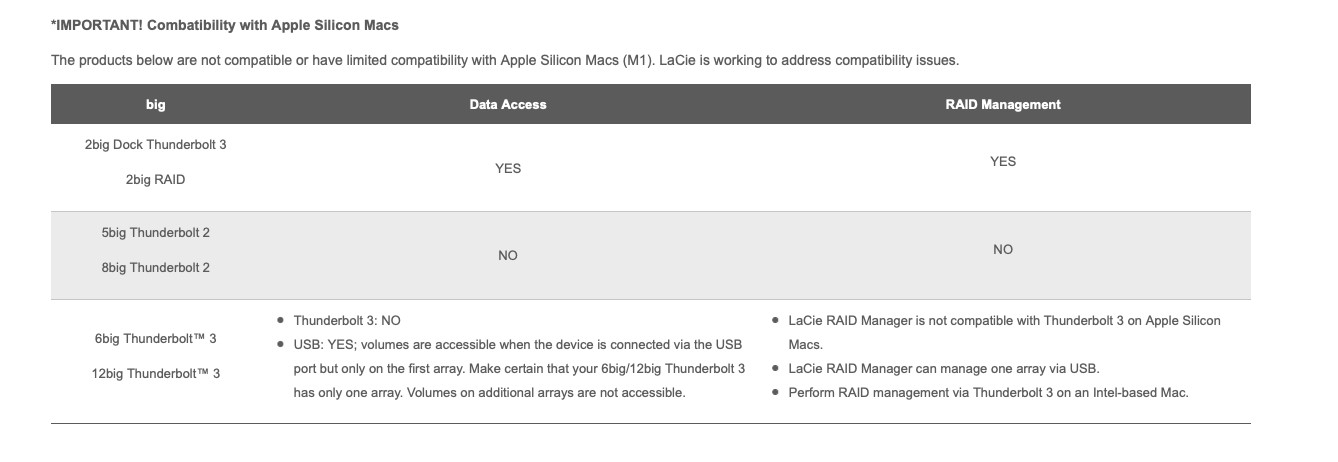
I am a photographer who uses a LaCie Big 5 to store and retrieve digital media assets. Unfortunately the new mac mini is not supported by Lacie Raid Manager and my digital assets are now invisible to my new mac mini. I have contacted Lacie but got almost zero help about future compatibility, so don't hold much hope there.


I thought I could buy a cheaper older mac mini with a T2 port that would recognise the Big 5 and daisy chain it to my new mini. Does this make sense? Any drawbacks, or a better way of storing, retrieving and working with massive video and still files?



Life is a daring adventure or nothing at all...


Create new topic
jarledb
Webhead
3319 posts

Uber Geek
+1 received by user: 1983

Moderator
ID Verified
Trusted
Lifetime subscriber

  #2671173 10-Mar-2021 17:52
Send private message

If I were you I would sell the LaCie and buy something that is compatible with the new M1 Mac.


Jarle Dahl Bergersen | Referral Links: Want $50 off when you join Octopus Energy? Use this referral code
Are you happy with what you get from Geekzone? Please consider supporting us by making a donation or subscribing.


Mehrts
1112 posts

Uber Geek
+1 received by user: 984

Trusted

  #2671815 11-Mar-2021 17:28
Send private message

What's the exact issue with the M1 Mac not being able to access the storage? Does the drive show up in the finder sidebar as external storage? Does it appear in Disk Utility?


Do you usually use some proprietary application running on the mac to access the files?


To answer your question of whether you can daisy-chain Macs: You can connect external drives to a Mac and share them on the network, so that the drives are accessible by other computers. But purchasing a second computer is just a waste for this one purpose.


Andib
1396 posts

Uber Geek
+1 received by user: 974

ID Verified
Trusted

  #2671818 11-Mar-2021 17:42
Send private message

Mehrts:


What's the exact issue with the M1 Mac not being able to access the storage? Does the drive show up in the finder sidebar as external storage? Does it appear in Disk Utility?


Do you usually use some proprietary application running on the mac to access the files?


My understanding is the the 5Bbig is a Thunderbolt 2 raid array and the new M1s don't support thunderbolt 2 so a connection issue rather than it being a software issue.


<# 
       .DISCLAIMER
       Anything I post is my own and not the views of my past/present/future employer.
#>


Mehrts
1112 posts

Uber Geek
+1 received by user: 984

Trusted

  #2671829 11-Mar-2021 18:00
Send private message

Andib:


My understanding is the the 5Bbig is a Thunderbolt 2 raid array and the new M1s don't support thunderbolt 2 so a connection issue rather than it being a software issue.


In that case, it's probably time to move over to dedicated network-based storage, or upgrade to a newer Thunderbolt-based storage system if performance is an absolute must-have.


Seems a bit weird that TB2 support was dropped.


Behodar
11102 posts

Uber Geek
+1 received by user: 6095

Trusted
Lifetime subscriber

  #2671853 11-Mar-2021 18:29
Send private message

Andib: My understanding is the the 5Bbig is a Thunderbolt 2 raid array and the new M1s don't support thunderbolt 2 so a connection issue rather than it being a software issue.


In that case would it just be a matter of using an adapter?


bluedisk

226 posts

Master Geek
+1 received by user: 39


  #2672026 11-Mar-2021 22:10
Send private message

Mehrts:


What's the exact issue with the M1 Mac not being able to access the storage? Does the drive show up in the finder sidebar as external storage? Does it appear in Disk Utility?


Do you usually use some proprietary application running on the mac to access the files?


To answer your question of whether you can daisy-chain Macs: You can connect external drives to a Mac and share them on the network, so that the drives are accessible by other computers. But purchasing a second computer is just a waste for this one purpose.


No the drive does not show up in the finder nor disk utility because it asks for a new driver. But there is no new driver for the M1. The proprietary application is LaCie Raid Manager. 


Isn't buying a second hand Mac Mini that has T2 for about $500 the only way for me to access my files though? I know others have suggested a newer system but I spent about $2000in 2019 on 5 x 4TB hard drives which still have my files on them. How would I keep these hard drives, or transfer media assets to another Raid? I can't exactly just take them out of the Big 5 and slot them into a newer system. Thats my issue.


Life is a daring adventure or nothing at all...


Shop now on Samsung phones, tablets, TVs and more (affiliate link).
bluedisk

226 posts

Master Geek
+1 received by user: 39


  #2672027 11-Mar-2021 22:12
Send private message

Behodar:


Andib: My understanding is the the 5Bbig is a Thunderbolt 2 raid array and the new M1s don't support thunderbolt 2 so a connection issue rather than it being a software issue.


In that case would it just be a matter of using an adapter?


I do have a T2 to T3 adaptor but its not working for connecting the Raid, it does however work for other devices.


Life is a daring adventure or nothing at all...


bluedisk

226 posts

Master Geek
+1 received by user: 39


  #2672029 11-Mar-2021 22:16
Send private message

Mehrts:


Andib:


My understanding is the the 5Bbig is a Thunderbolt 2 raid array and the new M1s don't support thunderbolt 2 so a connection issue rather than it being a software issue.


In that case, it's probably time to move over to dedicated network-based storage, or upgrade to a newer Thunderbolt-based storage system if performance is an absolute must-have.


Seems a bit weird that TB2 support was dropped.


Yes I think its weird that T2 support has been dropped given that it works perfectly fine for my use and is still a relatively recent and quick way of transferring big file sizes.


How do I move my 20 TB of data to a new system without spending thousands on new drives when there's nothing wrong with the old ones? There are 5 x 4TB drives that I bought in late 2019 that I can't exactly just slot into a new enclosure and hope to be able to read them.


Life is a daring adventure or nothing at all...


bluedisk

226 posts

Master Geek
+1 received by user: 39


  #2672031 11-Mar-2021 22:18
Send private message

jarledb:


If I were you I would sell the LaCie and buy something that is compatible with the new M1 Mac.


and how would I transfer 20 TB of media assets to a new system?


Life is a daring adventure or nothing at all...


bluedisk

226 posts

Master Geek
+1 received by user: 39


  #2672032 11-Mar-2021 22:26
Send private message


     LaCie Raid manager is not even compatible with Thunderbolt 3 on Apple M1 devices, its pretty poor in my view.


Life is a daring adventure or nothing at all...


Basil12
124 posts

Master Geek
+1 received by user: 74


  #2672033 11-Mar-2021 22:31
Send private message

bluedisk:


jarledb:


If I were you I would sell the LaCie and buy something that is compatible with the new M1 Mac.


and how would I transfer 20 TB of media assets to a new system?


My first thought is what do you use as your back up in case the entire drive ever went pear shaped, such as in a house fire?


In respect of your current problem, having a perfecty good drive full of files you want and a perfectly good computer, but the two don't talk, you presumably just need someone else with a slightly older Mac whom can help you with moving your files from your old drive to whatever you will use with your new computer. Whereabouts in NZ are you?


Shop now at Mighty Ape (affiliate link).
bluedisk

226 posts

Master Geek
+1 received by user: 39


  #2672244 12-Mar-2021 12:34
Send private message


The backups are on lots of different USB drives which is a pain, hence my decision to have all the files in one place on a 20 TB Raid drive. It was all working so well for about a year before the logic board died. In retrospect I should have bought an Intel based mac mini, but was seduced by the superior performance and low energy use of the M1. I'm on the Kapiti Coast.


I'm just not sure how to back up 20 TB worth of data without huge expense.


Life is a daring adventure or nothing at all...


Create new topic


Geekzone Live »

Try automatic live updates from Geekzone directly in your browser, without refreshing the page, with Geekzone Live now.


Are you subscribed to our RSS feed? You can download the latest headlines and summaries from our stories directly to your computer or smartphone by using a feed reader.