Geekzone: technology news, blogs, forums
Guest
Welcome Guest.
You haven't logged in yet. If you don't have an account you can register now.


OnceBitten

545 posts

Ultimate Geek
+1 received by user: 11


#288748 21-Jul-2021 08:33
Send private message

I've got a 2012 MacBook and it hasn't been updated for some time.


the last 2 years it has gotten very slow, particularly to start up and get e-mails / google chrome open (I am planning on getting that looked at)


So last night I decided to look for any updates and it came up to install / update to macOS Catalina


But when I went to install it -  a message came up saying 2 programs (1 being microsoft excel 2011) were not optimised and needed to be updated


Does this mean I won't be able to use excel after updating the MacBook with macOS Catalina??


I'm only asking because I an looking after my brothers finances (long story) and have everything documented on an excel spreadsheet and I don't really want to pay to update / upgrade excel if I can help it


Does anyone know if the macOS Catalina update will be suitable for a 2012 MacBook? and if so will I need to update / upgrade excel if I want to use it post update?


thanks in advance


View this topic in a long page with up to 500 replies per page Create new topic
 1 | 2
baabits
56 posts

Master Geek
+1 received by user: 31

ID Verified
Lifetime subscriber

  #2747484 21-Jul-2021 09:25
Send private message

Catalina will run fine but they removed support for 32 bit apps. That's why Office 2011 won't work.


What are you running now? If you don't want to upgrade Office (fair enough, 2011 works perfectly fine) then you could upgrade to Mojave 10.14, the version before catalina, using the app store link here: macOS Mojave 10.14 


I have a 2013 rMBP and it runs Mojave pretty smooth.


gazzerwgtn
52 posts

Master Geek
+1 received by user: 9


  #2747569 21-Jul-2021 11:28
Send private message

If you're using Chrome and Gmail why not just use Google docs, Spreadsheet opens excel files and can save them either way. Do away with Microsoft forever.


OnceBitten

545 posts

Ultimate Geek
+1 received by user: 11


  #2747575 21-Jul-2021 11:44
Send private message

gazzerwgtn:


If you're using Chrome and Gmail why not just use Google docs, Spreadsheet opens excel files and can save them either way. Do away with Microsoft forever.


Oh ok thanks - is Google Docs free?, and I will be able to open the spreadsheet in Google docs ok?


if so I'll use that


gazzerwgtn
52 posts

Master Geek
+1 received by user: 9


  #2747587 21-Jul-2021 11:52
Send private message

Yes it's free called "Sheets" accessed from the 9 dots on Google page. Excel Files can be opened either in excel or sheets


RunningMan
9184 posts

Uber Geek
+1 received by user: 4834


  #2747659 21-Jul-2021 14:50
Send private message

Or use Apple's spreadsheet, Numbers. Free from the app store.


gzt

gzt
18679 posts

Uber Geek
+1 received by user: 7809

Lifetime subscriber

  #2747818 21-Jul-2021 19:40
Send private message

OnceBitten: Oh ok thanks - is Google Docs free?, and I will be able to open the spreadsheet in Google docs ok?

Free to anyone with a Google mail account. Try it and make sure it works exactly as you expect for any fancy functions you have. Overall it's very compatible.


Shop now for Dell laptops and other devices (affiliate link).
OnceBitten

545 posts

Ultimate Geek
+1 received by user: 11


  #2747867 21-Jul-2021 21:19
Send private message

gzt: 
Free to anyone with a Google mail account. Try it and make sure it works exactly as you expect for any fancy functions you have. Overall it's very compatible.


thanks - it works fine.... I'll have to figure out how to make the text / font smaller though so it all fits on the page and for if I need to print it out, but it looks good


I assume it automatically saves because I couldn't see a 'save' button on the menu - but I did make a  minor change and bookmarked it as a favourite and when I reopened it, the change was still there


Newtown
141 posts

Master Geek
+1 received by user: 60

ID Verified

  #2747872 21-Jul-2021 21:22
Send private message


the last 2 years it has gotten very slow, particularly to start up and get e-mails / google chrome open


Do you have a hard drive or SSD? My MBP 2012 with SSD and 8 GB RAM is pretty fast. Mind you, Chrome is a bit of a memory hog, so use Safari or Firefox instead. 


Does anyone know if the macOS Catalina update will be suitable for a 2012 MacBook? and if so will I need to update / upgrade excel if I want to use it post update?


Which macOS are you running? I'm on High Sierra and it works really well. I also have Catalina and Big Sur on separate partitions. You could do the same: create a new partition (APFS volume), install Catalina on that, then you'll be able to boot between the two systems and can keep using Excel.


OnceBitten

545 posts

Ultimate Geek
+1 received by user: 11


  #2747889 21-Jul-2021 22:04
Send private message

Newtown:


Do you have a hard drive or SSD? My MBP 2012 with SSD and 8 GB RAM is pretty fast. Mind you, Chrome is a bit of a memory hog, so use Safari or Firefox instead. 


Newtown:


Which macOS are you running? I'm on High Sierra and it works really well. I also have Catalina and Big Sur on separate partitions. You could do the same: create a new partition (APFS volume), install Catalina on that, then you'll be able to boot between the two systems and can keep using Excel.


Sorry - you're talking a bit above me technical wise


How would I find out if it has a hard drive or SSD or what macOS I'm running?


Under system settings it has start-up disc so I'm assuming it's a hard drive


I'd love to get the MacBook running a bit faster though


Newtown
141 posts

Master Geek
+1 received by user: 60

ID Verified

  #2747958 22-Jul-2021 08:24
Send private message

Can you bring up the About this Mac panel as per this link:
https://support.apple.com/en-au/HT201260


And list the following:


  • Software + version
  • Processor
  • Memory
  • From the storage tab, if it's a normal hard drive or ssd


OnceBitten

545 posts

Ultimate Geek
+1 received by user: 11


  #2748021 22-Jul-2021 10:07
Send private message

Newtown:


Can you bring up the About this Mac panel as per this link:
https://support.apple.com/en-au/HT201260


And list the following:


  • Software + version
  • Processor
  • Memory
  • From the storage tab, if it's a normal hard drive or ssd


thanks for that - the details are as follows


  • Software + version - Mac OC Catalina version 10.15.7
  • Processor - 2.5GHz Dual Core Intel core i5
  • Memory - 4gb 1600 DDR3
  • From the storage tab, if it's a normal hard drive or ssd - Macintosh HD

I installed the Mac OS Catalina last night - so far so good


Stream your favourite shows now on Apple TV (affiliate link).
Groucho
542 posts

Ultimate Geek
+1 received by user: 216


  #2748067 22-Jul-2021 11:14
Send private message

I only recently upgraded my 2012 Mac Mini to Catalina as took me a while to phase myself out of two 32bit apps.


No real issues with the upgrade.  However the one thing I hadn't realised is the rebranding of the iTunes app to "Music", Apple also removed all the preloaded Internet Radio stations to encourage uptake of their paid Apple Music streaming service.  I was annoyed as had a handful of those original stations I listened to regularly which were ad-free.  Yes I could have just streamed via a browser but have a habit of quitting out of browsers when I've finished with them so that was never going to work.


If you or others are interested, with a bit of research I found someone had saved all the streamable URLs categorised at http://samsoft.org.uk/iTunes/InternetRadio.asp  Simply copy the URL then in "Music" go File > Open Stream URL then paste it into the popup.  It's then saved under a new Internet Radio playlist on the left.


outdoorsnz
694 posts

Ultimate Geek
+1 received by user: 303

ID Verified

  #2748070 22-Jul-2021 11:20
Send private message

My mac is slightly older than yours. If you don't have a SSD then you really want to think about replacing the existing HDD with a solid state drive.


I found my mac just got slower and slower, and upgrading just made things worse. Formatting and fresh install might make a difference, but you will be blown away by the speed difference a SSD will make!


If you are not technical you might find a local geekzoner to help you out or use a local PC repair shop. Well worth the effort in IMO.


Newtown
141 posts

Master Geek
+1 received by user: 60

ID Verified

  #2748076 22-Jul-2021 11:27
Send private message

OnceBitten:


  • Software + version - Mac OC Catalina version 10.15.7
  • Processor - 2.5GHz Dual Core Intel core i5
  • Memory - 4gb 1600 DDR3
  • From the storage tab, if it's a normal hard drive or ssd - Macintosh HD


You definitely need more RAM, 8 GB at least.


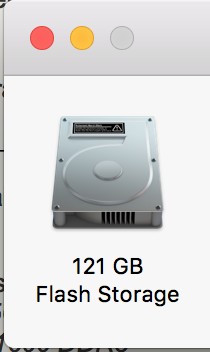
In the Storage tag, can you tell me what the text under the icon says? My one say Flash Storage, see image below. I'm assuming that you have a hard drive. 


I would replace the RAM and hard drive. If you're not that technical, I'd consider if it's worthwhile paying someone to do the upgrade or buy an used MBP off Trade Me. The 2013-2015 MacBook Pro retina models are pretty affordable. 


Groucho
542 posts

Ultimate Geek
+1 received by user: 216


  #2748091 22-Jul-2021 11:37
Send private message

Yes I should have added my 2012 Mini had an SSD installed as my Christmas 2019 present to myself as it was getting slower and slower.  I had already maxed out the RAM to 16GB.  I was contemplating buying a newer machine but the SSD made ALL the difference!


I kept the old HDD and bought a cheap USB enclosure for it.  If for some reason I need to access one of my old 32bit apps I can boot from that HDD.  I've done it once to test, performance isn't pretty over USB2 especially also being used to SSD speed but was good peace of mind for my upgrade anyway.


 1 | 2
View this topic in a long page with up to 500 replies per page Create new topic


Geekzone Live »

Try automatic live updates from Geekzone directly in your browser, without refreshing the page, with Geekzone Live now.


Are you subscribed to our RSS feed? You can download the latest headlines and summaries from our stories directly to your computer or smartphone by using a feed reader.