|
|
|
Firefox updated itself and managed to dump its Firefox.exe on my desktop. I'm guessing it's a temporary file that didn't get cleaned up properly, but that's what temp directories are for. An updater shouldn't even be touching the desktop!
Tripadvisor
Booked a tour through their website, so had to provide some details.
Unticked the "do you want to receive promotional material" box
Within hours received an advertising email from them. Clicked the unsubscribe link which came back as successful but will take up to 14 days to take effect. Why....just why?
The Institute of Unfinished Research has concluded that 6 out of 10 people
MSBUILD : error MSB4166: Child node "3" exited prematurely. Shutting down. Diagnostic information may be found in files in "C:\Users\cisjr\AppData\Local\Temp\MSBuildTempbphp5ne0.dmj\" and will be named MSBuild_*.failure.txt.
Well, it certainly had the "may" part correct: that path doesn't exist.
You have $0.00 in Subcard® Reward Dollars expiring on 30.06.2026 ⏰ There’s no minimum spend anymore, so make the most of every cent before it’s gone!
Sometimes I wonder whether Microsoft is ever going to get around to making multiple displays work well. Yesterday Windows decided that my taskbar should go on the other screen. This morning it opened an app on the secondary screen even though I always keep it on the primary one. These are not isolated examples.
More excel shenanigans:
paste a column of email address, plain text only so I don’t get a bunch of email links and to keep the existing formatting of the table I’m pasting into. It formats the text however to look like links with the email addresses underlined. That’s fine I don’t really care as it’s not a problem… except the last entry at the bottom of the list is plain text without the underlined link formatting. So, it hit f2 to edit the cell and hit enter to auto format it, and it makes it look the same but adds the mailto: link. Right click the cell and choose remove hyperlink and it wipes all the formatting
MadEngineer:
More excel shenanigans:
paste a column of email address, plain text only so I don’t get a bunch of email links and to keep the existing formatting of the table I’m pasting into. It formats the text however to look like links with the email addresses underlined. That’s fine I don’t really care as it’s not a problem… except the last entry at the bottom of the list is plain text without the underlined link formatting. So, it hit f2 to edit the cell and hit enter to auto format it, and it makes it look the same but adds the mailto: link. Right click the cell and choose remove hyperlink and it wipes all the formatting
This throws me as well whenever I put email addresses in but don't want actual hyperlinks. Found the trick is to "Clear" the hyperlinks, not "Remove". Select the cells, Hold ALT then press H + E + L, or Home ribbon, Editing section, Clear, then Clear Hyperlinks. That removes the link but keeps the formatting.
MadEngineer:
More excel shenanigans:
paste a column of email address, plain text only so I don’t get a bunch of email links and to keep the existing formatting of the table I’m pasting into. It formats the text however to look like links with the email addresses underlined. That’s fine I don’t really care as it’s not a problem… except the last entry at the bottom of the list is plain text without the underlined link formatting. So, it hit f2 to edit the cell and hit enter to auto format it, and it makes it look the same but adds the mailto: link. Right click the cell and choose remove hyperlink and it wipes all the formatting
Have you switched off the auto-formatting that adds the hyperlink? That's what I dis. File - Options - Proofing - 'AutoCorrect Options...' - 'Autoformat As You Type'. Then untick 'Internet and network paths with hyperlinks'.
Visual Studio has offered me an update to version 18.7. When I click the Release Notes link, it takes me to the notes for 18.6. When I type "visual studio 18.7 release notes" into Google, its blithering "AI" pipes up and tells me that there's no such version. If I use its alternate name "June 2026 Feature Update" then I get the release notes for 18.6, captioned as being for 18.7.

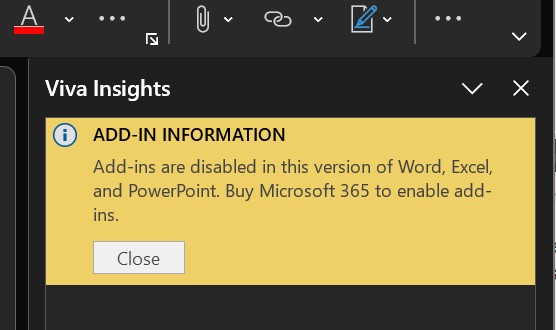
Outlook now shows this pane on every email. No idea what "Viva Insights" is or where it came from. Moreover, my account does a a M365 license applied (E5).
Viva is one of the most useless piece of software ever developed.
Referral links: Quic Broadband (free setup code: R587125ERQ6VE) | Samsung | AliExpress | Wise | Sharesies
Support Geekzone by subscribing (browse ads-free), or making a one-off or recurring donation through PressPatron.

LEGAL video, movies and TV download and streaming options in New Zealand
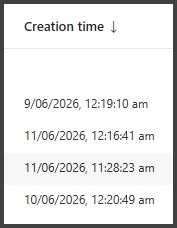
Microsoft Azure snapshots - Sorting of list on 'Creation time'

Please keep this GZ community vibrant by contributing in a constructive & respectful manner.
I installed some software that can open multiple file types such as .xml and .txt. During installation it asked whether I wanted to make it the default handler for those file types. I said no. It proceeded to delete all the existing associations.
For anyone curious, the commands to reassociate .txt with Notepad are:
ASSOC .txt=txtfile
FTYPE txtfile="%SystemRoot%\system32\notepad.exe" "%1"
There does not seem to be any way to do this via the UI. Simply going to Open With and browsing to notepad.exe does not work (it claims that "The programme you have selected cannot be associated with this file type").
Programs that infest the right click context menu, and don't give an option to yeah nah on the context menu association
Just jam your stupid app right in there with the rest of the unwanted context launchers.
And now there is Copilot. ARGGHHH
SepticSceptic:
Programs that infest the right click context menu, and don't give an option to yeah nah on the context menu association
Just the Windows context menu in general... now there are two file context menus, they don't look the same, and don't have the same content. Also, the new one seems laggier to open than the one on Windows 95.
|
|
|