Geekzone: technology news, blogs, forums
Guest
Welcome Guest.
You haven't logged in yet. If you don't have an account you can register now.


timmmay

20858 posts

Uber Geek
+1 received by user: 5350

Trusted
Lifetime subscriber

#154102 17-Oct-2014 21:11
Send private message

Has anyone else tried Air NZ mobile booking? Any time I go to the Air NZ site on my Samsung S4 it redirects me to their mobile site, and their Android app redirects me to the same place. That's fine. The problem is I can't book a flight.

When I click "book a flight" it gives me a list of starting airports so I click one. Nothing happens, so I click again. And again. I can't get off the screen to select my starting airport. Same things happens on my main computer using the mobile website, using Chrome. I tried it using Firefox and IE, and it works fine.

It turns out the Air NZ mobile website doesn't work on Chrome. That's surprising, since Chrome is the primary mobile browser on Android, which has about double the market share of Apple. Why would you make a mobile website that doesn't work on the majority of devices?

I'd be interested to hear if mobile booking at https://m.airnz.co.nz/ works on different devices for different people.

Filter this topic showing only the reply marked as answer Create new topic
alasta
6888 posts

Uber Geek
+1 received by user: 3362

Trusted
Subscriber

  #1157173 17-Oct-2014 21:25
Send private message

Works perfectly fine on iPhone 5S running iOS 7.


Batman
Mad Scientist
30012 posts

Uber Geek
+1 received by user: 6217

Trusted
Lifetime subscriber

  #1157175 17-Oct-2014 21:28
Send private message

It never used to work on ipad too (not sure if they fixed it I just dumped the ipad and got a laptop)

timmmay

20858 posts

Uber Geek
+1 received by user: 5350

Trusted
Lifetime subscriber

  #1157183 17-Oct-2014 21:38
Send private message

Not surprised it works on Apple. Wondering if it works on Android / chrome for anyone.


Kyanar
4089 posts

Uber Geek
+1 received by user: 1684

ID Verified
Trusted

  #1157192 17-Oct-2014 22:22
Send private message

Works fine on my HTC One M8 in Chrome.  Not an issue with Android, possibly just something specific to Samsung stuff?

(Edit to add) also works fine in Chrome on my Macbook.

timmmay

20858 posts

Uber Geek
+1 received by user: 5350

Trusted
Lifetime subscriber

  #1157193 17-Oct-2014 22:31
Send private message

Tested chrome on Windows 7, 8.1, and my S4, no luck. Could be dearth specific but strange it fails on 3 platforms.

freitasm
BDFL - Memuneh
80646 posts

Uber Geek
+1 received by user: 41030

Administrator
ID Verified
Trusted
Geekzone
Lifetime subscriber

  #1157209 17-Oct-2014 23:10
Send private message

Are you sure it's not your network connection? Three platforms and fail?

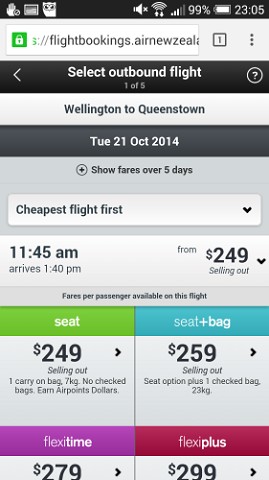
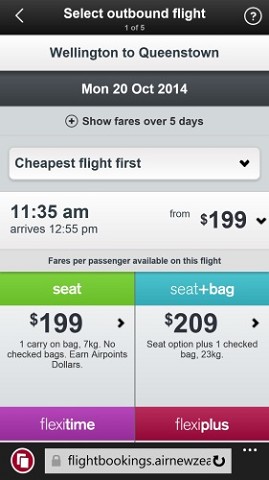
I tried on Chrome + Windows 8.1, Chrome + Android (screenshot #1, HTC One) and Windows Phone (screenshot #2). All seemed to work fine:


Referral links: Quic Broadband (free setup code: R587125ERQ6VE) | Samsung | AliExpress | Wise | Sharesies 


Support Geekzone by subscribing (browse ads-free), or making a one-off or recurring donation through PressPatron.


Shop now for Lenovo laptops and other devices (affiliate link).
timmmay

20858 posts

Uber Geek
+1 received by user: 5350

Trusted
Lifetime subscriber

  #1157287 18-Oct-2014 08:35
Send private message

It works on IE and Firefox on my PC, just not on Chrome on any platform. I wonder if Adblock or similar could be the cause? I have host and plugin level ad blocking on each of the machines... I'll try disabling them later on and see what happens.

sbiddle
30853 posts

Uber Geek
+1 received by user: 9996

Retired Mod
Trusted
Biddle Corp
Lifetime subscriber

  #1157313 18-Oct-2014 09:08
Send private message

Works fine for me on Chrome on multiple devices incl a couple of different Android ones.


timmmay

20858 posts

Uber Geek
+1 received by user: 5350

Trusted
Lifetime subscriber

  #1157508 18-Oct-2014 15:00
Send private message

I disabled ad blocking, which uses this hosts blacklist, and mobile booking started working again. I re-enabled it and it kept working. I guess there was a bad release of the blacklist. I'll update my PC when I get around to it just to confirm.

Filter this topic showing only the reply marked as answer Create new topic


Geekzone Live »

Try automatic live updates from Geekzone directly in your browser, without refreshing the page, with Geekzone Live now.


Are you subscribed to our RSS feed? You can download the latest headlines and summaries from our stories directly to your computer or smartphone by using a feed reader.