Geekzone: technology news, blogs, forums
Guest
Welcome Guest.
You haven't logged in yet. If you don't have an account you can register now.


duckDecoy

946 posts

Ultimate Geek
+1 received by user: 432

Subscriber

#284433 21-Apr-2021 18:09
Send private message

Stupidly I clicked on a link my friend sent me in game.


It opened up in MS Edge.  But oddly there were 2 other tabs opened, both which seemed to be have xsolla widget in their links.  And when I tried to type google in those tabs it just stayed on those pages rather than going to google like it normally does.


Have I screwed up?  Or am I being paranoid.


I am pasting the link below as text, but as I have no idea if it is harmful please only click if you know what you are doing!


https://www.google.com/search?q=homer+simpson+memes&source=lnms&tbm=isch&sa=X&ved=2ahUKEwid74Plz47wAhU-zTgGHdkSDSMQ_AUoAXoECAEQAw&biw=1140&bih=534#imgrc=hQh2TgE0qhNZYM


{edit - typo in title}


Create new topic

xpd

xpd
Geek of Coastguard
14115 posts

Uber Geek
+1 received by user: 4574

Retired Mod
ID Verified
Trusted
Lifetime subscriber

  #2696219 21-Apr-2021 18:23
Send private message

Fine here on Chrome, is just a google images search results page featuring homer simpson memes


XPD / Gavin


LinkTree


freitasm
BDFL - Memuneh
80646 posts

Uber Geek
+1 received by user: 41024

Administrator
ID Verified
Trusted
Geekzone
Lifetime subscriber

  #2696223 21-Apr-2021 18:37
Send private message

Correct, just a search link. 


Referral links: Quic Broadband (free setup code: R587125ERQ6VE) | Samsung | AliExpress | Wise | Sharesies 


Support Geekzone by subscribing (browse ads-free), or making a one-off or recurring donation through PressPatron.


freitasm
BDFL - Memuneh
80646 posts

Uber Geek
+1 received by user: 41024

Administrator
ID Verified
Trusted
Geekzone
Lifetime subscriber

  #2696224 21-Apr-2021 18:38
Send private message

A word of advice: if you have Windows 10 Pro you can enable Application Guard and open a new Microsoft Edge instance that runs as a separate virtual machine, completely isolated. Or if you have plenty of memory enable Windows Sandbox which runs as a virtual machine but completely deletes everything once closed.


Referral links: Quic Broadband (free setup code: R587125ERQ6VE) | Samsung | AliExpress | Wise | Sharesies 


Support Geekzone by subscribing (browse ads-free), or making a one-off or recurring donation through PressPatron.


duckDecoy

946 posts

Ultimate Geek
+1 received by user: 432

Subscriber

  #2696268 21-Apr-2021 21:50
Send private message

Thanks for the replies


Very strange I got those 2 other tabs.  But you've put my mind at rest


geoffwnz
1721 posts

Uber Geek
+1 received by user: 1577

ID Verified

  #2696407 22-Apr-2021 08:14
Send private message

duckDecoy:


Thanks for the replies


Very strange I got those 2 other tabs.  But you've put my mind at rest


I would probably double check your browser for misc add-ons, plugins, spurious "toolbars" etc. 


richms
29097 posts

Uber Geek
+1 received by user: 10205

Trusted
Lifetime subscriber

  #2696456 22-Apr-2021 08:20
Send private message

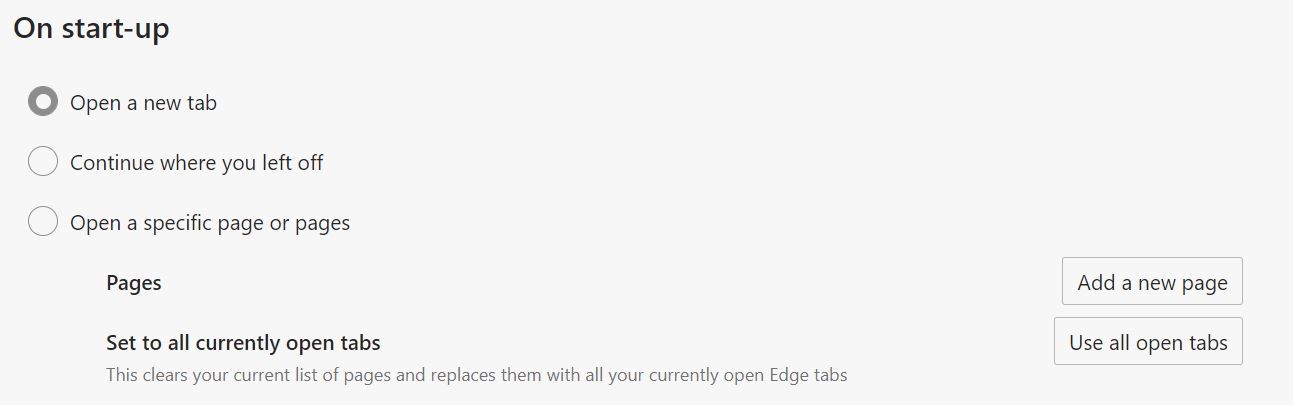
edge will open previous tabs on its own, and if some software had opened its page in edge when it installed then restarted, those tabs would restore when you next used edge.


Richard rich.ms


Shop now at Mighty Ape (affiliate link).
freitasm
BDFL - Memuneh
80646 posts

Uber Geek
+1 received by user: 41024

Administrator
ID Verified
Trusted
Geekzone
Lifetime subscriber

  #2696532 22-Apr-2021 09:53
Send private message

richms:


edge will open previous tabs on its own, and if some software had opened its page in edge when it installed then restarted, those tabs would restore when you next used edge.


Not Edge only but Chromium. It's an option in Settings, available for Google Chrome as well:


Referral links: Quic Broadband (free setup code: R587125ERQ6VE) | Samsung | AliExpress | Wise | Sharesies 


Support Geekzone by subscribing (browse ads-free), or making a one-off or recurring donation through PressPatron.


Create new topic


Geekzone Live »

Try automatic live updates from Geekzone directly in your browser, without refreshing the page, with Geekzone Live now.


Are you subscribed to our RSS feed? You can download the latest headlines and summaries from our stories directly to your computer or smartphone by using a feed reader.