Geekzone: technology news, blogs, forums
Guest
Welcome Guest.
You haven't logged in yet. If you don't have an account you can register now.


kebhow

17 posts

Geek
+1 received by user: 2


#277247 3-Oct-2020 14:28
Send private message

My Fibre connection point is approximately 15 m from where my pc is. I'd like to setup a wired connection but my house only has BT jackpoints, just wondering if the following will work.


  • Plug RJ11 cable from the fibre modem to nearby BT jackpoint 
  • Plug RJ11 cable from a BT jackpoint near my pc to a BT socket-RJ45 adapter (like this one) to plug into my PC

Now if this works, does anyone know what would be the maximum speed possible with the RJ11 cable ? reason being I'd like to use this for Oculus Quest wireless streaming.


Filter this topic showing only the reply marked as answer View this topic in a long page with up to 500 replies per page Create new topic
 1 | 2
nztim
4013 posts

Uber Geek
+1 received by user: 2710

ID Verified
Trusted
TEAMnetwork
Subscriber

  #2578599 3-Oct-2020 14:32
Send private message

Nope Nope Nope get a pro to run a CAT 6 Cable


Any views expressed on these forums are my own and don't necessarily reflect those of my employer. 


SomeoneSomewhere
1882 posts

Uber Geek
+1 received by user: 1086

Lifetime subscriber

  #2578600 3-Oct-2020 14:46
Send private message

BT jacks normally only have two wires connected into them. None of the common ethernet protocols will run on two wires, adaptors or not.


The cabling behind them is probably 2-pair Cat3. You will probably be able to get 10Mb/s, maybe 100Mb/s ethernet over that if you rewire the jacks to RJ45s with the cores in the right places.


Bear in mind that they are probably wired daisy-chain rather than star, so you won't get multiple connections.


froob
698 posts

Ultimate Geek
+1 received by user: 233

Lifetime subscriber

  #2578604 3-Oct-2020 15:11
Send private message

Probably not, as others have said.

If your house is relatively modern there is some chance that the phones are actually wired with ethernet cabling (e.g. cat5e cable), in which case you could potentially chop off the ends and replace them with RJ45 jacks, and get full gigabit ethernet speeds.

Even if they are wired with ethernet cable, the phone jacks may be daisy-chained rather than star-wired (i.e. all going back to a central point) in which case you would need to patch the wires together or use an ethernet switch at the jack locations, if there are several links between your source and desired destination.


richms
29099 posts

Uber Geek
+1 received by user: 10214

Trusted
Lifetime subscriber

  #2578606 3-Oct-2020 15:12
Send private message

I have run 100 meg ethernet over the black 2 pair buried cable in the past ok, but it was only about 8m of it underground from the shed to the house before I changed to cat5e, and also have used the white internal 2 pair stuff for a pretty long length, again at 100 megabit but worked OK.


But pull the BT sockets off and see if it was done with cat5 or better first before calling anyone.


Richard rich.ms

cyril7
9075 posts

Uber Geek
+1 received by user: 2499

ID Verified
Trusted
Subscriber

  #2578613 3-Oct-2020 15:27
Send private message

Hi, you need to give us some pics of the rear of the BT jacks showing the cabling, its quite possible that it is capable of carrying at least 100Mb/s if 2pair phone cabling of an appropriate build or even GigE if its four pair cat5/5e.


Cyril


kebhow

17 posts

Geek
+1 received by user: 2


  #2578614 3-Oct-2020 15:27
Send private message

richms:


I have run 100 meg ethernet over the black 2 pair buried cable in the past ok, but it was only about 8m of it underground from the shed to the house before I changed to cat5e, and also have used the white internal 2 pair stuff for a pretty long length, again at 100 megabit but worked OK.


But pull the BT sockets off and see if it was done with cat5 or better first before calling anyone.


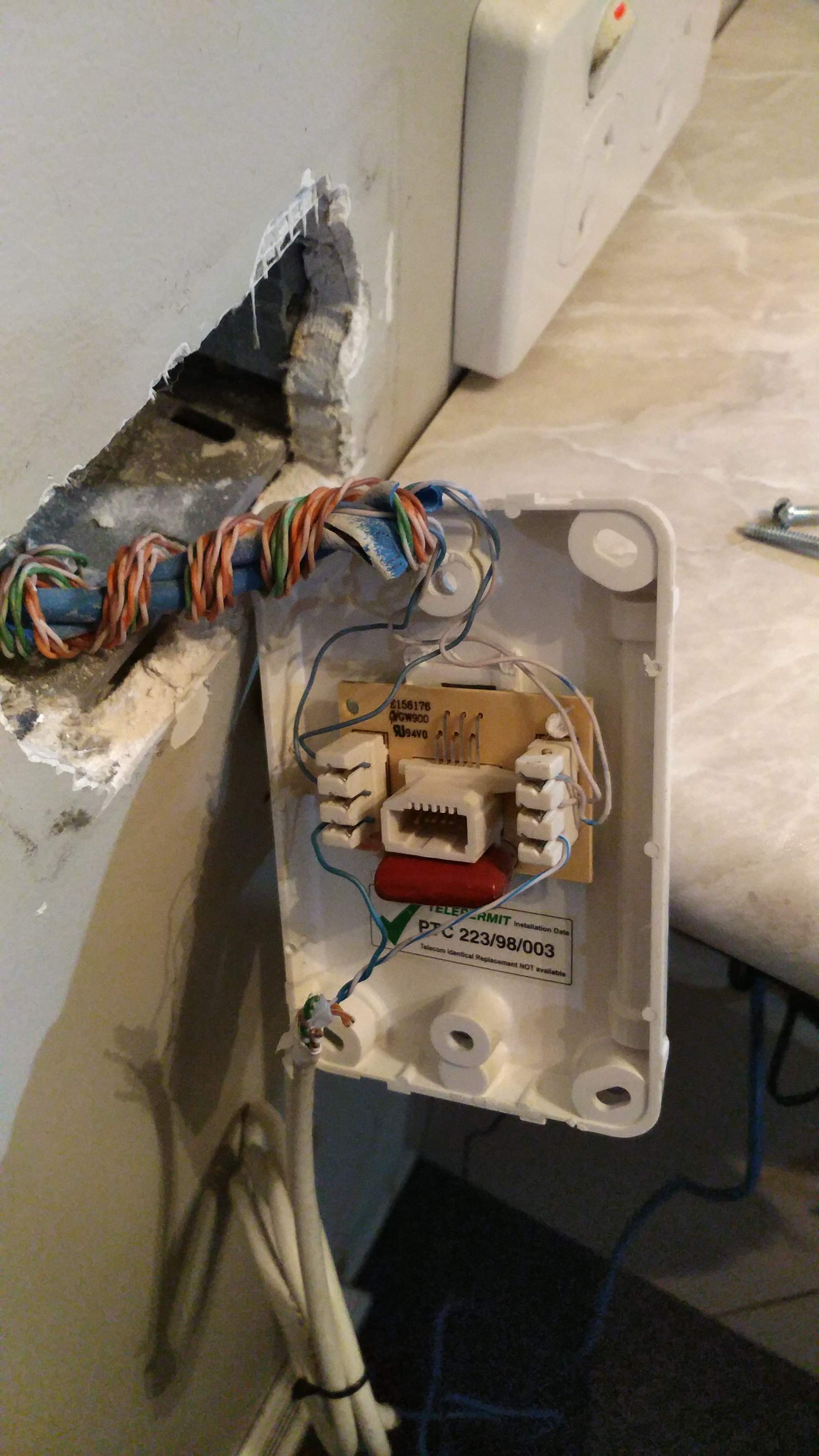
I have put a couple photos of the current setup and the cables behind the bt sockets. I also don't know about why there is that white cable sticking out of the socket.


Click to see full size


Click to see full size


Shop now for Lego sets and other gifts (affiliate link).
cyril7
9075 posts

Uber Geek
+1 received by user: 2499

ID Verified
Trusted
Subscriber

  #2578615 3-Oct-2020 15:31
Send private message

Hi, all of the cabling shown in those photos appears to be cat6 purhaps cat5e, so assuming they are not split in the walls etc ie they run directly from one BT to the next where you want to connect then just have them re terminated with RJ45 sockets and your away.


Edit, the white cable is just a nothing, remove that. How many other phone points are there in the house, there are two cables shown in the photo, can you trace where they go.


Cyril


kebhow

17 posts

Geek
+1 received by user: 2


  #2578620 3-Oct-2020 15:53
Send private message

cyril7:


Hi, all of the cabling shown in those photos appears to be cat6 purhaps cat5e, so assuming they are not split in the walls etc ie they run directly from one BT to the next where you want to connect then just have them re terminated with RJ45 sockets and your away.


Edit, the white cable is just a nothing, remove that. How many other phone points are there in the house, there are two cables shown in the photo, can you trace where they go.


Cyril


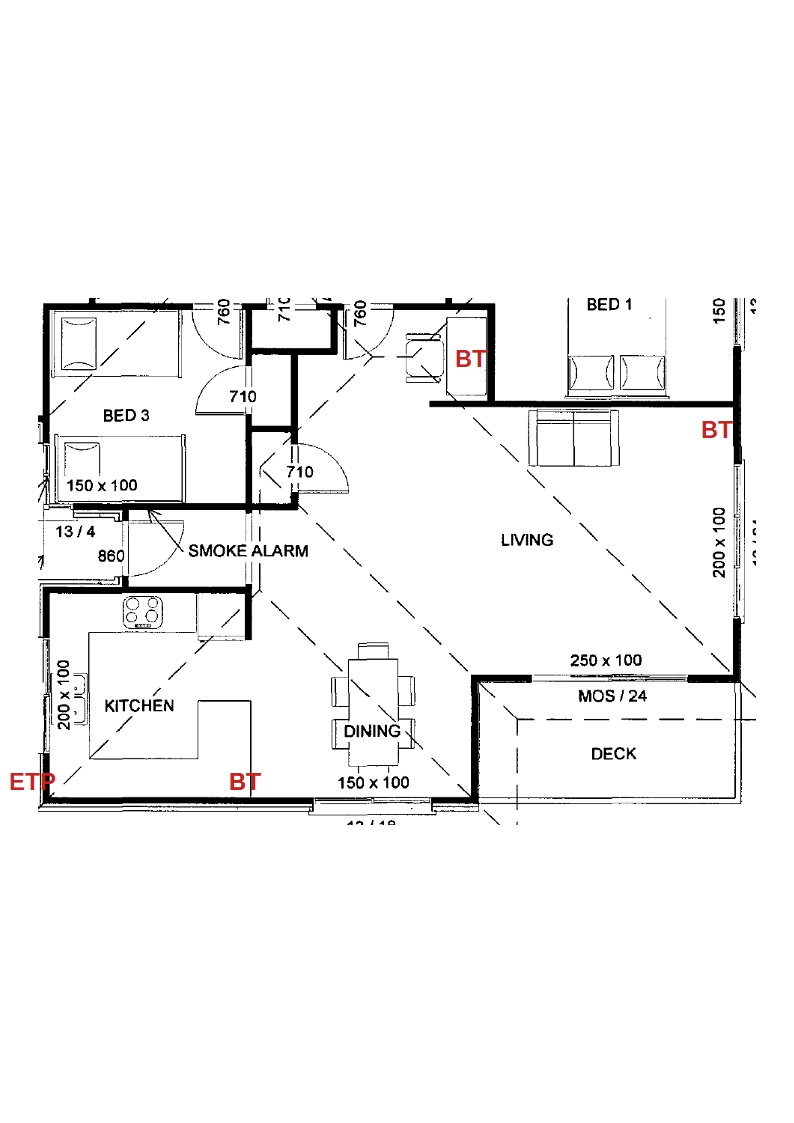
Just walked around and only found 3 around the house. the router is by the kitchen. the desk is where my pc is.


Click to see full size


cyril7
9075 posts

Uber Geek
+1 received by user: 2499

ID Verified
Trusted
Subscriber

  #2578623 3-Oct-2020 16:01
Send private message

OK, so please open up all other BT faceplates and photograph, where is the ETP, the outside fibre box.


Cyril


froob
698 posts

Ultimate Geek
+1 received by user: 233

Lifetime subscriber

  #2578626 3-Oct-2020 16:03
Send private message

If there are only three, then it should be quite easy to swap them over to RJ45 jacks. If you’re lucky, you’ll have a direct link between the kitchen and desk jacks. At worst, you’ll need to patch together the wires at the living room jack or put an ethernet switch there. You could figure out which jack is the end of the chain by taking off all the faceplates and seeing which only has a single wire.

Is this something you’re planning to do yourself, or likely to get someone in to do the work?


kebhow

17 posts

Geek
+1 received by user: 2


  #2578635 3-Oct-2020 16:42
Send private message

cyril7:


OK, so please open up all other BT faceplates and photograph, where is the ETP, the outside fibre box.


Cyril


Have attached a few more photos below. Does this mean the cables running between the BT jacks are actually Cat5/5e/6 and just need the faceplates replaced with RJ45 ?


Living Room BT


Click to see full size


PC BT


Click to see full size


ETP location


Click to see full size


froob: If there are only three, then it should be quite easy to swap them over to RJ45 jacks. If you’re lucky, you’ll have a direct link between the kitchen and desk jacks. At worst, you’ll need to patch together the wires at the living room jack or put an ethernet switch there. You could figure out which jack is the end of the chain by taking off all the faceplates and seeing which only has a single wire.

Is this something you’re planning to do yourself, or likely to get someone in to do the work?


I've never done this before so might be looking for someone to do it for me.


Shop now on Samsung phones, tablets, TVs and more (affiliate link).
nztim
4013 posts

Uber Geek
+1 received by user: 2710

ID Verified
Trusted
TEAMnetwork
Subscriber

  #2578639 3-Oct-2020 17:03
Send private message

What part of the country are you in?


Any views expressed on these forums are my own and don't necessarily reflect those of my employer. 


froob
698 posts

Ultimate Geek
+1 received by user: 233

Lifetime subscriber

  #2578641 3-Oct-2020 17:06
Send private message

Does this mean the cables running between the BT jacks are actually Cat5/5e/6 and just need the faceplates replaced with RJ45 ?


Yes, correct.

Based on your photos and the ETP location, probably one of the cables in the kitchen jack carries your incoming phone from the ETP, which then links to the desk jack, then finally to the lounge jack (which only has one cable so is the last link in the chain).

Where are you based? There is an installer (@coffeebaron) who is on these forums.


kebhow

17 posts

Geek
+1 received by user: 2


  #2578661 3-Oct-2020 17:44
Send private message

froob:
Does this mean the cables running between the BT jacks are actually Cat5/5e/6 and just need the faceplates replaced with RJ45 ?


Yes, correct.

Based on your photos and the ETP location, probably one of the cables in the kitchen jack carries your incoming phone from the ETP, which then links to the desk jack, then finally to the lounge jack (which only has one cable so is the last link in the chain).

Where are you based? There is an installer (@coffeebaron) who is on these forums.


Waikato. Thank you for that I'll contact him.


cyril7
9075 posts

Uber Geek
+1 received by user: 2499

ID Verified
Trusted
Subscriber

  #2578681 3-Oct-2020 18:00
Send private message

Hi, Fraser (coffeebaron) is the man to sort this for you, assuming what we understand is correct, ie ETP > Kitchen > Office > Lounge, then I would recommend you have all the legs (except the ETP) converted to ethernet, move the router to the workspace, use the kitchen to workspace link to ship the wan to the router, and then use the workspace to lounge link to ship the lan from the router to the smartTV.


If you are lucky you might be able to get the kitchen connection from the ONT to the workspace link all within the wall meaning no random cables on view.


Cyril


 1 | 2
Filter this topic showing only the reply marked as answer View this topic in a long page with up to 500 replies per page Create new topic


Geekzone Live »

Try automatic live updates from Geekzone directly in your browser, without refreshing the page, with Geekzone Live now.


Are you subscribed to our RSS feed? You can download the latest headlines and summaries from our stories directly to your computer or smartphone by using a feed reader.