Geekzone: technology news, blogs, forums
Guest
Welcome Guest.
You haven't logged in yet. If you don't have an account you can register now.


davidgo2

46 posts

Geek
+1 received by user: 15


#317792 15-Nov-2024 10:27
Send private message

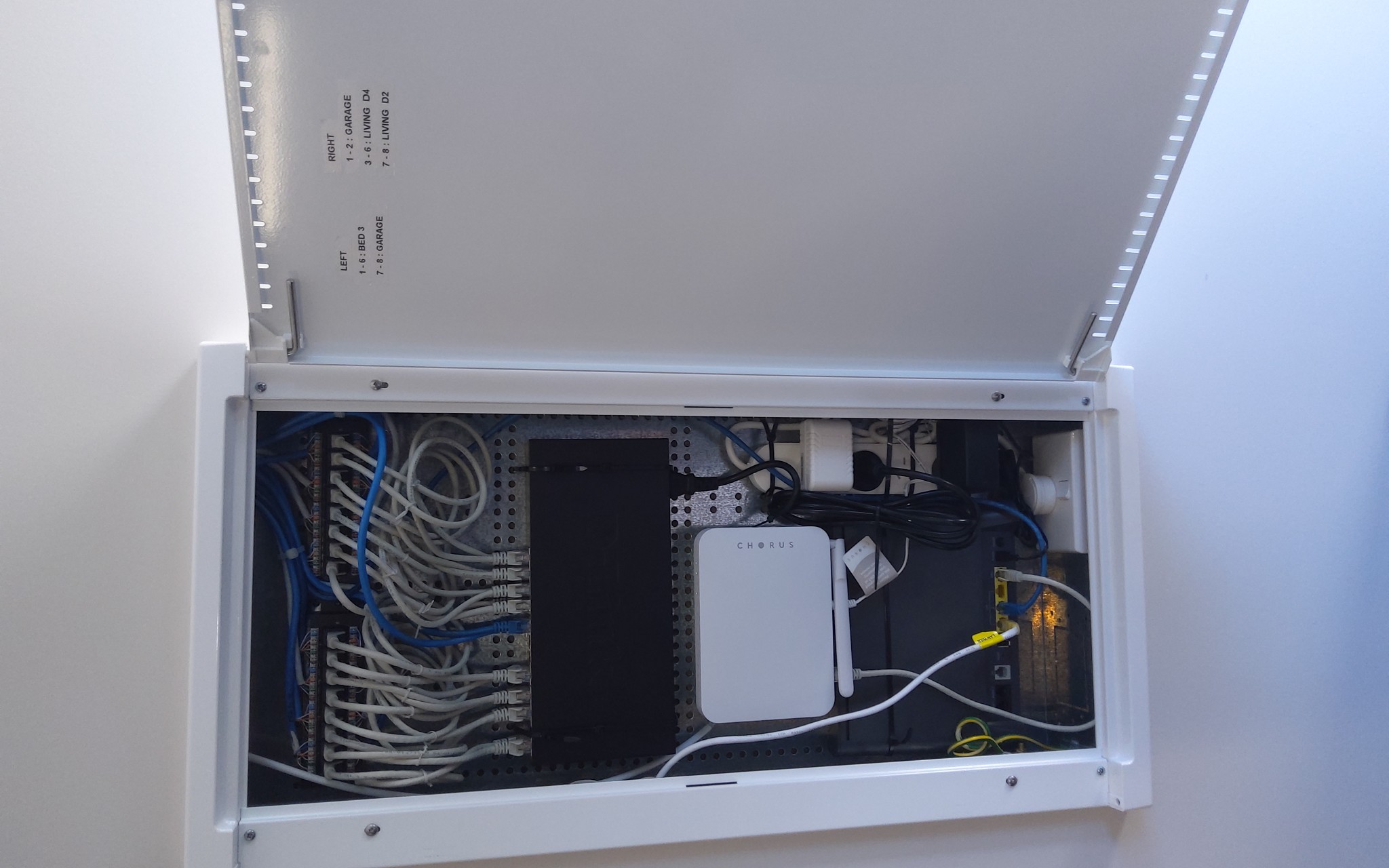
I'm trying to help a friend set up a network, and from a networking POV  the devs dropped the ball and its going to be a difficult to wire up properly.    I'm hoping I can free up some space in the access cabinet by moving the ONT up a little.   Some googling has revealed the (Gen 4 ONT) is mounted on a cassette -so I assume if i can see how to open the cassette I can unscrew it and screw it in a few CM's higher up.


Below is a pic of the board.  I'm hoping I can squeeze a basic PE router in there - I expect I'll need something like the Microtic RB960PGS - although if can get a Grandstream GWN7002 in there (or someone has any other good suggestions for a reliable but not high end router that has a web interface - I'm keen)




Create new topic
nitro
784 posts

Ultimate Geek
+1 received by user: 346


  #3309307 15-Nov-2024 10:48
Send private message

The short answer to that is you probably shouldn't. Exhibit A: I think I broke my fibre when I moved my ONT box


Also, I see no space problem there. In fact, you probably want a network switch closer to the patch panel, above the ONT, anyway.


Jase2985
13772 posts

Uber Geek
+1 received by user: 6254

ID Verified
Lifetime subscriber

  #3309308 15-Nov-2024 10:53
Send private message

you shouldnt be touching it as its not your to touch and any damage done, the cost to fix is on you.


But if you were to touch it, first i would remove the fibre cable that goes to the ONT. Does it have clips on the side to allow you to open it?


Jase2985
13772 posts

Uber Geek
+1 received by user: 6254

ID Verified
Lifetime subscriber

  #3309309 15-Nov-2024 10:56
Send private message

nitro:


Also, I see no space problem there. In fact, you probably want a network switch closer to the patch panel, above the ONT, anyway.


Spaced problem no, layout problem, definitely, it's right in the middle of the cabinet, it could/should have been put near the top or bottom and off to the side. too allow other equipment to be placed in there.


davidgo2

46 posts

Geek
+1 received by user: 15


  #3309318 15-Nov-2024 11:22
Send private message

nitro:


The short answer to that is you probably shouldn't. Exhibit A: I think I broke my fibre when I moved my ONT box


Also, I see no space problem there. In fact, you probably want a network switch closer to the patch panel, above the ONT, anyway.


The picture I posted is deceiving and makes the cabinet look a lot more spacious then it actually is.    If you consider that actual size of 5 "patch panel" ports and see how much space it takes up, it may give a better sense of scale.   The way the ONT is placed there is nowhere you could comfortably put any kind of switch.    I did see the post you call Exhibit A, and I am acutely aware of it - but it may be a $300 risk I just need to take.   That said, I'm pretty sure I have the flexibility that I can move the cassette without damaging the fibre.


davidgo2

46 posts

Geek
+1 received by user: 15


  #3309319 15-Nov-2024 11:23
Send private message

Jase2985:


you shouldnt be touching it as its not your to touch and any damage done, the cost to fix is on you.


But if you were to touch it, first i would remove the fibre cable that goes to the ONT. Does it have clips on the side to allow you to open it?


Not that I could obviously see/feel.   Thats the question I'm asking here!


nitro
784 posts

Ultimate Geek
+1 received by user: 346


  #3309369 15-Nov-2024 13:20
Send private message

davidgo2:


The picture I posted is deceiving and makes the cabinet look a lot more spacious then it actually is.    If you consider that actual size of 5 "patch panel" ports and see how much space it takes up, it may give a better sense of scale.   The way the ONT is placed there is nowhere you could comfortably put any kind of switch.    I did see the post you call Exhibit A, and I am acutely aware of it - but it may be a $300 risk I just need to take.   That said, I'm pretty sure I have the flexibility that I can move the cassette without damaging the fibre.


There's certainly room for improvement in the placing. The Chorus guys, and there are a few on here, would be best placed to give you a course of action. It seems to me like all you're after is how to unmount that ONT base plate (not sure what it's called) from the cabinet and move it a few centimeters.


Move to New Zealand's best fibre broadband service (affiliate link). Free setup code: R587125ERQ6VE. Note that to use Quic Broadband you must be comfortable with configuring your own router.
SirHumphreyAppleby
2962 posts

Uber Geek
+1 received by user: 1888


  #3309375 15-Nov-2024 13:39
Send private message

I'm not sure how easy those things are to move.


The Chorus tech who did one of our installs placed the ONT too low in the cabinet, so I was unable to use the power point. He told me to get the electrician to move the power, which clearly wasn't going to fly. I'm not sure he knew how to remove the cassette either as he ended up destroying it getting it out.


Jvipers2
240 posts

Master Geek
+1 received by user: 92


  #3309381 15-Nov-2024 14:16
Send private message

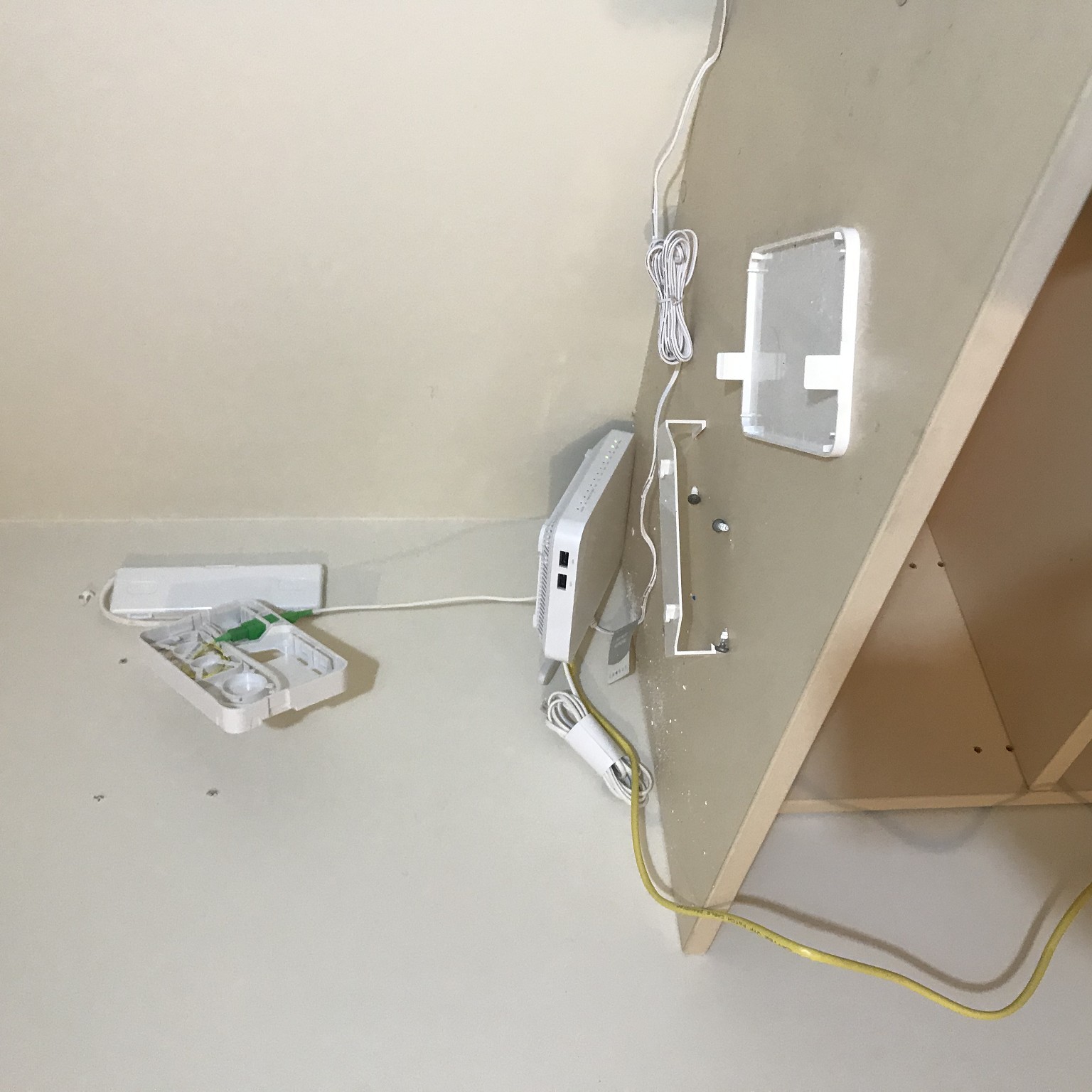
2 clips to the sides (one each side) of the would release the holder...

Another 2 clips will open the face plate, then screws will free it...


CYaBro
4731 posts

Uber Geek
+1 received by user: 1195

ID Verified
Trusted

  #3309384 15-Nov-2024 14:24
Send private message

Disconnect that green plug from the bottom first!


Opinions are my own and not the views of my employer.


Apsattv
2467 posts

Uber Geek
+1 received by user: 731


  #3309386 15-Nov-2024 14:25
Send private message

You could get extra room by pulling up the tv splitter and cables. They don't really need to be in the box.


Here's miine.


raytaylor
4088 posts

Uber Geek
+1 received by user: 1311

Trusted

  #3311071 20-Nov-2024 17:42
Send private message

1) Take the ont off and remove the green/white patch lead by unplugging it. Keep the ends safe from touching anything - you dont want them picking up any dust. 


2) Use a hook shaped tool of some sort to pull out the sides of the face plate. They are just arms that hook around the splice enclosure base. The faceplate will come off exposing the fiber pigtail and splice inside. 


3) Being careful not to touch the fibers, remove the screws - they are probably #2 square drive, reposition the base plate to where you need it and screw it back on to the backboard. 


Ray Taylor

There is no place like localhost

Spreadsheet for Comparing Electricity Plans Here


Shop now for Lenovo laptops and other devices (affiliate link).
Apsattv
2467 posts

Uber Geek
+1 received by user: 731


  #3318443 9-Dec-2024 17:04
Send private message

@davidgo2 any followup?


davidgo2

46 posts

Geek
+1 received by user: 15


  #3318444 9-Dec-2024 17:18
Send private message

Apsattv:


@davidgo2 any followup?


I managed to work around the issue without moving the box in the end.  There was just enough space for me to double-sided tape a Mikrotic router in the box.


Create new topic


Geekzone Live »

Try automatic live updates from Geekzone directly in your browser, without refreshing the page, with Geekzone Live now.


Are you subscribed to our RSS feed? You can download the latest headlines and summaries from our stories directly to your computer or smartphone by using a feed reader.