Geekzone: technology news, blogs, forums
Guest
Welcome Guest.
You haven't logged in yet. If you don't have an account you can register now.


View this topic in a long page with up to 500 replies per page Create new topic
1 | 2 | 3
parsec

25 posts

Geek
+1 received by user: 3

ID Verified
Subscriber

  #3074284 9-May-2023 16:04
Send private message

Outstanding! Thank you


quickymart
14940 posts

Uber Geek
+1 received by user: 13954

ID Verified

  #3074304 9-May-2023 17:47
Send private message

For comparison purposes, using the University of Canterbury mirror, I'm getting this on Spark:


parsec

25 posts

Geek
+1 received by user: 3

ID Verified
Subscriber

  #3074314 9-May-2023 18:22
Send private message

quickymart:


For comparison purposes, using the University of Canterbury mirror, I'm getting this on Spark:


hmmmm I'm not even close


quic
236 posts

Master Geek
+1 received by user: 754

Trusted
Quic Broadband
Lifetime subscriber

  #3074331 9-May-2023 19:24
Send private message

Just an update from our side after looking into this.


Can see some variety in speeds between the mirrors that @michaelmurfy advised earlier, but its very hard to tell if this is related to an issue on our side, the mirrors side, the many variables in between, or heck - if it's an issue at all!


For example - a test download from the 2degrees mirror looks like the below, not anything out of the ordinary per se.

And from the UC mirror - roughly the same story.


I can see however that some downloads starting from the same mirrors are pretty low speed, then retrying with the same mirror is fine - interesting.


An added point of interest is as stated earlier, speedtests are fine and are higher than these mirrors. That's both great from a network perspective as shows the throughput through the network end to end is possible, but also a headscratcher as to why @parsec can't even break ~2Mbps. We don't shape different traffic types - our job as an ISP is to deliver traffic from source to destination, not to be the "traffic" police of what that traffic is.


Certainly not saying that there isn't an issue on the Quic Broadband side of things, just saying that these sorts of issues are notoriously hard to track down from an ISP perspective if there is indeed an issue. We'll continue to keep digging and testing to see if we can find anything from our side, and of course report back to the community if/when something is found!


TL;DR - we're going to keep looking to see if we can find anything our side and help out, and will let you all know. :-)


Quic Broadband
quic.nz - The telco who puts you in charge!


michaelmurfy
meow
13579 posts

Uber Geek
+1 received by user: 10910

Moderator
ID Verified
Trusted
Lifetime subscriber

  #3074380 9-May-2023 23:45
Send private message

@quic it sounds like you should host a Linux mirror in your Wellington PoP when it goes live :)


Michael Murphy | https://murfy.nz
Referral Links: Quic Broadband (use R122101E7CV7Q for free setup)

Are you happy with what you get from Geekzone? Please consider supporting us by subscribing.
Opinions are my own and not the views of my employer.


TheMightyKiwipeso
70 posts

Master Geek
+1 received by user: 31
Inactive user


  #3074384 10-May-2023 01:15
Send private message

You'd probably get a much faster bittorrent download of the latest Ubuntu - mostly around the speed of the better local mirrors as I recall.


Shop now for Lego sets and other gifts (affiliate link).
rugrat
3142 posts

Uber Geek
+1 received by user: 944

Lifetime subscriber

  #3074385 10-May-2023 02:30
Send private message

I use this for web sites with crappy download speeds


https://www.freedownloadmanager.org/


On wifi, it usually increases my download speed by 8 times, and even more on Ethernet. 


It is also a bit torrent downloader and looking at web site there’s other things it can do now, I mainly just use it to accelerate web page downloads. 


Speed limit seems to be per connection so for example it breaks file into 8 parts and downloads each part on a different connection to the web site.


allio
895 posts

Ultimate Geek
+1 received by user: 529


  #3074440 10-May-2023 10:30
Send private message

Not very useful but as another datapoint - I am getting 10-25MB/s on all the mirrors posted in this thread on Voyager 300/100. That's a single stream download - using multiple streams with aria2c or similar will max out at 30MB/s. I don't think mirror congestion explains the speeds parsec is experiencing, particularly given this:


parsec:


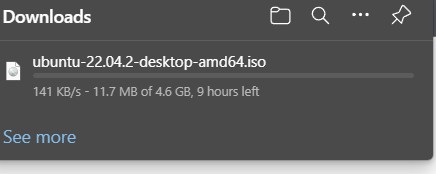
p.s. A W11 iso from Microsoft.com, just now is running at 147KB/s, a reported 10 hour download.


parsec

25 posts

Geek
+1 received by user: 3

ID Verified
Subscriber

  #3074455 10-May-2023 11:08
Send private message

TheMightyKiwipeso:


You'd probably get a much faster bittorrent download of the latest Ubuntu - mostly around the speed of the better local mirrors as I recall.


Thanks, have just downloaded an ubuntu 23.04 iso via torrent. I let it run to completion and it averaged ~3.0MB/s across 55 peers.


A definite improvement.


parsec

25 posts

Geek
+1 received by user: 3

ID Verified
Subscriber

  #3074460 10-May-2023 11:21
Send private message

rugrat:


I use this for web sites with crappy download speeds


https://www.freedownloadmanager.org/


On wifi, it usually increases my download speed by 8 times, and even more on Ethernet. 


It is also a bit torrent downloader and looking at web site there’s other things it can do now, I mainly just use it to accelerate web page downloads. 


Speed limit seems to be per connection so for example it breaks file into 8 parts and downloads each part on a different connection to the web site.


Thanks rugrat


I think my issue is more fundamental than just crappy websites, a fast connection unable to break out of KB/s speeds on good local mirrors, something's not right.


It wasn't always like this, maybe just in the last couple of weeks or so.


For the life of me I can't figure out what's changed.


parsec

25 posts

Geek
+1 received by user: 3

ID Verified
Subscriber

  #3074462 10-May-2023 11:26
Send private message

allio:


Not very useful but as another datapoint - I am getting 10-25MB/s on all the mirrors posted in this thread on Voyager 300/100. That's a single stream download - using multiple streams with aria2c or similar will max out at 30MB/s. I don't think mirror congestion explains the speeds parsec is experiencing, particularly given this:


parsec:


p.s. A W11 iso from Microsoft.com, just now is running at 147KB/s, a reported 10 hour download.


Thanks allio,


I don't think its congestion either. I've tried random downloads from random sites at random times of the day, no improvement.


It's not just iso downloads either, I also have slow application and OS update speeds.


Shop on-line at New World now for your groceries (affiliate link).
mdav056
616 posts

Ultimate Geek
+1 received by user: 160

Subscriber

  #3074519 10-May-2023 11:49
Send private message

Are you people sure there isn't something more systemic going on this morning?  On my desktop (w10, fibre 1000) I'm finding that a lot of links in emails won't resolve (mostly overseas ones), but these are going through Mimecast (via work Exchange server). Mimecast doesn't appear to be where the problem is. My partner also could not get on to a Zoom meeting via a link (same work, so same mimecast).  I've also had some problems when my software wants to check licences (US) but retry seems to fix it. Finally, I broke out my surface pro, and (wondering about problematic win-10 updates) did a win update and it took absolutely ages to check the availability of updates (like @parsec) -- wifi, but down and upload speeds are in the 300s-400s. Can't do anything to the desktop system at present as I'm in the middle of a backup which takes (if it does a full one) 12-14 hours ... so I don't want to stop it now.  Spark, Auckland.  


gml


MikeB4
MikeB4
18775 posts

Uber Geek
+1 received by user: 12766

ID Verified
Trusted
Subscriber

  #3074521 10-May-2023 12:07
Send private message

In the last few weeks I have downloaded ISOs for Ubuntu 23.4, Fedora 38 and Mint and over the years I have used the Canterbury Uni mirror but with these latest downloads I have found the Canterbury mirror next to useless with download speeds in some cases in the low KB/s rate. I have stopped several downloads and restarted using an off shore mirror which have been a lot faster and more reliable.  


Here is a crazy notion, lets give peace a chance.


mdav056
616 posts

Ultimate Geek
+1 received by user: 160

Subscriber

  #3074528 10-May-2023 12:33
Send private message

Just had major problems getting on to Geekzone on both desktop and laptop -- failed to resolve a few times, and then did (and not through mimecast)  -- glad you are still there! Quite a bit going on on Downdetector facebook page.


gml


johna8
90 posts

Master Geek
+1 received by user: 5

ID Verified

  #3075701 13-May-2023 08:30
Send private message

Seems fine for me on 2Degrees - last year with another upstream provider I had some similar speeds.


It was faster to use an Australian mirror than a local NZ mirror. They seemed to think it was due to the multithread vs single threads.


See how you go with some Australian mirrors?


1 | 2 | 3
View this topic in a long page with up to 500 replies per page Create new topic


Geekzone Live »

Try automatic live updates from Geekzone directly in your browser, without refreshing the page, with Geekzone Live now.


Are you subscribed to our RSS feed? You can download the latest headlines and summaries from our stories directly to your computer or smartphone by using a feed reader.