Geekzone: technology news, blogs, forums
Guest
Welcome Guest.
You haven't logged in yet. If you don't have an account you can register now.


View this topic in a long page with up to 500 replies per page Create new topic
1 | 2 | 3
yitz
2277 posts

Uber Geek
+1 received by user: 608


  #3274021 21-Aug-2024 00:58
Send private message

You could try pinging the DNS recursive server address in case their resolver IPs are different depending on access method (fibre vs 4G etc).


Try pinging something like whoami.akamai.net


or dig TXT o-o.myaddr.l.google.com +short


or if you want to grab your own IP by making a direct query to Google's DNS servers


dig TXT o-o.myaddr.l.google.com @ns1.google.com +short


Obviously still dependent on connectivity to Google/Akamai/CDN infrastructure... but then again if you are having trouble reaching these providers do you really have full Internet access... e.g. https://www.geekzone.co.nz/forums.asp?forumid=40&topicid=315747 


BarTender
3630 posts

Uber Geek
+1 received by user: 2572

ID Verified
Trusted
Lifetime subscriber

  #3274027 21-Aug-2024 06:08
Send private message

These should all be available.

https://www.ntppool.org/en/zone/nz

Jiriteach
1141 posts

Uber Geek
+1 received by user: 376

ID Verified
Trusted
Lifetime subscriber

  #3274044 21-Aug-2024 08:35
Send private message

neb:


An update on this, does anyone know of any pingable addresses on 2Degrees?  You can't ping their DNS servers, and I'd like to have something that isn't half-a-dozen hops away, I just need to check whether I can get from the device to 2Degrees' network.


Edited to add: The reason they're not pingable is that the published values are wrong, DHCP returns addresses 118.148.12.10 and 118.149.12.10 which are pingable.


Use the 2degrees speedtest servers for pinging.
Search "2degrees" as keyword here on my speedtest server finder - https://speedtest-server-finder.se7en.co.nz/


Grab the host and you can ping or traceroute to that.


-- opinions expressed by me are solely my own. ie - personal


neb

neb

11294 posts

Uber Geek
+1 received by user: 10018

Trusted
Lifetime subscriber

  #3274133 21-Aug-2024 13:10
Send private message

The problem with the NTP pool and Speedtest servers, and anything else like that, is that they're DNS names, not static IP addresses.  I was after static addresses that won't change, which is why I usually use DNS servers.


Jiriteach
1141 posts

Uber Geek
+1 received by user: 376

ID Verified
Trusted
Lifetime subscriber

  #3274141 21-Aug-2024 13:31
Send private message

neb:

The problem with the NTP pool and Speedtest servers, and anything else like that, is that they're DNS names, not static IP addresses.  I was after static addresses that won't change, which is why I usually use DNS servers.


That’s very hard to find and no guarantee that they won’t change. Their speedtest servers are probably the next closest and unlikely to change. They would be static.


-- opinions expressed by me are solely my own. ie - personal


gbwelly
1264 posts

Uber Geek
+1 received by user: 777

Subscriber

  #3274146 21-Aug-2024 13:42
Send private message

Do you have a static IP address? I do, and use the free-tier Uptime Robot to ping myself. It's much more useful that way as it emails me, anything on my LAN isn't going to be able to alert me until the connection comes back up. https://uptimerobot.com/


Support Geekzone with one-off or recurring donations Donate via PressPatron.

neb

neb

11294 posts

Uber Geek
+1 received by user: 10018

Trusted
Lifetime subscriber

  #3274147 21-Aug-2024 13:43
Send private message

DNS servers are very unlikely to change since they need a fixed address for anyone not using DHCP.


yitz
2277 posts

Uber Geek
+1 received by user: 608


  #3274149 21-Aug-2024 13:48
Send private message

neb:


DNS servers are very unlikely to change since they need a fixed address for anyone not using DHCP.


But most mobile/DSL/Fibre connections are dynamically assigned as you found out


Also many ISPs resolver addresses aren't reachable from off-net so would not work in case of failover to another provider.


I would have thought Google Public DNS' 8.8.8.8 was as globally ping-able as you could get.


Jiriteach
1141 posts

Uber Geek
+1 received by user: 376

ID Verified
Trusted
Lifetime subscriber

  #3274165 21-Aug-2024 13:57
Send private message

Here - default-rdns.vocus.co.nz (101.98.5.82)

Thats pingable and one of their routers. You should be able to see the same if you traceroute to one of their speedtest servers. Its the next hop.


-- opinions expressed by me are solely my own. ie - personal


neb

neb

11294 posts

Uber Geek
+1 received by user: 10018

Trusted
Lifetime subscriber

  #3274166 21-Aug-2024 13:59
Send private message

All I need is a way of checking whether the link from here to the ISP is live, or at least when there's been a problem in the past that's the bit that's gone down.  For that, the ISP's DNS servers are the best solution.


Jiriteach
1141 posts

Uber Geek
+1 received by user: 376

ID Verified
Trusted
Lifetime subscriber

  #3274167 21-Aug-2024 14:00
Send private message

neb:


All I need is a way of checking whether the link from here to the ISP is live, or at least when there's been a problem in the past that's the bit that's gone down.  For that, the ISP's DNS servers are the best solution.


Use the above - its the next hop out of your network and one of their main routers. Even if you ping their DNS servers - it has to go through that router.


-- opinions expressed by me are solely my own. ie - personal


Shop on-line at New World now for your groceries (affiliate link).
yitz
2277 posts

Uber Geek
+1 received by user: 608


  #3274168 21-Aug-2024 14:04
Send private message

Jiriteach:


Here - default-rdns.vocus.co.nz (101.98.5.82)

Thats pingable and one of their routers. You should be able to see the same if you traceroute to one of their speedtest servers. Its the next hop.


No ICMP echo response from that IP and I'm pinging from a wholesale 2degrees Fibre connection. Might as well ping your connection's next hop / BNG hop.


Often router responses are filtered by interface and so are BNG hops, I can only ping the BNG I'm currently connected through but not another one another connection I know is alive is connected through.


That IP seems to be the link-net IP for peering between Spark and 2degrees so probably works only for those connecting from behind Spark.


neb

neb

11294 posts

Uber Geek
+1 received by user: 10018

Trusted
Lifetime subscriber

  #3274173 21-Aug-2024 14:13
Send private message

yitz: No ICMP echo response from that IP and I'm pinging from a wholesale 2degrees Fibre connection. Might as well ping your connection's next hop / BNG hop.


I'm also getting no response on that IP.  The two DNS servers are working fine so far so looks like I'll stick with those.


freitasm
BDFL - Memuneh
80938 posts

Uber Geek
+1 received by user: 41670

Administrator
ID Verified
Trusted
Geekzone
Lifetime subscriber

  #3274192 21-Aug-2024 17:07
Send private message

Jiriteach:


Here - default-rdns.vocus.co.nz (101.98.5.82)

Thats pingable and one of their routers. You should be able to see the same if you traceroute to one of their speedtest servers. Its the next hop.


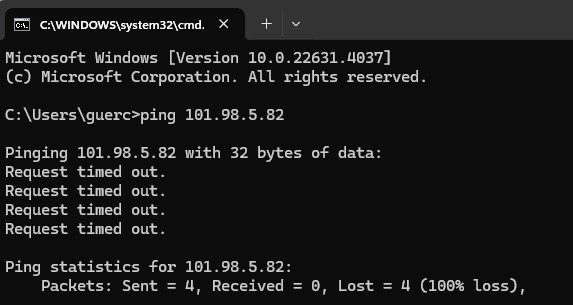
No response for me either (from a 2degrees connection):


Referral links: Quic Broadband (free setup code: R587125ERQ6VE) | Samsung | AliExpress | Wise | Sharesies 


Support Geekzone by subscribing (browse ads-free), or making a one-off or recurring donation through PressPatron.


Jiriteach
1141 posts

Uber Geek
+1 received by user: 376

ID Verified
Trusted
Lifetime subscriber

  #3274194 21-Aug-2024 17:16
Send private message

freitasm:


Jiriteach:


Here - default-rdns.vocus.co.nz (101.98.5.82)

Thats pingable and one of their routers. You should be able to see the same if you traceroute to one of their speedtest servers. Its the next hop.


No response for me either (from a 2degrees connection):


Hmm - thats strange as its pingable from outside their network and its on the way to one of the speedtest servers on their network! Oh well - if the DNS servers are working then might as well use those. I use Cloudflare's DNS servers for connectivity checks - same as Ubiquiti's own connectivity checks ping.ui.com which just resolves to Cloudflare.


-- opinions expressed by me are solely my own. ie - personal


1 | 2 | 3
View this topic in a long page with up to 500 replies per page Create new topic


Geekzone Live »

Try automatic live updates from Geekzone directly in your browser, without refreshing the page, with Geekzone Live now.


Are you subscribed to our RSS feed? You can download the latest headlines and summaries from our stories directly to your computer or smartphone by using a feed reader.