Geekzone: technology news, blogs, forums
Guest
Welcome Guest.
You haven't logged in yet. If you don't have an account you can register now.


View this topic in a long page with up to 500 replies per page Create new topic
1 | ... | 16 | 17 | 18 | 19 | 20 | 21 | 22 | 23 | 24 | 25 | 26 | ... | 27
news4jc
18 posts

Geek
+1 received by user: 1


  #2833413 16-Dec-2021 13:11
Send private message

After Slingshot offering a new router, the speed mysteriously went from 50/100 to 100/100, and been steady for a few days now. Don't want their crappy Netcom router, so I'll stay as I am I think. Sheesh!


mentalinc
3385 posts

Uber Geek
+1 received by user: 1025

Trusted

  #2833429 16-Dec-2021 13:24
Send private message

Do you have a switch in between?
DO you actually have a gigabit network card - that is set to auto negotiate?


CPU: AMD 5900x | RAM: GSKILL Trident Z Neo RGB F4-3600C16D-32GTZNC-32-GB | MB:  Asus X570-E | GFX: EVGA FTW3 Ultra RTX 3080Ti| Monitor: LG 27GL850-B 2560x1440


Quic: https://account.quic.nz/refer/473833 R473833EQKIBX 


news4jc
18 posts

Geek
+1 received by user: 1


  #2833855 17-Dec-2021 09:40
Send private message

mentalinc:


Do you have a switch in between?


Yes, but I tested with the PC & laptop connected directly to the router. Speeds are 3mbps  faster than the speed tested through the switch.


mentalinc:


DO you actually have a gigabit network card - that is set to auto negotiate?


Yes and yes.


defragger
268 posts

Ultimate Geek
+1 received by user: 2


  #2851276 15-Jan-2022 22:37
Send private message

defragger:


johna8:


Is it a 7390 from say Snap/2Degrees? Then likely this setting won't be updating if you are on another provider.


Account Information - Internet Connection - Make sure Connection Settings are at least 1000 Mbit/s Down/Up specified.


Home Network - Network Settings - LAN Settings - make sure they aren't on green mode / power mode - especially the WAN port used.


If these are fine replace the cable - should at least be 1Gb connectivity between Fritz and ONT?


You can see this on the ONT too visually:


LAN Port LED
Orange - There is a 1Gbps device detected on the Port
Orange Flashing - There is 1Gbps data activity detected on the Port
Green - There is a 10/100Mbps device detected on the Port
Green Flashing - There is 10/100Mbps data activity detected on the Port


From what I can see on my 7490 - although would recommend picking up a 7490 for cheap.


Yep it is from Snap days, running it on Bigpipe. Have tried all those steps, even changed cable between Switch and Fritzbox. ONT LED is Green flashing (connected via original yellow cable, I think its gigabit) so I feel like its definitely the Fritzbox but I will play around a bit more this weekend. Thanks for the help so far folks! (I know kinda hijacking haha)


So finally got a resolution today. I ended up narrowing it down to ONT shortly after this with some dms to johna8, but then it took 6 weeks to convince Bigpipe + Chorus this.


Chorus came in today, swapped the ONT and presto, full 300/100 vs 100/100 perviously. So the bottleneck was the GE1 port / fibre box


Fairly happy :) 


stick
357 posts

Ultimate Geek
+1 received by user: 113


  #2851331 16-Jan-2022 09:19
Send private message

Is anyone getting 300+ on Tuatahi (UFF)? I'm always getting about 283 and when I went to a friend's house who was chrous, they were getting 310ish

I'm on Orcon and the friend is on Trust power (so double vocus)

quickymart
14964 posts

Uber Geek
+1 received by user: 14003

ID Verified

  #2851367 16-Jan-2022 11:18
Send private message

It's up to 300, so your speeds are fine. However make sure you're not testing over wifi.


Move to New Zealand's best fibre broadband service (affiliate link). Free setup code: R587125ERQ6VE. Note that to use Quic Broadband you must be comfortable with configuring your own router.
cyril7
9075 posts

Uber Geek
+1 received by user: 2499

ID Verified
Trusted
Subscriber

  #2851372 16-Jan-2022 11:22
Send private message

St1ick: Is anyone getting 300+ on Tuatahi (UFF)? I'm always getting about 283 and when I went to a friend's house who was chrous, they were getting 310ish

I'm on Orcon and the friend is on Trust power (so double vocus)


Hi, Actual speed is an "upto" my guess is it all depends on how UFF and Chorus have setup their policer setup, these are well inside those variables.


Cyril


andrewcnz
965 posts

Ultimate Geek
+1 received by user: 73


  #2853162 19-Jan-2022 07:55
Send private message

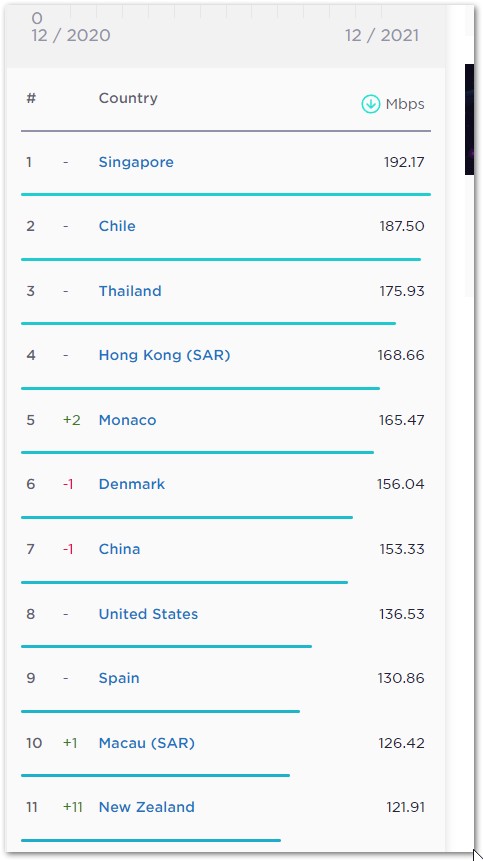
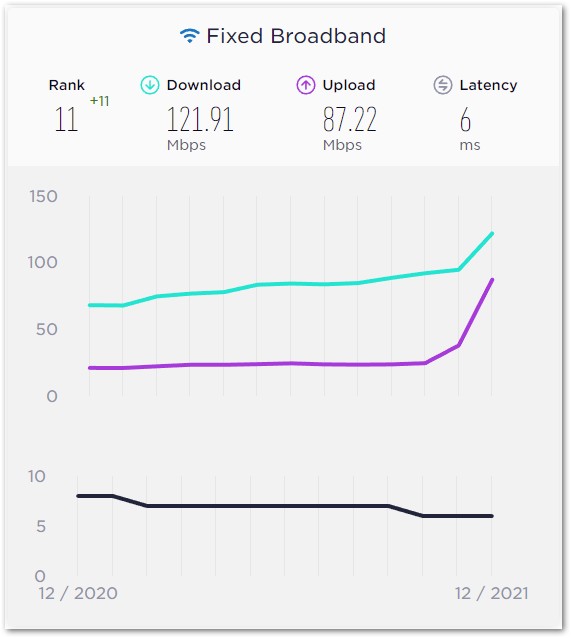
New Zealand's speeds have jumped on the Ookla speed test rankings up 11 places to number 11 for fixed broadband.


https://www.speedtest.net/global-index


cyril7
9075 posts

Uber Geek
+1 received by user: 2499

ID Verified
Trusted
Subscriber

  #2853170 19-Jan-2022 08:33
Send private message

andrewcnz:

New Zealand's speeds have jumped on the Ookla speed test rankings up 11 places to number 11 for fixed broadband.


https://www.speedtest.net/global-index


Ha, so while we jumped up 11, the NBN dropped Australia back 4, oh dear.

miked
207 posts

Master Geek
+1 received by user: 22

Trusted

  #2853197 19-Jan-2022 09:41
Send private message

Just got notice at work, that our 200/100 business fibre with Inspire has had a free upgrade to 300/300 which is nice! Had been just thinking it was a bad deal now after all the residential speed boosts! (And we actually speed tested the it at 320/410 the other day!)


Does anyone know if this a universal Chorus upgrade, or just an Inspire thing?


cyril7
9075 posts

Uber Geek
+1 received by user: 2499

ID Verified
Trusted
Subscriber

  #2853220 19-Jan-2022 10:32
Send private message

Hi, it all depends if its via UFB or Inspires own fibre (of which they have a lot), I just checked one of our work connections that is on Inspires own fibre and its still 200/100


Cyril


Shop now for Dell laptops and other devices (affiliate link).
Amosnz
569 posts

Ultimate Geek
+1 received by user: 131

Lifetime subscriber

  #2853224 19-Jan-2022 10:45
Send private message

It was mentioned in their recent newsletter that business speeds were increasing, it doesnt differentiate between Chorus/Inspire fibre so possibly its based on billing rollover?


https://www.inspire.net.nz/newsletter/jan-2022


Speedtest


miked
207 posts

Master Geek
+1 received by user: 22

Trusted

  #2853250 19-Jan-2022 11:14
Send private message

Yeah, we have Chorus provided business fibre with Inspire. I found this page:


https://sp.chorus.co.nz/product-update/chorus-future-fibre-portfolio-confirmed-changes


....and whilst it doesn't mention 200/100 connections, it does talks about 100/100 jumping to 300/300... so it looks like it might well be a Chorus thing... in which case presumably other ISPs will be doing this too!


Will also be interesting to see if Inspire's own fibre speeds up too...(although that might need more time if their equipment isn't up to it, or needs "re-configuring" to make it happen... whereas Chorus presumably did all the background work & config checks before making their announcements... making it easier for ISPs to follow along without much work for Chorus fibre).


MadEngineer
4597 posts

Uber Geek
+1 received by user: 2577

Trusted

  #2853777 19-Jan-2022 18:26
Send private message

andrewcnz:


New Zealand's speeds have jumped on the Ookla speed test rankings up 11 places to number 11 for fixed broadband.


https://www.speedtest.net/global-index


Screenshots for posterity:


You're not on Atlantis anymore, Duncan Idaho.

rogercruse
644 posts

Ultimate Geek
+1 received by user: 211

ID Verified
Lifetime subscriber

  #2857157 27-Jan-2022 13:50
Send private message

Linux:...Northpower have confirmed changes are coming Jan 2022 - 300/100...


@Linux: Probably jumping the gun here as January 2022 is quite over.... but my NorthPower located fibre network hasn't been upgraded yet.


1 | ... | 16 | 17 | 18 | 19 | 20 | 21 | 22 | 23 | 24 | 25 | 26 | ... | 27
View this topic in a long page with up to 500 replies per page Create new topic


Geekzone Live »

Try automatic live updates from Geekzone directly in your browser, without refreshing the page, with Geekzone Live now.


Are you subscribed to our RSS feed? You can download the latest headlines and summaries from our stories directly to your computer or smartphone by using a feed reader.