Geekzone: technology news, blogs, forums
Guest
Welcome Guest.
You haven't logged in yet. If you don't have an account you can register now.


View this topic in a long page with up to 500 replies per page Create new topic
1 | ... | 271 | 272 | 273 | 274 | 275 | 276 | 277 | 278 | 279 | 280 | 281 | ... | 285
hio77
'That VDSL Cat'
13036 posts

Uber Geek
+1 received by user: 3896

ID Verified
Trusted
Lizard Networks
Subscriber

  #1854787 29-Aug-2017 14:09
Send private message

afasthorse:


Ah well, thanks for your reply. I guess I just have to hope that the impossible happens and they start on the fibre soon.


What you likely will find is your neighbour simply has a really good copper pair (or your on a really sh!tty one).


sadly that is "network preforming well"


#include <std_disclaimer>


Any comments made are personal opinion and do not reflect directly on the position my current or past employers may have. 


miked
207 posts

Master Geek
+1 received by user: 22

Trusted

  #1854789 29-Aug-2017 14:11
Send private message

My VDSL line still disconnects/reconnects multiple times whenever there is wind or rain. I just noticed that the trees on the berm down the road are brushing one of the overhead phonelines (not sure if it is mine or a neighbour's).


Clearly the disconnects are something I should bring up with my supplier anyway (But being intermittent, it is harder to trace, as sods law says it is rock solid when the Chorus guys come! It can be solid all week, then when it rains drop out 10 - 20 times that day).


However, separately, are the trees something I should report to my supplier for Chorus to deal with, or are they something that I should report to the council for them to deal with? The wires could well be damaged and suffering from water ingress where the trees rub which could be cause of my disconnects... equally it could be anywhere on the overhead wires, or pole connections between me and the cabinet (about 200m away) and therefore unrelated.


The overhead wire from the pole to my house was brand new when I moved in 18 months ago. As was the Cat6 run from the demarcation point to my network cabinet.


Mike


smalltrader
174 posts

Master Geek
+1 received by user: 62


  #1854844 29-Aug-2017 15:22
Send private message

miked:


My VDSL line still disconnects/reconnects multiple times whenever there is wind or rain. I just noticed that the trees on the berm down the road are brushing one of the overhead phonelines (not sure if it is mine or a neighbour's).


Clearly the disconnects are something I should bring up with my supplier anyway (But being intermittent, it is harder to trace, as sods law says it is rock solid when the Chorus guys come! It can be solid all week, then when it rains drop out 10 - 20 times that day).


However, separately, are the trees something I should report to my supplier for Chorus to deal with, or are they something that I should report to the council for them to deal with? The wires could well be damaged and suffering from water ingress where the trees rub which could be cause of my disconnects... equally it could be anywhere on the overhead wires, or pole connections between me and the cabinet (about 200m away) and therefore unrelated.


The overhead wire from the pole to my house was brand new when I moved in 18 months ago. As was the Cat6 run from the demarcation point to my network cabinet.


Mike


Trees brushing again phone line could well be a problem. You need to establish first the ownership of the trees before any action can be taken. Is the tree on your land or on Council's land. If it is on Council's land then it is definitely Council's responsibility to trim the trees so that it does not interfere with phone line or power line.


For me, the Council's trees were so close to our power line. I rang the Council but there were no urgency on their part to do something so I was force to take my own action to trim off branches which are too close to the power line.


miked
207 posts

Master Geek
+1 received by user: 22

Trusted

  #1854878 29-Aug-2017 15:56
Send private message

Thanks. They are on the berm a couple of doors down. Presumably they are council owned then (unless they belong to the house they are in front of?)


Was mostly checking if it was best for me to report them to Chorus or Council. Sounds like Council.


Regardless of whether it is my phoneline or a neighbour's, it makes sense to deal with it ASAP. Once they have been contacted, if it sounds like it might be a slow process, taking a saw to the offending branches might be a pragmatic way forwards. ;)


sholdowa
8 posts

Wannabe Geek


  #1858170 4-Sep-2017 14:15
Send private message

I've just spent 90 minutes doing what I should have done in the first place, and installing a splitter as far upstream as possible, rather than somewhere easy. I now only have 2 pairs of a single Cat 5e cable connected ( about 10m ), one for DSL and one for POTS, which isn't connected to anything.


The problem I've got is the uplink speed: and this was what I was hoping for improvement of when I migrated from ADSL.


I'm getting about 35Mbit/s download, but 800Kbit/s up.


Router is a DrayTek Vigor 130, and these are the current stats.


 > vdsl status
---------------------- ATU-R Info (hw: annex A, f/w: annex A/B/C) -----------
Running Mode : 8B State : SHOWTIME
DS Actual Rate : 34066000 bps US Actual Rate : 730000 bps
DS Attainable Rate : 34415208 bps US Attainable Rate : 800000 bps
DS Path Mode : Interleave US Path Mode : Fast
DS Interleave Depth : 288 US Interleave Depth : 1
NE Current Attenuation : 28 dB Cur SNR Margin : 0 dB
DS actual PSD : 2. 7 dB US actual PSD : 14. 9 dB
NE CRC Count : 11 FE CRC Count : 652
NE ES Count : 5 FE ES Count : 582
Xdsl Reset Times : 0 Xdsl Link Times : 53
ITU Version[0] : b5004946 ITU Version[1] : 544e0000
VDSL Firmware Version : 05-07-06-0D-01-07 [with Vectoring support]
Power Management Mode : DSL_G997_PMS_L0
Test Mode : DISABLE
-------------------------------- ATU-C Info ---------------------------------
Far Current Attenuation : 40 dB Far SNR Margin : 5 dB
CO ITU Version[0] : b500494b CO ITU Version[1] : 4e530101
DSLAM CHIPSET VENDOR : < IKNS >


Any ideas what I could try next?


hio77
'That VDSL Cat'
13036 posts

Uber Geek
+1 received by user: 3896

ID Verified
Trusted
Lizard Networks
Subscriber

  #1858175 4-Sep-2017 14:20
Send private message

Double check you are using a VDSL Compatable splitter.


as a test, directly link modem to ETP.


Please post spectrum too if possible, 35mbit from DS1 seem excessively high which would indicate some form of issues with US1. (as one would expect with a over distance drop)


#include <std_disclaimer>


Any comments made are personal opinion and do not reflect directly on the position my current or past employers may have. 


Shop now for Lego sets and other gifts (affiliate link).
sholdowa
8 posts

Wannabe Geek


  #1858187 4-Sep-2017 14:33
Send private message

I'm using a 'DYNAMIX XDSL Master Wired in filter ADSL/ADSL2+/VDSL/VDSL2 Telepermitted' from PBTech


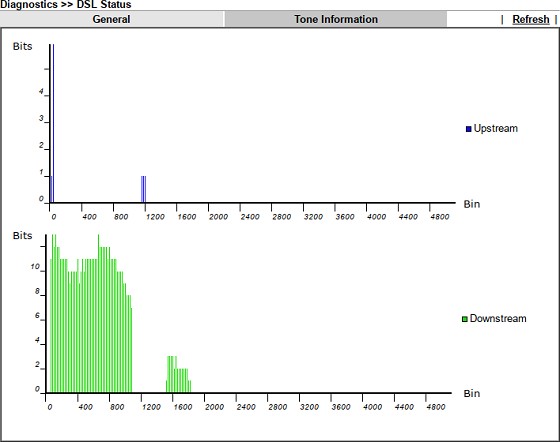
Does this tone info help?


Forgot to mention I manually set the SNR to -50 ( on a scale of -50 to +50 ) to get these figures. I was attempting to maximise the upstream though.


hio77
'That VDSL Cat'
13036 posts

Uber Geek
+1 received by user: 3896

ID Verified
Trusted
Lizard Networks
Subscriber

  #1858192 4-Sep-2017 14:41
Send private message

Ah your snr tweaking, that explains the confusion with Bin allocation.


Looks like your US0 is a little low, US1 is rather under used.


Possible causes would be wiring (normally IW for Upstream) or a bridgetap/Multiples on the line (which would be near impossible to get resolved)


In terms of tweaking, your only tweaking the margin that your modem can "hear" not how loud your modem can "shout"


#include <std_disclaimer>


Any comments made are personal opinion and do not reflect directly on the position my current or past employers may have. 


sholdowa
8 posts

Wannabe Geek


  #1858197 4-Sep-2017 14:47
Send private message

Would it be better to untweak the SNR - reset to 0?


hio77
'That VDSL Cat'
13036 posts

Uber Geek
+1 received by user: 3896

ID Verified
Trusted
Lizard Networks
Subscriber

  #1858198 4-Sep-2017 14:49
Send private message

sholdowa:


Would it be better to untweak the SNR - reset to 0?


That may give a more clear view of your lines SNR (and thus the expected loss over distance)


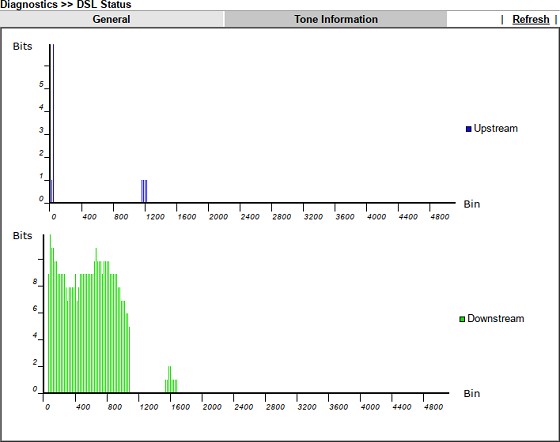
However i do go back to the point of that, Bit allocation looks low in Upstream.


#include <std_disclaimer>


Any comments made are personal opinion and do not reflect directly on the position my current or past employers may have. 


sholdowa
8 posts

Wannabe Geek


  #1858206 4-Sep-2017 15:01
Send private message

with the SNR reset to 0, 


> vdsl status
---------------------- ATU-R Info (hw: annex A, f/w: annex A/B/C) -----------
Running Mode : 8B State : SHOWTIME
DS Actual Rate : 27781000 bps US Actual Rate : 761000 bps
DS Attainable Rate : 28088120 bps US Attainable Rate : 808000 bps
DS Path Mode : Interleave US Path Mode : Fast
DS Interleave Depth : 233 US Interleave Depth : 1
NE Current Attenuation : 28 dB Cur SNR Margin : 6 dB
DS actual PSD : 2. 5 dB US actual PSD : 14. 8 dB
NE CRC Count : 1 FE CRC Count : 653
NE ES Count : 1 FE ES Count : 591
Xdsl Reset Times : 0 Xdsl Link Times : 54
ITU Version[0] : b5004946 ITU Version[1] : 544e0000
VDSL Firmware Version : 05-07-06-0D-01-07 [with Vectoring support]
Power Management Mode : DSL_G997_PMS_L0
Test Mode : DISABLE
-------------------------------- ATU-C Info ---------------------------------
Far Current Attenuation : 40 dB Far SNR Margin : 5 dB
CO ITU Version[0] : 00000000 CO ITU Version[1] : 00000000
DSLAM CHIPSET VENDOR : < unknown >


Plus the tone info.


Shop now at Mighty Ape (affiliate link).
SamF

1598 posts

Uber Geek
+1 received by user: 252

Trusted

  #1858392 4-Sep-2017 19:49
Send private message

Now that you've done your wiring improvements, it might be worth getting your ISP to reset DLM on your line so that it can re-train based on your improved line conditions.


hio77
'That VDSL Cat'
13036 posts

Uber Geek
+1 received by user: 3896

ID Verified
Trusted
Lizard Networks
Subscriber

  #1858394 4-Sep-2017 19:54
Send private message

Missed replying, Still looks like US issues, Your signal is attenuating hard.


Likely multiple causing loss of Upstream speed, You can try raising this but 99% likely to be gobbling a NFF.


SamF:


Now that you've done your wiring improvements, it might be worth getting your ISP to reset DLM on your line so that it can re-train based on your improved line conditions.


We actually can't request this to be done very easily at all now days, Chorus don't particularly like such requests.


Port refreshes no longer reset DLM since the rollout of ddDLM too.


#include <std_disclaimer>


Any comments made are personal opinion and do not reflect directly on the position my current or past employers may have. 


SamF

1598 posts

Uber Geek
+1 received by user: 252

Trusted

  #1858401 4-Sep-2017 20:08
Send private message

hio77:


We actually can't request this to be done very easily at all now days, Chorus don't particularly like such requests.


Port refreshes no longer reset DLM since the rollout of ddDLM too.


Well that sucks!  Still, could be worth talking to the ISP about and explaining the situation.


smalltrader
174 posts

Master Geek
+1 received by user: 62


  #1858403 4-Sep-2017 20:11
Send private message

SamF:


Now that you've done your wiring improvements, it might be worth getting your ISP to reset DLM on your line so that it can re-train based on your improved line conditions.


With ddDLM, resetting of port may no longer be necessary based on my own observation. ddDLM will detect that the line condition has improved and will gradually increase the sync speed. ddDLM usually make speed adjustment after sitting in the background monitoring for about 3 days.


Unlike the old DLM, ddDLM it is fairly "dynamic". It does not stay in one spot for long. It is constantly adjusting speed based on line condition. This is my own observation based on monitoring ddDLM behaviour since it went live on my line in late April. ddDLM's behaviour sort of makes sense as I believe the goal is get close to optimal performance at any point in time.


There is no white paper on ddDLM so the above is based on anecdotal evidence.


1 | ... | 271 | 272 | 273 | 274 | 275 | 276 | 277 | 278 | 279 | 280 | 281 | ... | 285
View this topic in a long page with up to 500 replies per page Create new topic


Geekzone Live »

Try automatic live updates from Geekzone directly in your browser, without refreshing the page, with Geekzone Live now.


Are you subscribed to our RSS feed? You can download the latest headlines and summaries from our stories directly to your computer or smartphone by using a feed reader.