Geekzone: technology news, blogs, forums
Guest
Welcome Guest.
You haven't logged in yet. If you don't have an account you can register now.


Filter this topic showing only the reply marked as answer View this topic in a long page with up to 500 replies per page Create new topic
1 | 2 | 3 | 4 | 5
RunningMan
9186 posts

Uber Geek
+1 received by user: 4840


  #3115036 12-Aug-2023 17:21
Send private message

Have you checked the IPv4 connectivity - i.e to local and WAN addresses? What range is your WAN IPv4 in?


Overdrive5000

26 posts

Geek


  #3115037 12-Aug-2023 17:25
Send private message

RunningMan:


Have you checked the IPv4 connectivity - i.e to local and WAN addresses? What range is your WAN IPv4 in?


local ip addresses are in the 192.168.0.xxx range 


RunningMan
9186 posts

Uber Geek
+1 received by user: 4840


  #3115041 12-Aug-2023 17:37
Send private message

Yep, but you've raised you may not have IPv4 connectivity. You need to check more than if you have a local IPv4 address. Do you have a WAN IPv4? What range is it in?, Can you ping or traceroute to external IPv4 hosts?


yitz
2239 posts

Uber Geek
+1 received by user: 594


  #3115047 12-Aug-2023 17:50
Send private message

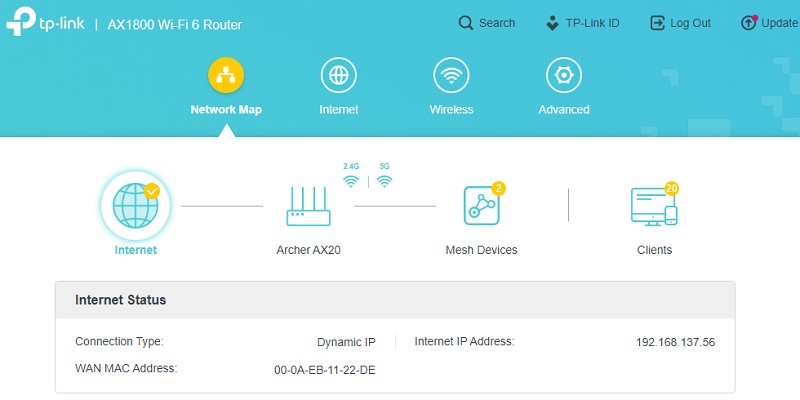
For your TP-Link router browse to http://192.168.0.1/ log in and your Connection Type and Internet IP Address is shown under Network Map > Internet


Check you do have an IPv4 Internet IP Address which consists of 4 groups of numbers separated by dots.


To run a IPv4 traceroute search for 'cmd' under the Windows Start menu and use the command tracert -4 8.8.8.8 (for Google's Public DNS servers or the other DNS servers you tried and websites you can't access)


Overdrive5000

26 posts

Geek


  #3115058 12-Aug-2023 18:14
Send private message

RunningMan:

Yep, but you've raised you may not have IPv4 connectivity. You need to check more than if you have a local IPv4 address. Do you have a WAN IPv4? What range is it in?, Can you ping or traceroute to external IPv4 hosts?


Networking isn't my strong suit, can you please provide more detail like how to find it, I know how to ping and tracert

RunningMan
9186 posts

Uber Geek
+1 received by user: 4840


  #3115107 12-Aug-2023 18:30
Send private message

As @yitz has posted above.


Shop on-line at New World now for your groceries (affiliate link).
Delorean
673 posts

Ultimate Geek
+1 received by user: 343

ID Verified
Trusted
Lifetime subscriber

  #3115108 12-Aug-2023 18:48
Send private message

Just checking you have turned off the ONT for 30 seconds since the switchover.


Sometimes this fixes issues


Referral Link: | Quic Broadband (use R142206E0L2CR for free setup)


Overdrive5000

26 posts

Geek


  #3115110 12-Aug-2023 18:59
Send private message

Delorean:


Just checking you have turned off the ONT for 30 seconds since the switchover.


Sometimes this fixes issues


Yes tried that 


Overdrive5000

26 posts

Geek


  #3115112 12-Aug-2023 19:05
Send private message

yitz:


For your TP-Link router browse to http://192.168.0.1/ log in and your Connection Type and Internet IP Address is shown under Network Map > Internet


Check you do have an IPv4 Internet IP Address which consists of 4 groups of numbers separated by dots.


To run a IPv4 traceroute search for 'cmd' under the Windows Start menu and use the command tracert -4 8.8.8.8 (for Google's Public DNS servers or the other DNS servers you tried and websites you can't access)


Yes ip address is 60.234.xxx.xxx cant ping 8.8.8.8 but can ping 1.1.1.1, Tracert on 8.8.8.8 times out after the 3rd hop to 72.14.195.229


RunningMan
9186 posts

Uber Geek
+1 received by user: 4840


  #3115114 12-Aug-2023 19:27
Send private message

So you've got IPv4 connectivity, but something odd going on with it. Similar to this perhaps?


Overdrive5000

26 posts

Geek


  #3115117 12-Aug-2023 19:49
Send private message

RunningMan:

So you've got IPv4 connectivity, but something odd going on with it. Similar to this perhaps?


That does sound pretty similar, with Ethernet upload is always faster than download, the most annoying issue is not being able to play certain games on my Xbox series x since shifting

I'm going to purchase another Ethernet cable to connect Xbox directly to the router to see if it makes a difference. It's also wierd that a vpn fixes it wouldn't that suggest it's a traffic routing issue on isp end ?


Move to New Zealand's best fibre broadband service (affiliate link). Free setup code: R587125ERQ6VE. Note that to use Quic Broadband you must be comfortable with configuring your own router.
yitz
2239 posts

Uber Geek
+1 received by user: 594


  #3115185 12-Aug-2023 21:35
Send private message

Overdrive5000: It's also wierd that a vpn fixes it wouldn't that suggest it's a traffic routing issue on isp end ?


Are you on 60.234.115.x because it looks like some Australian ISP (AS9942) has hijacked it.


Definitely one for @Sounddude to check out


Overdrive5000

26 posts

Geek


  #3115189 12-Aug-2023 21:54
Send private message

yitz:

Overdrive5000: It's also wierd that a vpn fixes it wouldn't that suggest it's a traffic routing issue on isp end ?


Are you on 60.234.115.x because it looks like some Australian ISP (AS9942) has hijacked it.


Definitely one for @Sounddude to check out


Yes your correct, so what needs to happen now ?

yitz
2239 posts

Uber Geek
+1 received by user: 594


  #3115190 12-Aug-2023 21:59
Send private message

Overdrive5000: Yes your correct, so what needs to happen now ?
Sky need to take customers off that IP range until the routing issue is fixed.


Call and ask Sky to put you onto another IP address.


Domino99
9 posts

Wannabe Geek


#3115193 12-Aug-2023 22:11
Send private message

Hi, We just changed from Myrepublic to Sky and am having the exact same issue. I can only google if my vpn is running, if its not I can only go to sites I have been too before. We have been riping our hair out trying to config the Asus AC2900 to work. When I called Sky and asked them to reset the connection ( was thinking like a port reset) they said we can't help you at all because you re using a 3rd party router. I had to order the sky one as I work from hm so need this up and running ASAP. 


Do I just ask them to change the IP or pay for a static one?


1 | 2 | 3 | 4 | 5
Filter this topic showing only the reply marked as answer View this topic in a long page with up to 500 replies per page Create new topic


Geekzone Live »

Try automatic live updates from Geekzone directly in your browser, without refreshing the page, with Geekzone Live now.


Are you subscribed to our RSS feed? You can download the latest headlines and summaries from our stories directly to your computer or smartphone by using a feed reader.