|
|
|
Adam88: Iphone 15 does.. im grabbing that soon
As an iPhone 15 Pro Max owner along with owning thousands of dollars of networking gear myself including WiFi 6E access points ask when you've ever needed multi-gigabit speeds to your phone?
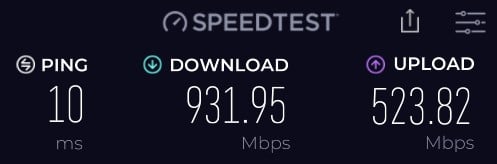
I tested this today with my access points and created a WiFi 6E network. Great, it works, it is pretty quick but honestly couldn't notice a difference from 6E to my existing 6 wireless network.
It is a minor upgrade from the 14 to the 15 really but if you're only doing this for WiFi 6E then perhaps step back and ask yourself what you're really hoping to achieve here? A speedtest to show you can perhaps do over a gigabit?
There is some good advise on this page: https://www.duckware.com/tech/wifi-in-the-us.html
Hyperfibre is a niche and it honestly seems like you really don't need it. Sure it is OK to want things but how much money do you want to sink into this and what are you really hoping to achieve? Your use-case seems really light to me to the point it even sounds like you'll hardly fully take advantage of Gigabit yet alone Hyperfibre.
Michael Murphy | https://murfy.nz
Referral Links: Quic Broadband (use R122101E7CV7Q for free setup)
Are you happy with what you get from Geekzone? Please consider supporting us by subscribing.
Opinions are my own and not the views of my employer.
Adam88: @jiriteach
@vindy500
And maybe that is ok… so i can provide my wired connections thru a 2.5gb switch
And then look to hardwire maybe 2x access points in either end of the house?
But im asking well, what particular APs and switch would i use?
You could buy a 2.5gbe switch yes and provide wired connections through that to Wifi 6E ap's that have 2.6gbe ports on them.
That will give you a wired 2.5gbe network but you still wont get the speeds you are after over wifi.
-- opinions expressed by me are solely my own. ie - personal
Adam88: But that will give me still around 1gb speeds for wifi correct?
@jiriteach
Not an easy question to answer as its highly dependant on so many factors.
ie. The devices (laptops etc.) having Wifi 6E cards or support, network congestion in your area (how many wifi networks are competing for space), other noise, how far you are away from the access points, the access points being setup correctly to work with the right channels and frequency to support the higher throughput.
Its possible in a lab environment but cannot see how this is practical for day to day use.
-- opinions expressed by me are solely my own. ie - personal
nztim:
as @Linux said Hyperfibre is a complete waste of time, unless you are willing to spend circa 10K upgrading your entire network.
$10K is a bit harsh. I have just spent $1400 getting 40 Gbit/s Infiniband going between my three main PCs - 40 Gbit/s Inifinband gear is obsolete in the business environment and so is available pretty cheap second hand and surplus new.
However, if I were to switch to Hyperfibre I would still need a good 10 Gbit/s Ethernet router as Internet routers do not do Infiniband.
Adam88:
hey mate,
that sounds great, are you with 2 degrees? does that router work with 2degrees?
All good if i PM you? just to get some further info/help?
Yeah I am with 2Degrees. The router works out of the box, no configuration needed.
Plug RED 10GbE WAN port into ONT, plug YELLOW 10GbE LAN port into QNAP 10GbE port and turn on.
2.5GbE to all ethernet connected devices, and Wi-Fi 6E.
The Ubiquiti UDM-Pro can support hyperfibre and the U6 Enterprise is wifi 6E with a 2.5g lan port. Theoretically that it about as good as you are going to be able to get before wifi 7 becomes mainstream. The reviews for the U6 Enterprise show that it can deliver multi-gigabit speeds over wifi.

Join Mercury and I’ll get bonus rewards points. Make sure you use my referral link to explore their wonderful offers. https://www.mercury.co.nz/join?m_copc=FGF50&m_rc=100211888685
Router: UXG-Lite
AP's: 2x U6-Pro, 1x U6-Lite, 1x UK-Ultra, 1x AC Mesh Pro
Phone: S26 Ultra
Wearable: Garmin Forerunner 955
AQuietPlace:
Adam88:
hey mate,
that sounds great, are you with 2 degrees? does that router work with 2degrees?
All good if i PM you? just to get some further info/help?
Yeah I am with 2Degrees. The router works out of the box, no configuration needed.
Plug RED 10GbE WAN port into ONT, plug YELLOW 10GbE LAN port into QNAP 10GbE port and turn on.
2.5GbE to all ethernet connected devices, and Wi-Fi 6E.
@Aquietplace
I recently had 4G/4G Hyper Fibre installed in my new place. Went with 2 degrees because it wasn't much more than I was paying with Spark at my previous address. The Orbi they gave me only had 4 1G ports out. I noticed that there are Orbi routers with that one 2.5G out but that's not the one they gave me. I purchased the exact QNAP switch you mentioned for my network. Ran cat 6 cabling upstairs where my gaming PC and PS5 is, and where my switch was going to be, thinking I will then have multiple 2.5G wired connections to my devices. I was going to return my switch today but might hang onto it and get hold of 2Degrees. Did your Orbi come with the Hyper Fibre connection or did you purchase it? I am in Auckland.
Wow this is hilarious, the hyperfibre router from 2degrees, it it only has gigabit ports on it (with a 2.5G to connect to the ONT)?
yet they that: "To ensure you get the best possible speeds from your new Hyperfibre connection, you will need to use our dedicated Hyperfibre modem which is included in your plan."
CPU: AMD 5900x | RAM: GSKILL Trident Z Neo RGB F4-3600C16D-32GTZNC-32-GB | MB: Asus X570-E | GFX: EVGA FTW3 Ultra RTX 3080Ti| Monitor: LG 27GL850-B 2560x1440
Quic: https://account.quic.nz/refer/473833 R473833EQKIBX
|
|
|