Geekzone: technology news, blogs, forums
Guest
Welcome Guest.
You haven't logged in yet. If you don't have an account you can register now.


Adam88

17 posts

Geek


#307127 22-Sep-2023 13:53
Send private message

Hi All,


New here so hi!


Needing help from some Subject Matter Experts on Hyperfibre...


I have quickly realized that when reaching out to local businesses for help in Auckland, they have very limited knowledge of hyperfibre...


So Storey is that i have recently upgraded my fibre to hyperfibre (2GBUP/2GBDOWN).. chorus has come in and changed the ONT to a massive new ONT...


It currently then connects to the Orbi Router which came with me signing up to 2 degrees


The orbi router is then connected into a patch panel (installed circa 2015) which provides direct ethernet to bedroom and lounge... for 2x tvs, and a ps5... and a spare slot currently plugged into a deco x20 unit which is useless.


What do I need to ensure i have max speeds via ethernet and max possible Wi-Fi coverage around the house (200sqm)


Yes, i am aware that the TVs and so forth don't need hyperfibre speeds and i can do just fine off normal fibre max.. although because i can get hyperfibre... i would like it set up properly...


So any advice is most welcomed... Do i need a special switch setup? Are mesh units ok? or with ethernet backhaul? Better to have Access Points installed instead? What is the max wifi speeds i can possibly get off Hyperfibre 2GB?


Basically, happy to pay a business/person to come in and install these for me, just need to be pointed in the right direction...


Thanks all,


Adam


View this topic in a long page with up to 500 replies per page Create new topic
 1 | 2 | 3 | 4
nztim
4012 posts

Uber Geek
+1 received by user: 2710

ID Verified
Trusted
TEAMnetwork
Subscriber

  #3130489 22-Sep-2023 14:02
Send private message

The orbi has 1x 2.5G port to go to the ONT meaning you are SOL to get anything more that gigabit out of the remaining ports (as that's the max they support)


2degrees doesn't support 3rd party routers but they are IPoE over VLAN10 so any router that is capable of routing 2gbps with 2 or more 2.5G or 10G ports will work (think Mikrotik CCR which requires setup to get going)


You will then need 10gbps switch and NICS in each of your devices however if you get a CCR1072 this has 12 10 gig ports you will also need SFP+ modules.


As you can see Hyperfibre gets very expensive very fast to actually make use of it


Any views expressed on these forums are my own and don't necessarily reflect those of my employer. 


Adam88

17 posts

Geek


  #3130493 22-Sep-2023 14:11
Send private message

Hey mate,


thanks for coming back to me,


Hmm i did notice that about the router...


I could go down the other path but tbh im probably out of my depth to do this myself?


Hmm ok so thats the ethernet pathway... how about getting max out of wifi? what is possible? Sounds like to do this, i will need to change my router anyhow...


Linux
12181 posts

Uber Geek
+1 received by user: 8473

Trusted
Lifetime subscriber

  #3130497 22-Sep-2023 14:26
Send private message

Do you really need HyperFibre? Cool if you do but many gamers are getting HF and thinking pings are going to be lower etc....


Adam88

17 posts

Geek


  #3130500 22-Sep-2023 14:28
Send private message

Hey mate,


probably not? Although if i can, then why not?


Im really after those amazing wifi speeds also...


Linux
12181 posts

Uber Geek
+1 received by user: 8473

Trusted
Lifetime subscriber

  #3130501 22-Sep-2023 14:32
Send private message

Adam88:


Hey mate,


probably not? Although if i can, then why not?


Im really after those amazing wifi speeds also...


@Adam88 Have you got Wi-Fi 7 hardware?? I think you are going to be disappointed


nztim
4012 posts

Uber Geek
+1 received by user: 2710

ID Verified
Trusted
TEAMnetwork
Subscriber

  #3130502 22-Sep-2023 14:34
Send private message

Adam88:


Hmm ok so thats the ethernet pathway... how about getting max out of wifi? what is possible? Sounds like to do this, i will need to change my router anyhow...


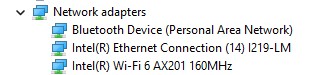
The Orbi supports Wifi-6 but to get over 1gbps you will need 160mhz wide channels which unless you are in the sticks will cause interference with your Neighbours


Your devices also have to support Wifi6 see snip from device manager of my laptop


Your speed will be whatever your lowest common denominator is


as @Linux said Hyperfibre is a complete waste of time, unless you are willing to spend circa 10K upgrading your entire network.


Any views expressed on these forums are my own and don't necessarily reflect those of my employer. 


Shop now on AliExpress (affiliate link).
nztim
4012 posts

Uber Geek
+1 received by user: 2710

ID Verified
Trusted
TEAMnetwork
Subscriber

  #3130504 22-Sep-2023 14:38
Send private message

On another note, RSM has opened up part of the 6GHZ band for Wifi 6E but again the Orbi is not a 6E Access point and my laptop that is less than a year old doesn't support 6E


https://www.rsm.govt.nz/projects-and-auctions/completed-projects/wlan-use-in-the-6-ghz-band/


Any views expressed on these forums are my own and don't necessarily reflect those of my employer. 


michaelmurfy
meow
13579 posts

Uber Geek
+1 received by user: 10910

Moderator
ID Verified
Trusted
Lifetime subscriber

  #3130505 22-Sep-2023 14:51
Send private message

Adam88:


probably not? Although if i can, then why not?


Im really after those amazing wifi speeds also...


WiFi = you really don't need Hyperfibre. Gigabit will suit you totally fine.


I guess you're wanting Hyperfibre because "why not" but really you're burning money here and will not get what you're after. Over WiFi you may reach close to Gigabit speeds and that is it. To take advantage of Hyperfibre you really need devices with multi-gig Ethernet ports and have everything hardwired.


Sure, you could likely chuck more money at the problem but you're really dreaming if you're after "amazing" WiFi speeds.


Michael Murphy | https://murfy.nz
Referral Links: Quic Broadband (use R122101E7CV7Q for free setup)

Are you happy with what you get from Geekzone? Please consider supporting us by subscribing.
Opinions are my own and not the views of my employer.


Adam88

17 posts

Geek


  #3130506 22-Sep-2023 14:52
Send private message

@Linux,


I dont currently... as im just setting this thing up, although its almost future proofing?


Otherwise is there something else i can do to ensure highest possible wifi speeds around?


Like no company so far can give me any recommendations... regardless of costs... Do you know a company which specializes in fast setups?


Adam88

17 posts

Geek


  #3130508 22-Sep-2023 14:54
Send private message

murphy, im happy with almost 1gig wifi speeds around the whole house, id be happy with that, again still need a company to help set this up for me? any reccomendations?


It sounds like no real point in hyperfibre atm because technology simply isnt up to scratch like all the devices.. 


AQuietPlace
12 posts

Geek
+1 received by user: 2

ID Verified

  #3130540 22-Sep-2023 15:35
Send private message

Hi Adam88.


I recently went with HyperFibre 2 and got this CF60 connected to this QNAP Switch and a few of these 2.5 Gigabit Switches


This provides 2 Gigabit speeds to all of my Ethernet connected devices via the switches, and with Wi-Fi6E from the router I get 1.7Gbps over Wi-Fi to 6E clients that are only a few metres away. 


The 2 Gigabit Symmetrical has benefits over a 1000/500 service, especially with the upstream.


I don't see the need for more than 2Gigabit speeds, and my onboard LAN in the PCs are only 2.5 Gigabit but if the time does eventuate, then I just need to swap out the switches and LAN cards.


Shop now on AliExpress (affiliate link).
Adam88

17 posts

Geek


  #3130541 22-Sep-2023 15:41
Send private message

hey mate,


that sounds great, are you with 2 degrees? does that router work with 2degrees?


All good if i PM you? just to get some further info/help?


Spyware
3818 posts

Uber Geek
+1 received by user: 1366

Lifetime subscriber

  #3130545 22-Sep-2023 15:54
Send private message

Here's an Aruba wifi 6 AP, https://www.ascent.co.nz/productspecification.aspx?itemID=605738, just $1594 each.


Spark Max Fibre using Mikrotik CCR1009-8G-1S-1S+, CRS125-24G-1S, Unifi UAP, U6-Pro, UAP-AC-M-Pro, Apple TV 4K (2022), Apple TV 4K (2017), iPad Air 1st gen, iPad Air 4th gen, iPhone 13, SkyNZ3151 (the white box). If it doesn't move then it's data cabled.


Adam88

17 posts

Geek


  #3130547 22-Sep-2023 15:55
Send private message

jesus nice, but not cheap huh.... :S


Spyware
3818 posts

Uber Geek
+1 received by user: 1366

Lifetime subscriber

  #3130549 22-Sep-2023 15:59
Send private message


Spark Max Fibre using Mikrotik CCR1009-8G-1S-1S+, CRS125-24G-1S, Unifi UAP, U6-Pro, UAP-AC-M-Pro, Apple TV 4K (2022), Apple TV 4K (2017), iPad Air 1st gen, iPad Air 4th gen, iPhone 13, SkyNZ3151 (the white box). If it doesn't move then it's data cabled.


 1 | 2 | 3 | 4
View this topic in a long page with up to 500 replies per page Create new topic


Geekzone Live »

Try automatic live updates from Geekzone directly in your browser, without refreshing the page, with Geekzone Live now.


Are you subscribed to our RSS feed? You can download the latest headlines and summaries from our stories directly to your computer or smartphone by using a feed reader.