Geekzone: technology news, blogs, forums
Guest
Welcome Guest.
You haven't logged in yet. If you don't have an account you can register now.


View this topic in a long page with up to 500 replies per page Create new topic
1 | ... | 61 | 62 | 63 | 64 | 65 | 66 | 67
Yank1w1
47 posts

Geek
+1 received by user: 29


  #3091206 17-Jun-2023 18:17
Send private message

I had Starlink for 2 years and used both Citrix and Fortinet SSL vpns and had no issues maintaining remote access for 8-10 hours a day.  The only time  I had any real issue was when Starlink changed the IP address range from a Google supplied subnet to a SpaceX owned one.  I worked with Starlink to get the various Locator services to update the subnet from being located in Hawthorn California to Auckland New Zealand.  
  SSL VPNs are generally more stable than IPSEC ones.  This is from my experience.  
  My dish was mounted on the roof with a totally clear view to the south with zero detected obstructions. 


Mike61
109 posts

Master Geek
+1 received by user: 28


  #3091357 18-Jun-2023 12:57
Send private message

Mike61: Have just tried unplugging the Ethernet adapter. Did a speed test before and after and speeds increased. Went from around 110 to 170 using the advance speedtest. Think I will try bypass mode and see how it goes.

Cheers

Mike


Update: put Starlink into bypass mode and setup my ASUS dsl-ac68u to use for wifi and as a router. All working good. Was getting 50 - 60Mbps on speedtest. Then I checked which wifi connection I was using. Had 2.4 turned on, went to 5 and speedtest now normally shows around 150Mbps, peak I have seen was 245Mbps. So I'm a happy camper.


Cheers


Mike

juliant
104 posts

Master Geek
+1 received by user: 4


  #3091372 18-Jun-2023 14:08
Send private message

I might try and put the dish temporarily on the roof (still on its ground stand) and put a sandbag or something on it. Wait for a calm day and give it a few hours and see if the 0.1 sec+ outages continue and whether she can access remote server.


She did get into it today, but not another one that she needs


Sky Obstruction data says 0.79% aand time obstruction 0.02%


Would that small amount be enough to be a problem. Sounds to me the short frequent outages are just what happens when it goes from one satellite to another?


tim0001
274 posts

Ultimate Geek
+1 received by user: 146


  #3120853 27-Aug-2023 15:24
Send private message

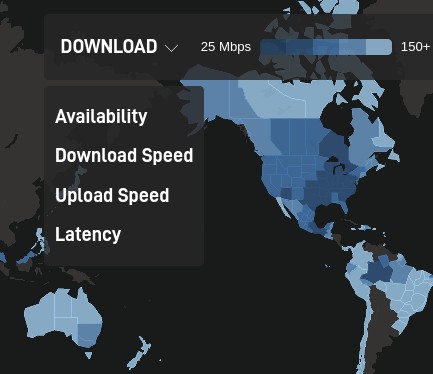
I see Starlink are now publishing maps showing speeds and latency.


itey
479 posts

Ultimate Geek
+1 received by user: 84


  #3122002 30-Aug-2023 19:52
Send private message

have just bought starlink for my parents


they were pulling their hair out at <1mbit/sec rural wifi just outside of Auckland (Kumeu).


Does anyone have any suggestions on best kit to mount the dish to the roof?


At present no aerials on the house so no existing mounting points.


thank you


juliant
104 posts

Master Geek
+1 received by user: 4


  #3122085 31-Aug-2023 08:44
Send private message

You could look at what this outfit offers - note they are not Starlink....


Starlink DIY Installation Kit - Free Shipping in NZ - STARLINK INSTALLERS​


Starlink also have products on their website


I guess for most people its just a standard tv type mast that is used


One tip I read - the end of the cable that goes into the dish is quite wide so hard to fit through small gaps - the other end is thinner so best to run cable from the dish to the house rather than the other way around


Shop now for Lego sets and other gifts (affiliate link).
coffeebaron
6304 posts

Uber Geek
+1 received by user: 3567

Trusted
Lifetime subscriber

  #3122100 31-Aug-2023 09:05
Send private message

This https://www.gowifi.co.nz/mounting-hardware/bkt-24-starlink.html?virtuemart_manufacturer_id=64 


or this: https://www.matchmaster.co.nz/satellite/13mm-sm14/ 


I tend to use the Match Master one for most of the installs I do. It seems more stable than the other one. I also carry a few other mounts for various install options.


Rural IT and Broadband support.


Broadband troubleshooting and master filter installs.
Starlink installer - one month free: https://www.starlink.com/?referral=RC-32845-88860-71 
Wi-Fi and networking
Cel-Fi supply and installer - boost your mobile phone coverage legally


Need help in Auckland, Waikato or BoP? Click my email button, or email me direct: [my user name] at geekzonemail dot com


Ge0rge
2114 posts

Uber Geek
+1 received by user: 2060

Trusted
Lifetime subscriber

  #3122187 31-Aug-2023 12:24
Send private message

juliant:

You could look at what this outfit offers - note they are not Starlink....


Starlink DIY Installation Kit - Free Shipping in NZ - STARLINK INSTALLERS​


Starlink also have products on their website


I guess for most people its just a standard tv type mast that is used


One tip I read - the end of the cable that goes into the dish is quite wide so hard to fit through small gaps - the other end is thinner so best to run cable from the dish to the house rather than the other way around


Don't buy the plastic pole adaptor - it's poorly 3d printed and doesn't fit securely.

pristle
158 posts

Master Geek
+1 received by user: 42

Subscriber

  #3135762 28-Sep-2023 10:38
Send private message

I got this from a colleague with a client across the ditch. Anyone know if we're getting the same deal?


New Service Plan Available


Starlink is now offering a new service plan for A$230/mo. The 40Gb Priority plan includes unlimited Standard Data (same as Residential offering today), along with priority support, public IP, a dashboard, and 40GB of high network priority data.Read more on key features below.


Public IP: Starlink'sIPv4 is dynamically DHCP assigned, but maintains virtually the same functionality as a true static IP. All service plans include a /56 IPv6 prefix. More details are available here.


Business Dashboard: View and manage all your Starlink's (sic) in one central dashboard: track performance metrics, modify router settings (if using Starlink router), and adjust more advanced network settings.


Priority Data: Plan include 40GB of Priority Data, which receives network priority over Standard Data. After using your allotted Priority Data, you can either opt-in for more Priority Data by the GB of default to unlimited Standard Data (same as residential offering).


This plan is best for small businesses and retail locations as well as backup or low bandwidth IoT use cases.


EDIT:  I think I've stumbled on the confirmation that it's available, but with a 'business' installation. So I guess the hidden question is, can a residential installation able to upgrade the business plan detailed above, without the outlay on new hardware?


coffeebaron
6304 posts

Uber Geek
+1 received by user: 3567

Trusted
Lifetime subscriber

  #3135926 28-Sep-2023 13:29
Send private message

NZ price is $260 per month. It doesn't mention public IP though. I suspect it will have one and hoping they have just missed that in the text. Though $100 per month for a static ip is quite a lot (if that's the main reason for this plan)


Rural IT and Broadband support.


Broadband troubleshooting and master filter installs.
Starlink installer - one month free: https://www.starlink.com/?referral=RC-32845-88860-71 
Wi-Fi and networking
Cel-Fi supply and installer - boost your mobile phone coverage legally


Need help in Auckland, Waikato or BoP? Click my email button, or email me direct: [my user name] at geekzonemail dot com


pristle
158 posts

Master Geek
+1 received by user: 42

Subscriber

  #3135985 28-Sep-2023 15:36
Send private message

I think that is the main driving idea behind the comment from the contact.


The client is a (Lotus/IBM/HCL Domino/Notes customer with a global collection of servers that 'push' replication regularly. The NZ site can 'push' out, but has to 'pull' replicate to get updates from the other sites. I understand it's been a bit problematic as it has to be scheduled.


While I've successfully got the the NZ client machines talking to do file&print to the AKL base through TailScale, but it's not been suitable for the Domino/Notes system.


The site is a business with at least 10 users online at any given time.


HP


Shop now for HP laptops and other devices (affiliate link).
coffeebaron
6304 posts

Uber Geek
+1 received by user: 3567

Trusted
Lifetime subscriber

  #3136141 28-Sep-2023 21:52
Send private message

I can confirm public IP with this plan. Not sure if it is static, but will test this too.


Rural IT and Broadband support.


Broadband troubleshooting and master filter installs.
Starlink installer - one month free: https://www.starlink.com/?referral=RC-32845-88860-71 
Wi-Fi and networking
Cel-Fi supply and installer - boost your mobile phone coverage legally


Need help in Auckland, Waikato or BoP? Click my email button, or email me direct: [my user name] at geekzonemail dot com


kiwifidget
"Cookie"
3641 posts

Uber Geek
+1 received by user: 1969

Lifetime subscriber

  #3151644 24-Oct-2023 04:59
Send private message

Is anyone using Starlink between Bombay and Beachlands?


Would appreciate some screenshots of speedtests if so, thanks.


Delete cookies?! Are you insane?!


DjShadow
4222 posts

Uber Geek
+1 received by user: 1322

ID Verified
Trusted
Subscriber

  #3229019 11-May-2024 13:50
Send private message

Just out of interest, I'm reading the planet is currently getting blasted with a geomagnetic storm strong enough for Transpower to take some circuits offline down south, would this have any effect on Starlink?


coffeebaron
6304 posts

Uber Geek
+1 received by user: 3567

Trusted
Lifetime subscriber

  #3229025 11-May-2024 14:02
Send private message

DjShadow:


Just out of interest, I'm reading the planet is currently getting blasted with a geomagnetic storm strong enough for Transpower to take some circuits offline down south, would this have any effect on Starlink?


Here is my currently painfully slow Starlink connection 😆


Rural IT and Broadband support.


Broadband troubleshooting and master filter installs.
Starlink installer - one month free: https://www.starlink.com/?referral=RC-32845-88860-71 
Wi-Fi and networking
Cel-Fi supply and installer - boost your mobile phone coverage legally


Need help in Auckland, Waikato or BoP? Click my email button, or email me direct: [my user name] at geekzonemail dot com


1 | ... | 61 | 62 | 63 | 64 | 65 | 66 | 67
View this topic in a long page with up to 500 replies per page Create new topic


Geekzone Live »

Try automatic live updates from Geekzone directly in your browser, without refreshing the page, with Geekzone Live now.


Are you subscribed to our RSS feed? You can download the latest headlines and summaries from our stories directly to your computer or smartphone by using a feed reader.