Geekzone: technology news, blogs, forums
Guest
Welcome Guest.
You haven't logged in yet. If you don't have an account you can register now.


arunj

13 posts

Geek


#111894 19-Nov-2012 08:49
Send private message

Hi all,

In the last 6 months or so, my adsl2+ upload speeds have come down to .65 to .75 Mbps where as earlier it used to be 1.01 - 1.05 Mbps. I checked with a work mate and he mentioned the same as well. I also rang the helpdesk but no real help as such. No change has been made on my side. Has anyone else  experienced similar drops in uploads. Any ideas as to how can this be fixed.

Thanks
Arun

Create new topic
johnr
19282 posts

Uber Geek
+1 received by user: 2526
Inactive user


  #719283 19-Nov-2012 08:50
Send private message

What make and model modem are you using?

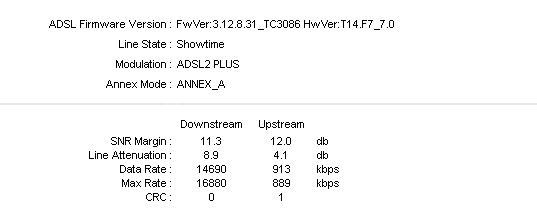
Please post line stats from modem


tonyhughes
Hawkes Bay
8476 posts

Uber Geek
+1 received by user: 6

Retired Mod
Trusted
Lifetime subscriber

  #719287 19-Nov-2012 08:53
Send private message

As with download speeds, this is incredibly likely to be your home wiring. ("Nothings changed' and 'My mate is having same problem too' do not alter this scenario).

Post modem stats as per Johns request, and also tell us about your wiring and filtering setup, including location of double phone plugs and phone extension cords, and extra phones/faxes etc.


arunj

13 posts

Geek


  #719289 19-Nov-2012 08:59
Send private message

thanks, will get the line stats today evening when i get home. the modem is a TP-Link TD-W8901G, and i only have one jackpoint which has a filter connected going to the phone and adsl router. i have replaced the filter and also tried the telecom supplied TG582n, similar upload speeds. 


johnr
19282 posts

Uber Geek
+1 received by user: 2526
Inactive user


  #719290 19-Nov-2012 09:01
Send private message

Watch out for those Thomson modems! I swapped out one at my sisters place yesterday for a Vodafone HG556a and speed almost doubled Down link and up link increased 200k

johnr
19282 posts

Uber Geek
+1 received by user: 2526
Inactive user


  #719291 19-Nov-2012 09:02
Send private message

arunj: thanks, will get the line stats today evening when i get home. the modem is a TP-Link TD-W8901G, and i only have one jackpoint which has a filter connected going to the phone and adsl router. i have replaced the filter and also tried the telecom supplied TG582n, similar upload speeds. 


So no other jack points in the house?

arunj

13 posts

Geek


  #719294 19-Nov-2012 09:07
Send private message

nope, just one. its a small unit


Stream your favourite shows now on Apple TV (affiliate link).
arunj

13 posts

Geek


  #719359 19-Nov-2012 10:26
Send private message

i just used the telecom one for testing, I use the TPlink wireless one.

line stats attached


https://cdn.geekzone.co.nz/imagessubs/37d88e5d2f626561daaecd848f91555b.jpg

Oldhat
180 posts

Master Geek

Lifetime subscriber

  #719422 19-Nov-2012 11:54
Send private message

Degradation on the upload can sometimes be related to the filter.

Try testing the modem without a filter and see what the upload speed is. If you don't have a spare phone cable, use the phone's cable direct to the jackpoint.

arunj

13 posts

Geek


  #719706 19-Nov-2012 19:59
Send private message

i have bypassed the the filter plugging in the phone cable direct into the phone socket and into the modem, it did improve the download sync speed by 500ish kbps but the upload speed remained the same at 909 kbps.

johnr
19282 posts

Uber Geek
+1 received by user: 2526
Inactive user


  #719710 19-Nov-2012 20:02
Send private message

900k up is perfect

arunj

13 posts

Geek


  #720027 20-Nov-2012 12:06
Send private message

i know its perfectly acceptable from an isp point of view, thats what telecom told me. but thats not why i posted the query here.


Shop now on Samsung phones, tablets, TVs and more (affiliate link).
johnr
19282 posts

Uber Geek
+1 received by user: 2526
Inactive user


  #720029 20-Nov-2012 12:08
Send private message

arunj: i know its perfectly acceptable from an isp point of view, thats what telecom told me. but thats not why i posted the query here.


I am reading the thread title " Telecom ADSL2+ upload speeds " 900k is perfect so now I am confused

arunj

13 posts

Geek


  #720035 20-Nov-2012 12:30
Send private message

Trying again...
Earlier is about 6 months or so ago
Router/Modem is TP-Link TD-W8901G
Single jack point in the house

Earlier: Sync upload speed: 1200 kbps, Speedtest auckland server upload speed: 1.05 Mbps
Now: Sync upload speed: 900 kbps, Speedtest auckland server upload speed: .72 Mbps

have tried changing phone cable, adsl filter, telecom TG582n router
I am getting "Now" upload sync and speed test results.

is there anything else that can be done?
are others here at geekzone noticing a similar drop in the upload sync / transfer speeds?

Create new topic


Geekzone Live »

Try automatic live updates from Geekzone directly in your browser, without refreshing the page, with Geekzone Live now.


Are you subscribed to our RSS feed? You can download the latest headlines and summaries from our stories directly to your computer or smartphone by using a feed reader.