Geekzone: technology news, blogs, forums
Guest
Welcome Guest.
You haven't logged in yet. If you don't have an account you can register now.


ajobbins

5053 posts

Uber Geek
+1 received by user: 1279

Trusted

#13992 9-Jun-2007 14:36
Send private message

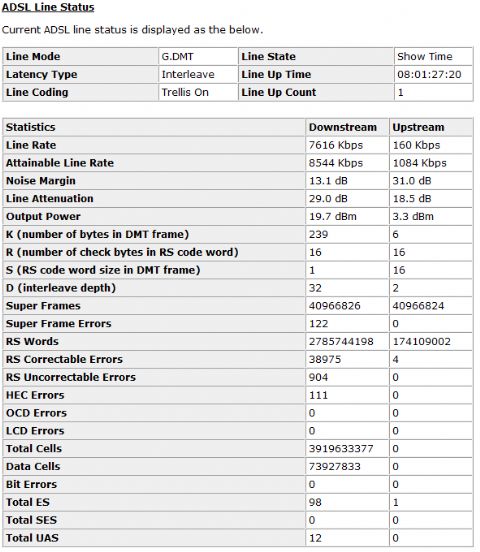
Our Woosh ADSL speeds seem to be getting worse and worse, even now that we are changed off their 'Unlimited' plan and can't get back on it. I'm not really sure what all the Line Status figures mean so is anyone able to explain some of the result from this?

Here is a speed test done a few mins ago:


And here is the stats from the Modem:


Twitter: ajobbins


Create new topic
Satyr
64 posts

Master Geek
+1 received by user: 1


  #74443 12-Jun-2007 21:23
Send private message

Currently on the Unlimited plan with woosh and this is the speeds Im getting (Torrents are capped 24/7 now though, which is gay)


Batman
Mad Scientist
30012 posts

Uber Geek
+1 received by user: 6217

Trusted
Lifetime subscriber

  #74470 13-Jun-2007 10:01
Send private message

the only 2 i trust is xtra and orcon. i've tried woosh before, and gave up on them.

UnrealSolo
26 posts

Geek
Inactive user


  #76023 26-Jun-2007 19:25
Send private message

trying using another net company obviously the net you on now is budget. trying using xtra or telstra clear .. any tht suites you best


ajobbins

5053 posts

Uber Geek
+1 received by user: 1279

Trusted

  #76035 26-Jun-2007 20:12
Send private message

Only stayed with Woosh as several people in my flat already had woosh email addresses they wanted to keep. Xtra is crap IMHO (And many other peoples). TCL Cable would be ideal if I could get it, but I cant.


Twitter: ajobbins


quadiator
31 posts

Geek


  #79043 20-Jul-2007 23:04
Send private message

woosh unlimited - caps the torrent downloads speed? what about the normal downloads, from megaupload or rapidshare?


bobby

mikenz
15 posts

Geek


  #79111 21-Jul-2007 14:15
Send private message

I think it depends on which exchange you connect to. My friend in Pakuranga is only getting 500kbps download using speedtest.net. His line rate is 10Mbps (ADSL2). He is with Xtra by the way.


Shop now for Lenovo laptops and other devices (affiliate link).
Niel
3267 posts

Uber Geek
+1 received by user: 80

Trusted

  #79172 22-Jul-2007 10:12
Send private message

Interesting.  I am also in Pakuranga (Edgewater) and I sync at 9.5Mbps, attainable is over 11Mbps, but my download speed is around 3.5Mbps.  I am not complaining about 3.5Mbps, just that it is a third of my sync speed with the exchange.  But anyway, I'm on the Pakuranga exchange but my ISP is XNet which I believe has an excellent path to the Internet.  They need to, because they need high quality for their VFX service (VoBB or VoIP).  My ping time is always under 50ms and my download speed varies between 3.4Mbps and 3.7Mbps day or night, weekday or weekend.  My modem is a cheap Dynalink RTA1320.  My "down" SNR is 12dB, yet I get a much better download speed than the other 2 posts in this thread.

So the problem is not the exchange, the problem is the ISP through which your data goes.  If you can sync at a high speed, then your line is probably fine.


You can never have enough Volvos!


Spyware
3818 posts

Uber Geek
+1 received by user: 1366

Lifetime subscriber

  #79182 22-Jul-2007 11:36
Send private message

Windows OS by default isn't configured for optimal throughput on the Internet. TCP receive window (RWIN) needs to be increased to 256960, a multiple of MSS. See http://www.speedguide.net/downloads.php. There is also an analysis tool in the left hand menu.

« SpeedGuide.net TCP Analyzer Results »
Tested on: 07.21.2007 19:35
IP address: 222.154.xxx.x
 
TCP options string: 020405b40103030201010402
MSS: 1460
MTU: 1500
TCP Window: 256960 (multiple of MSS)
RWIN Scaling: 2 bits (4)
Unscaled RWIN : 64240
Reccomended RWINs: 64240, 128480, 256960, 513920
BDP limit (200ms): 10278kbps (1285KBytes/s)
BDP limit (500ms): 4111kbps (514KBytes/s)
MTU Discovery: ON
TTL: 50
Timestamps: OFF
SACKs: ON
IP ToS: 00000000 (0)


Spark Max Fibre using Mikrotik CCR1009-8G-1S-1S+, CRS125-24G-1S, Unifi UAP, U6-Pro, UAP-AC-M-Pro, Apple TV 4K (2022), Apple TV 4K (2017), iPad Air 1st gen, iPad Air 4th gen, iPhone 13, SkyNZ3151 (the white box). If it doesn't move then it's data cabled.


Niel
3267 posts

Uber Geek
+1 received by user: 80

Trusted

  #79204 22-Jul-2007 14:10
Send private message

Spyware: Windows OS by default isn't configured for optimal throughput on the Internet. TCP receive window (RWIN) needs to be increased to 256960, a multiple of MSS. See http://www.speedguide.net/downloads.php. There is also an analysis tool in the left hand menu.


I like Spyware!  Thanks mate, my connection went from 3.5Mbps to 5Mbps just by using this simple tool!  It has optimised the Windows network card settings, guess I should also look at my router and at my modem.  Well, one item in the chain is now sorted.


You can never have enough Volvos!


Spyware
3818 posts

Uber Geek
+1 received by user: 1366

Lifetime subscriber

  #79207 22-Jul-2007 14:45
Send private message

I changed from a ZyXEL Prestige 600 series achieving slightly over 5 Mbps to a Belkin BSD9630au4 which gives me around 6.8 Mbps throughput. Sync is still around 8 Mbps with my exchange not being upgraded to ADSL2+ until next month. The problem with the Belkin is that if the wireless capability is enabled the router's webserver completely hangs.


Spark Max Fibre using Mikrotik CCR1009-8G-1S-1S+, CRS125-24G-1S, Unifi UAP, U6-Pro, UAP-AC-M-Pro, Apple TV 4K (2022), Apple TV 4K (2017), iPad Air 1st gen, iPad Air 4th gen, iPhone 13, SkyNZ3151 (the white box). If it doesn't move then it's data cabled.


Create new topic


Geekzone Live »

Try automatic live updates from Geekzone directly in your browser, without refreshing the page, with Geekzone Live now.


Are you subscribed to our RSS feed? You can download the latest headlines and summaries from our stories directly to your computer or smartphone by using a feed reader.
