Geekzone: technology news, blogs, forums
Guest
Welcome Guest.
You haven't logged in yet. If you don't have an account you can register now.


akinzy1405

2 posts

Wannabe Geek


#217955 19-Jul-2017 21:25
Send private message

Hi guys,


Having trouble understanding how to setup MX records in 1st Domains to feedback emails into G-suite.


How do I know what MX record type (MX 0, MX 10, MX 20, MX 30, MX 40, MX 50) to use for the following:
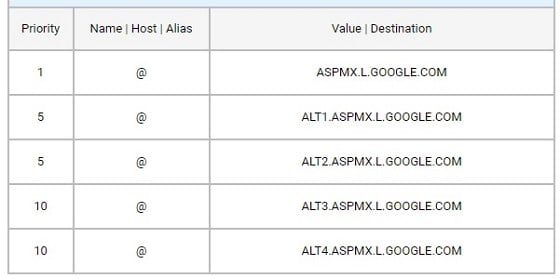


A little confused so any help greatly appreciated.


Create new topic
billgates
4706 posts

Uber Geek
+1 received by user: 672

Trusted

  #1825526 19-Jul-2017 21:28
Send private message

Just use MX0 for 1 priority then MX10 for priority 5. You don't need to enter all MX records


Do whatever you want to do man.


akinzy1405

2 posts

Wannabe Geek


  #1825530 19-Jul-2017 21:31
Send private message

billgates: Just use MX0 for 1 priority then MX10 for priority 5. You don't need to enter all MX records


Thanks Bill!
I also need to do priority 15 to verify. Would you suggest MX10 or MX 20?


marpada
487 posts

Ultimate Geek
+1 received by user: 182


  #1825532 19-Jul-2017 21:34
Send private message

I'm not familiar with 1st Domains, but the actual value of the priority doesn't really matter, emails will be delivered with the server(s) with the lowest priority, and it unavailable the servers with a higher priority value will be tried. Also you don't need to enter all 5 MX servers (some DNS provider might allow restrict how many MX servers you can add), just add as many as you can starting with the ones with the lower priority value.


Make sure you add the SPF (TXT) record while you're on it


https://support.google.com/a/answer/178723?hl=en


michaelmurfy
meow
13579 posts

Uber Geek
+1 received by user: 10910

Moderator
ID Verified
Trusted
Lifetime subscriber

  #1825535 19-Jul-2017 21:41
Send private message

My suggestion is to move from your domain providers DNS over to something like Cloudflare (free) which makes configuration very easy in the process (and if you're running a website adds free protection, SSL etc).


Michael Murphy | https://murfy.nz
Referral Links: Quic Broadband (use R122101E7CV7Q for free setup)

Are you happy with what you get from Geekzone? Please consider supporting us by subscribing.
Opinions are my own and not the views of my employer.


Create new topic


Geekzone Live »

Try automatic live updates from Geekzone directly in your browser, without refreshing the page, with Geekzone Live now.


Are you subscribed to our RSS feed? You can download the latest headlines and summaries from our stories directly to your computer or smartphone by using a feed reader.