Geekzone: technology news, blogs, forums
Guest
Welcome Guest.
You haven't logged in yet. If you don't have an account you can register now.


Dalida

4 posts

Wannabe Geek
+1 received by user: 1


#289971 12-Oct-2021 16:18
Send private message

Hi - newbie here.

Hoping someone could please enlighten me with this theoretical question.

Could the fact that I spent 2 days logging into & exploring the functions of my 6 year old HG659 Modem/Router have caused some major interference on the incoming VDSL phone line?

Or possibly some disruption at the small junction box at the end of my shared, rented driveway?

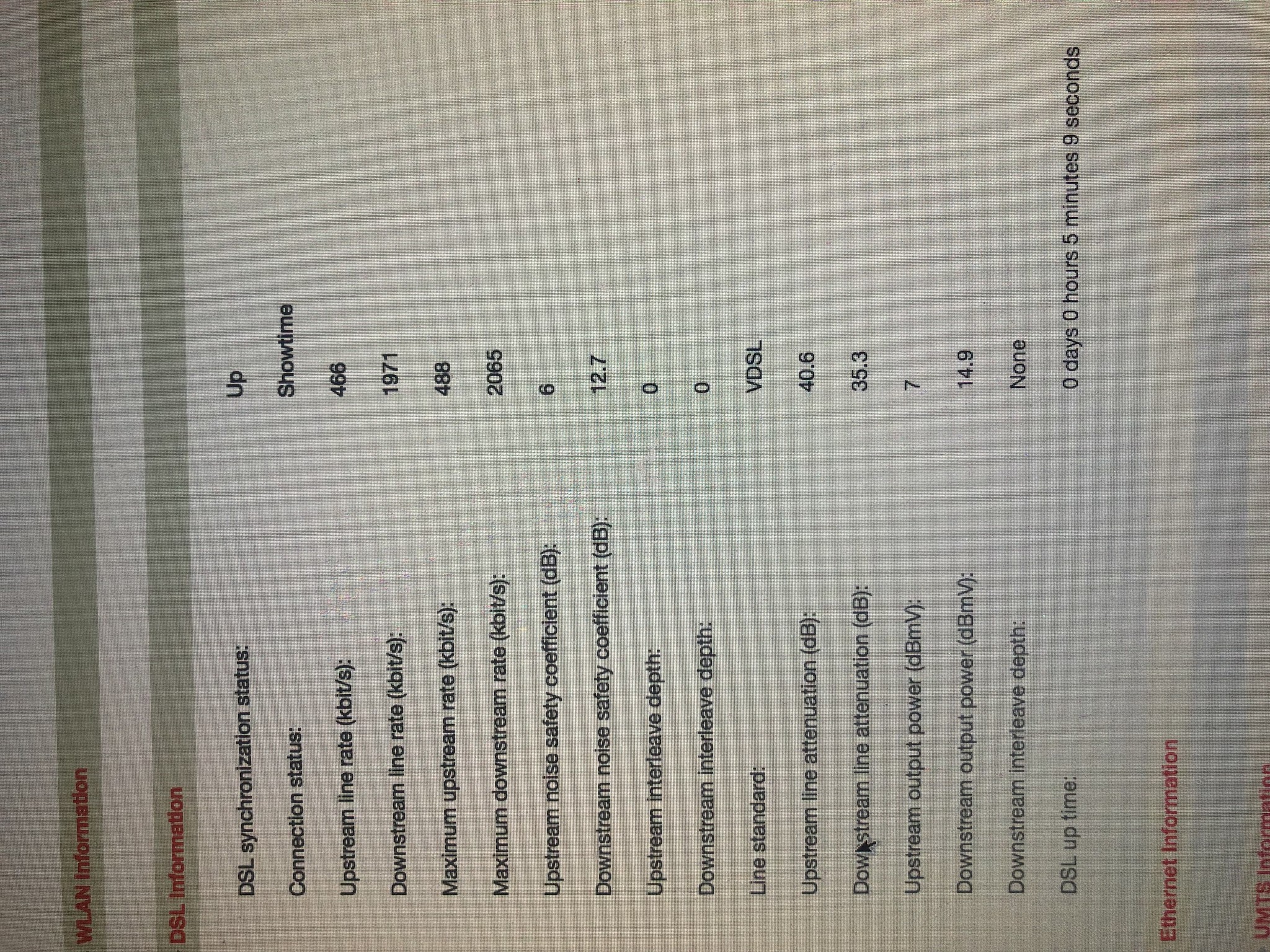
Such that I have gone from average speeds of Downstream 31.162 Mbps & Upstream 8.954 - to average of 1.971 & 0.466 respectively - that is, if I am even successful in even establishing an internet connection.

This all began minutes after I logged out of the router & after I was exploring the various Fibre options for my area.

This cannot be coincidence that the incoming line has degraded after interacting with the modem IMHO.

The only way I could regain a dodgy on/off internet connection was by plugging in an analog phone (I haven’t used the “landline” of my home/internet connection for ages - and when I used to there was always interference.)

I am unable to find an ETP anywhere on exterior of house.

I have replaced:

- [ ] the xdsl master filter
- [ ] the gel crimps from filter orange/white to line in
- [ ] the RJ45 wall socket to filter green/white
- [ ] the RJ12 DSL cable from RJ45 to modem.
- [ ] the master BT phone jack to filter blue/white
- [ ] I have removed the cable for the other (unused) jackpoints from the phone jack.
- [ ] I have performed countless factory restores on the modem.

I am only barely able to receive a test call from my mobile, most times it drops the call after ringing & answering, & I can’t get a proper ringtone when lifting handset. I have checked & redone all connections. I have tried various options such as removing filter & phone & connecting DSL directly to incoming line. Also connecting filter to incoming line & DSL but not connecting its blue/white cables to any phones.

I have really done all I can think of, after researching a number of these topics, and I now feel I should ask for help.

I’ve attached a pic of the best DSL specs I can get - when it intermittently works.

Thanks for reading this far & thanks in advance for any suggestions/wisdom you can offer.


View this topic in a long page with up to 500 replies per page Create new topic
 1 | 2
RunningMan
9184 posts

Uber Geek
+1 received by user: 4834


  #2794077 12-Oct-2021 16:23
Send private message

1) The image is too small to see
2) No, looking at settings would not cause this
3) Given POTS is also having significant problems, there is likely a line fault outside your premises.
4) Not every property has an ETP - the demarc is most likely where the master filter is installed.


By redoing the internal wiring you've done far more testing than most. Probably time to log a fault with your provider.


Tinkerisk
4798 posts

Uber Geek
+1 received by user: 3660


  #2794089 12-Oct-2021 16:42
Send private message

How have you logged-in to the router. Via WiFi or a wired ethernet connection?


- NET: FTTH & VDSL, OPNsense, 10G backbone, GWN APs
- SRV: 12 RU HA server cluster, 0.1 PB storage on premise
- IoT:   thread, zigbee, tasmota, BidCoS, LoRa, WX suite, IR
- 3D:    two 3D printers, 3D scanner, CNC router, laser cutter


Behodar
11095 posts

Uber Geek
+1 received by user: 6072

Trusted
Lifetime subscriber

  #2794091 12-Oct-2021 16:44
Send private message

Have you been rebooting or otherwise dropping and restarting the connection? If you reconnect too many times then the modem at the other end will assume that your line is faulty and reduce the speeds in an effort to improve reliability.


quickymart
14940 posts

Uber Geek
+1 received by user: 13953

ID Verified

  #2794115 12-Oct-2021 17:32
Send private message

Those are pretty poor speeds for VDSL.


richms
29098 posts

Uber Geek
+1 received by user: 10208

Trusted
Lifetime subscriber

  #2794212 12-Oct-2021 19:24
Send private message

Unless you manually set an inappropriate modulation then there is little you could do in settings to lower speeds of the sync.


My first step would be to unplug it from the line, factory reset it and put your details back in if needed, and then after its been unplugged for a while reconnect it and see if it syncs better.


If not, then get onto the ISP about a replacement that they will support and log a fault if that doesnt help with it.


Richard rich.ms

Dalida

4 posts

Wannabe Geek
+1 received by user: 1


  #2794266 12-Oct-2021 20:47
Send private message

Thank you all for your feedback & recommendations.

I’m using an Ethernet connection to the router.

Over the last few days I have rebooted & factory restored the modem numerous times, and in addition the modem drops the WAN & Internet lights & I assume restarts the connection a while later.

I will try the unplug, factory reset, reprogram, leave it to sit & then reconnect it later - tomorrow.

If no joy then I will contact ISP again about investigating POTS, checking for any speed reductions, replacing the modem etc.

On Saturday, after having no steady WAN light & no Internet light for over 12 hours I called my ISP:
- [ ] They couldn’t see any signals from my modem.
- [ ] They told me that even if it was working they couldn’t perform a “service provider speed test” that I requested.
- [ ] They said that whilst the HG659 wasn’t provided anymore for new connections it was still a reliable unit, used by many customers.
- [ ] Also they preferred customers using this model of modem when trying to diagnose faults. When I asked why this was, they said it was because the newer models wouldn’t allow them to remote into the unit.
- [ ] They told me that the factory reset would only start after the “power” light went out/flickered - when in fact I later discovered this doesn’t go out, but the 4 LAN lights illuminate & extinguish together to indicate factory reset had begun.
- [ ] They told me that I should have replaced the EPL EPVDSL2 VDSL2 Splitter myself, as these fail after a short time & require regular replacements. I think they meant if I had been using a “plug in” microfilter, as I found the xDSL master splitter (filter) inside a junction box on the wall. I asked how a layman would have known to replace this & they said a layman wouldn’t know. I read in historical threads here that these xDSL master splitters are very reliable & rarely fail - but I replaced anyway. Other than this splitter there are no other filters.
- [ ] After 1.5 hours of talking & trying to do a factory reset (waiting for a light to go off that doesn’t go out) they finally agreed to send me a replacement modem - a newer model DN8245 (also Huawei.) I then suggested I plug in a phone, that I hadn’t used in months, and with a horrible crackly distorted dual tone, for some reason the WAN & Internet lights on modem illuminated & miraculously I had about 28 Mbps Download - for a short time.
- [ ] They then said all was fine & the reset had just come through & I didn’t need the replacement after all.
- [ ] After completing this call it all crashed again.

I understand that I’m renting in a SFA, with no broadband vectoring, and soon the copper wires will go. I’ve just been complacent & endured what I thought were acceptable speeds as I didn’t want to incur any cost or inconvenience to anybody by going fibre.

Now I see that the cost saving & speed/data benefits would be advantageous.

I just wish I hadn’t somehow “broken” the VDSL just as I was coming to this understanding.

Thanks again - what a great community of helpful people - I will certainly interact here on various topics going forward.

Cheers


Shop now on AliExpress (affiliate link).
RunningMan
9184 posts

Uber Geek
+1 received by user: 4834


  #2794291 12-Oct-2021 21:57
Send private message

Dalida: [snip]
- [ ] They told me that I should have replaced the EPL EPVDSL2 VDSL2 Splitter myself, as these fail after a short time & require regular replacements.


What?


Linux
12174 posts

Uber Geek
+1 received by user: 8469

Trusted
Lifetime subscriber

  #2794294 12-Oct-2021 22:26
Send private message

RunningMan:


Dalida: [snip]
- [ ] They told me that I should have replaced the EPL EPVDSL2 VDSL2 Splitter myself, as these fail after a short time & require regular replacements.


What?


@Dalida WTH you are kidding me? I would be asking them to pay for the replacement you did not require


You could have water on the line causing the drop in speed lots of rain about


quickymart
14940 posts

Uber Geek
+1 received by user: 13953

ID Verified

  #2794301 12-Oct-2021 23:31
Send private message

Do you have fibre available where you are?


Batman
Mad Scientist
30012 posts

Uber Geek
+1 received by user: 6217

Trusted
Lifetime subscriber

  #2794302 13-Oct-2021 05:53
Send private message

i have to say, about ??14 years ago i had a vdsl line, and every time i swap a new modem, the line speed gets lower. though mine wasn't the fastest to begin with, it just kept going down. like this.


no idea why. maybe neighbours installed vdsl is my only explanation.


RunningMan
9184 posts

Uber Geek
+1 received by user: 4834


  #2794325 13-Oct-2021 08:36
Send private message

@batman, neighbours installing xDSL is a valid explanation. The more crosstalk in the feeder bundle, the lower everyone connects at. In fibre areas, the opposite happens. As less people have xDSL, the remaining ones get a better sync rate.


Shop now on Samsung phones, tablets, TVs and more (affiliate link).
Bung
6733 posts

Uber Geek
+1 received by user: 2926

Subscriber

  #2794329 13-Oct-2021 08:40
Send private message

Dalida: I then suggested I plug in a phone, that I hadn’t used in months, and with a horrible crackly distorted dual tone, for some reason the WAN & Internet lights on modem illuminated & miraculously I had about 28 Mbps Download - for a short time.


Dalida: I am only barely able to receive a test call from my mobile, most times it drops the call after ringing & answering, & I can’t get a proper ringtone when lifting handset. I have checked & redone all connections. I have tried various options such as removing filter & phone & connecting DSL directly to incoming line.


If you still have a landline connection and can't get the phone working properly that suggests that there's a fault in one of the connections. How are you checking them, with a meter or just visually?

Tinkerisk
4798 posts

Uber Geek
+1 received by user: 3660


  #2794364 13-Oct-2021 10:06
Send private message

Last time I had symptoms like described here was when I had a mains protectional earth grounding problem with an strange external power supply of an HP notebook plugged in via a shielded Cat5 eth cable to a Fritz!Box. With WiFi only everything was fine.


- NET: FTTH & VDSL, OPNsense, 10G backbone, GWN APs
- SRV: 12 RU HA server cluster, 0.1 PB storage on premise
- IoT:   thread, zigbee, tasmota, BidCoS, LoRa, WX suite, IR
- 3D:    two 3D printers, 3D scanner, CNC router, laser cutter


wellygary
8810 posts

Uber Geek
+1 received by user: 5287


  #2794389 13-Oct-2021 10:52
Send private message

Bung: 


If you still have a landline connection and can't get the phone working properly that suggests that there's a fault in one of the connections. How are you checking them, with a meter or just visually?


Yip, it certainly sounds like a fault on one leg of the copper pair , (could be on your site, or more likely in the line from the Exchange to your ETP)- 


Irrespective of complaining about your BB speeds ( which will have CSRs telling you do do a whole lot of stuff) 


Simple call your ISP and tell them your landline is not working correctly....


Dalida

4 posts

Wannabe Geek
+1 received by user: 1


  #2794411 13-Oct-2021 11:26
Send private message

Quote: If you still have a landline connection and can't get the phone working properly that suggests that there's a fault in one of the connections. How are you checking them, with a meter or just visually?

I’ve made the 2 gel crimp connections several times, as this was my 1st time using these.
Also, as it was about 30 years since I used a plastic Krone tool on a jackpoint I bought a new $4 one, but I have to admit that some of the connections didn’t accept the wires very well & needed a lot of pushing. I used a multimeter to test the incoming phone line. I didn’t write it down but I believe it was about 45V DC.

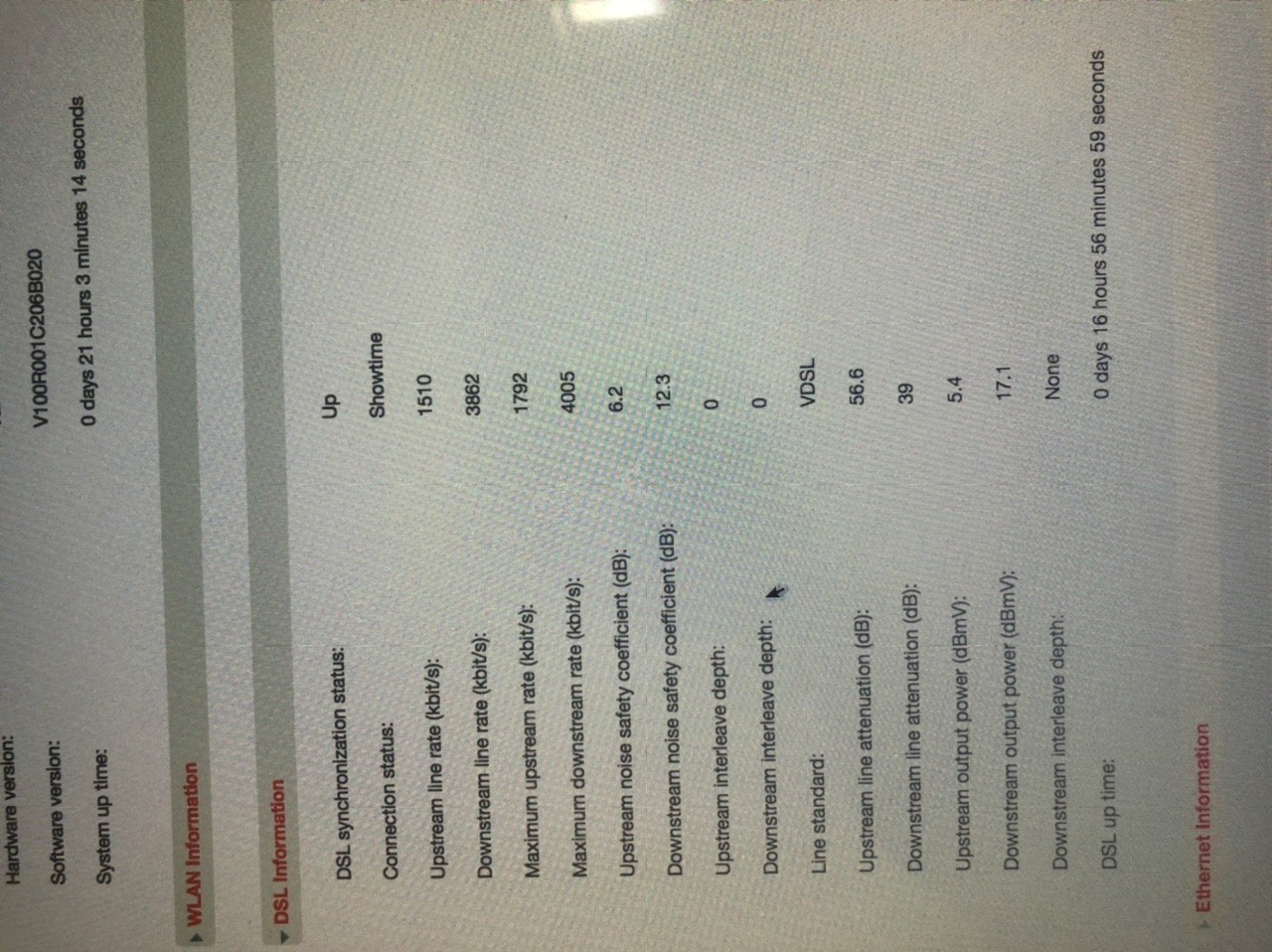
I used the Wifi all night without it dropping & this morning the router is sitting on D/L 3.862 & U/L 1.510 Mbps. I’ll post a new pic of the DSL specs - I notice the line attenuation figures have increased as the connection rates have improved.

I’m afraid to touch any of the cabling now for fear of upsetting the weak performance I have .

I thought I would call the ISP now before I do the reset as a above.

Yes we have Fibre here - we are in a SFA (Specified Fibre Area) & I understand the copper wires will become redundant soon - so now is a good time to embrace fibre. I know that I will kick myself for not going down the fibre route sooner.

The only reason I logged into the modem originally is because I am about to connect a Helium Hotspot/miner (surprised nobody is discussing this topic yet on the Geekzone site) & I will need to port forward/use DMZ so thought I better figure out how this all works.

I still can’t understand why all this started minutes after I disconnected the Mac from the modem LAN after accessing it all day, and even more ironically after using the Chorus tools to check for fibre availability etc.


 1 | 2
View this topic in a long page with up to 500 replies per page Create new topic


Geekzone Live »

Try automatic live updates from Geekzone directly in your browser, without refreshing the page, with Geekzone Live now.


Are you subscribed to our RSS feed? You can download the latest headlines and summaries from our stories directly to your computer or smartphone by using a feed reader.