Geekzone: technology news, blogs, forums
Guest
Welcome Guest.
You haven't logged in yet. If you don't have an account you can register now.


TommySharp

135 posts

Master Geek
+1 received by user: 14

ID Verified

#293432 20-Jan-2022 13:16
Send private message

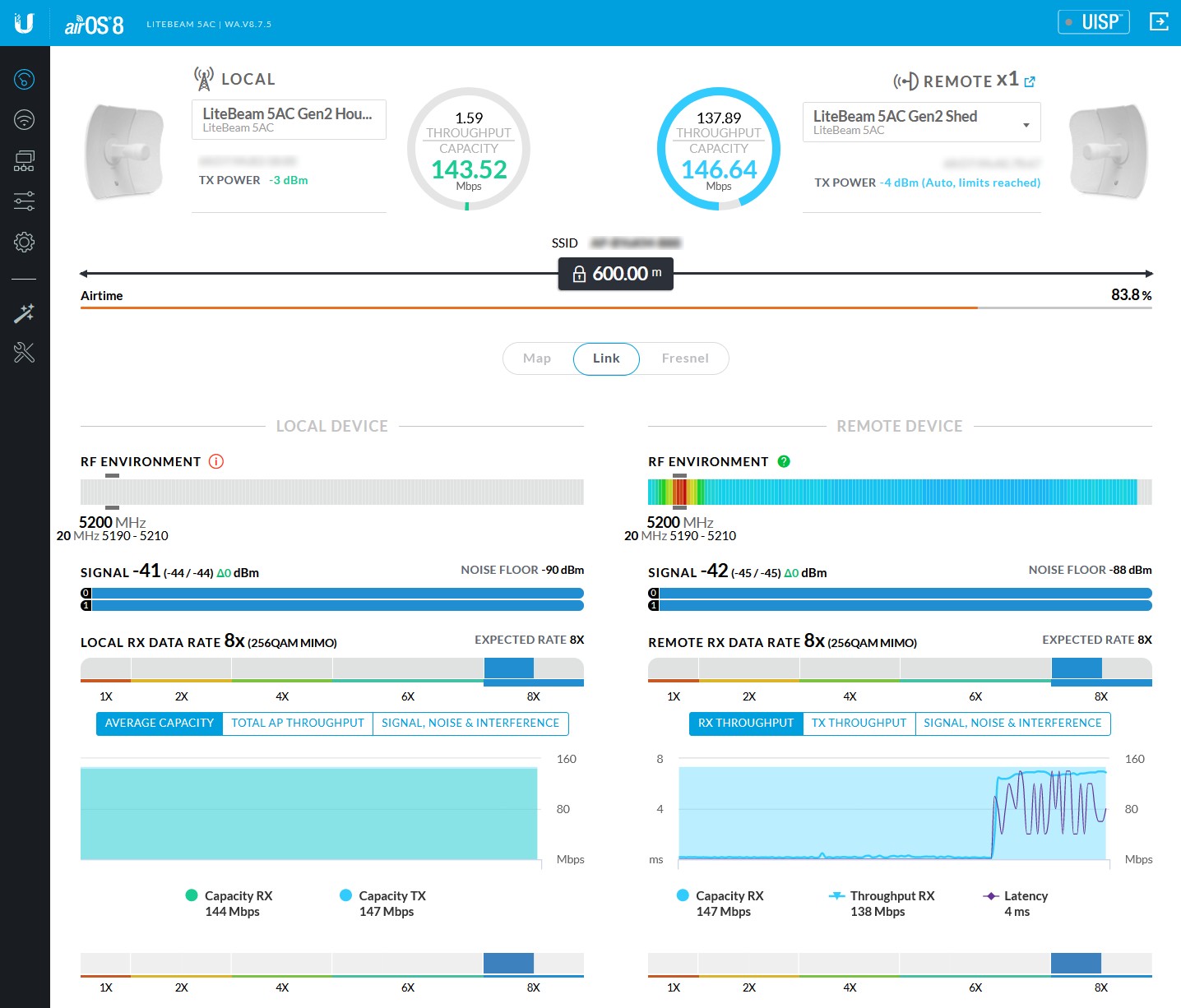
I've setup a couple of LiteBeams to connect up my workshop which is about 250m from the main house. It's working well but the throughput seems to max out at 145Mbps... I've tinkered with the alignment to try improve things but this is the best I can get.


Maybe someone with more experience could give me a hand with finding out what the issue is?


View this topic in a long page with up to 500 replies per page Create new topic
 1 | 2
wratterus
1687 posts

Uber Geek
+1 received by user: 678


  #2854083 20-Jan-2022 13:25
Send private message

Lower your output power, aim for around a -50 signal. That speed is correct for a 20MHz channel. You can use a wider channel if you need more throughput. Best to use between 5725 & 5850Mhz for fixed PtP. 


Azzura
609 posts

Ultimate Geek
+1 received by user: 224

ID Verified

  #2854086 20-Jan-2022 13:35
Send private message

Try going wider channel bandwidth.

Try different freq area.


Check LOS....

Site might help.... https://link.ui.com/#


TommySharp

135 posts

Master Geek
+1 received by user: 14

ID Verified

  #2854141 20-Jan-2022 13:50
Send private message

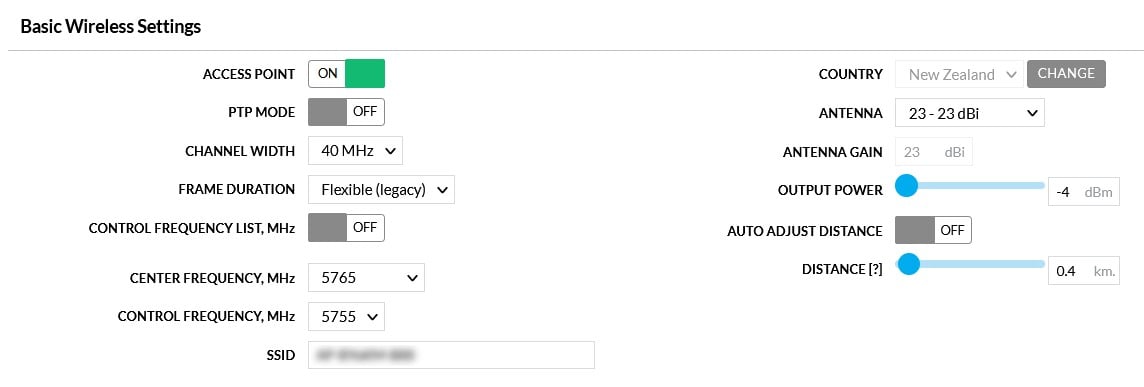
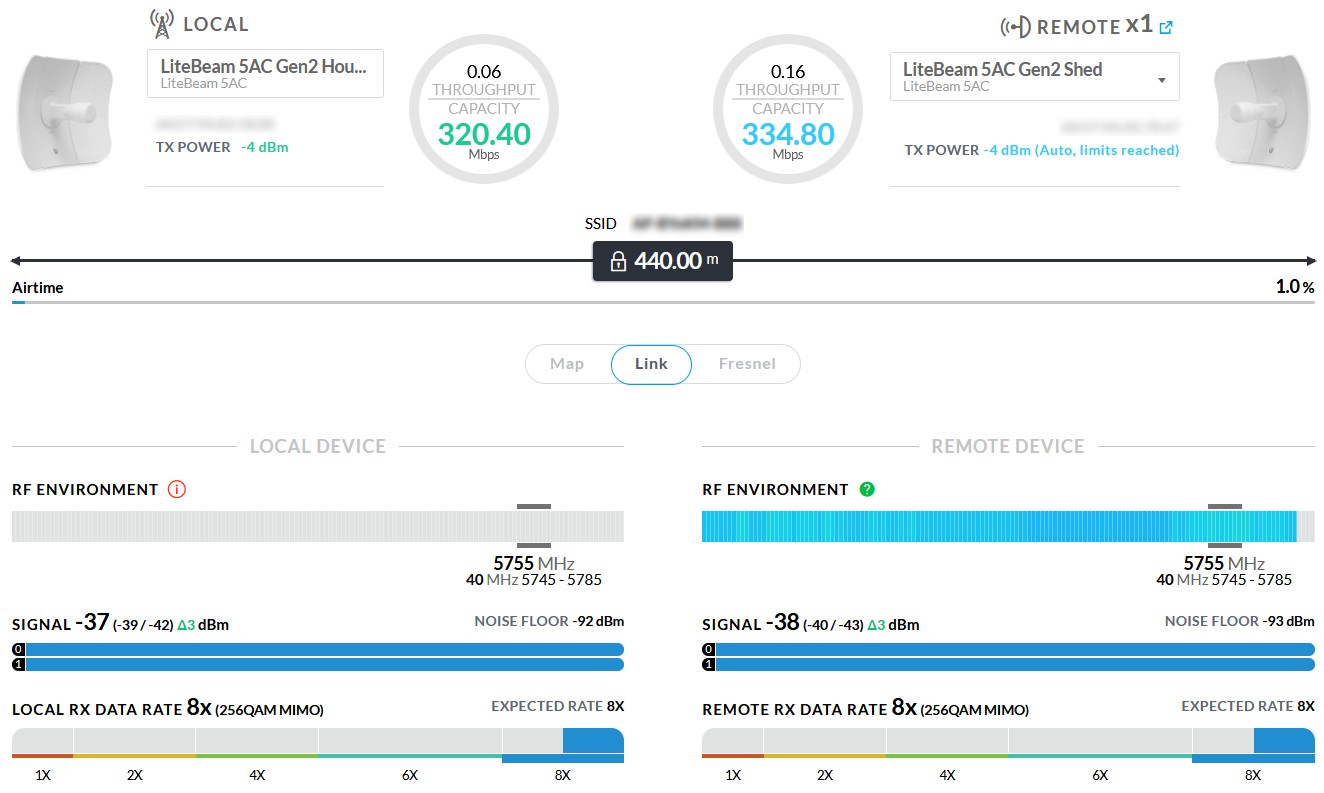
Thanks for the input guys! I've poked around the admin screens a bit and changing the settings on the dish at the house to this has improved things a LOT... Sitting at 320Mbps.... How do I "lower your output power"...?


Azzura
609 posts

Ultimate Geek
+1 received by user: 224

ID Verified

  #2854156 20-Jan-2022 14:12
Send private message

It is output power.....judging by the slider ---i'd say it is already as low as it can go.

I'd try going even wider than 40. I think they can go 80 in the settings. If it doesn't hold stable....you could increase output a little or you can just reduce the channel width again.


wratterus
1687 posts

Uber Geek
+1 received by user: 678


  #2854159 20-Jan-2022 14:15
Send private message

Yeah those radios are super overkill for that distance & it looks like you can't get the power low enough to be ideal. Make sure you've lowered the power output on both radios. 

It shouldn't cause you any major issues. if you are fairly rural crank the channel width to 80MHz & see what you get. If you are urban I'd recommend leaving it at 40. It looks like your spectrum is pretty damn clean there so thinking you are out on your own somewhere?


Bear in mind you'll need to change the station to 80MHz manually, it won't auto switch like it does for 20/40. 


Also run a real test over the link, don't just look at the pretty numbers in the UI. 


TommySharp

135 posts

Master Geek
+1 received by user: 14

ID Verified

  #2854160 20-Jan-2022 14:20
Send private message

Thanks guys, will keep tinkering…. Just out of interest, what would be a more suitable setup for this distance?


Shop now for Dyson appliances (affiliate link).
TommySharp

135 posts

Master Geek
+1 received by user: 14

ID Verified

  #2854161 20-Jan-2022 14:21
Send private message

Should I be setting PTP on? It appears that is the only way I can get more than 40mhz…


wratterus
1687 posts

Uber Geek
+1 received by user: 678


  #2854164 20-Jan-2022 14:33
Send private message

Yes


TommySharp

135 posts

Master Geek
+1 received by user: 14

ID Verified

  #2854168 20-Jan-2022 14:41
Send private message

Awesome, they look to be linking up at 450Mbs when I use 60mhz and a real world test maxes out at about 300Mbs...
I'll tinker some more another day now that I know which buttons to turn but for now it's way better... Thanks for the help!


wratterus
1687 posts

Uber Geek
+1 received by user: 678


  #2854175 20-Jan-2022 14:52
Send private message

You'll probably find 80MHz better than 60. 


anatokidave
66 posts

Master Geek
+1 received by user: 21

ID Verified

  #2854523 21-Jan-2022 10:55
Send private message

A few more points to consider:


First up, relevant information on channel use is contained in the RSM doc entitled 'Important information for users of Wi-Fi devices in the 5 GHz band'.


As part of the setting-up process, I would use the channel scan function on both your AP and client to find some clear channels (this feature can by found under 'Tools'). If you are in a rural location, then most of the band should be clear.  If there is a WISP operating in ur area, then it is likely to be using spectrum between 5725 and 5865.


The screenshot of link shows that it is excellent and is providing maximum bandwidth for that 20Mhz channel width.  As noted above, the link might be running a bit 'hot' - eg the signal levels are at the threshold of overwhelming the receivers on each unit.


You don't describe what the use-case is for internet the workshop - but if it is not being used for anything more than social media, email, web browsing, you-tube, or streaming, then you have plenty of capacity.


I'm figuring that you wanted to see if you could achieve the advertised '450Mbps' through put that is advertised for these units.  However, by using an 80Mhz channel width, you are opening yourself up to increased noise and interference, especially if you use the spectrum between 5725 and 5865 GHz.  This chunk of spectrum is used by WISP's for longer range point to point links.  5725 to 5865 is the only part of the GURL spectrum where users are permitted to use increased power levels to achieve stable links.  IMHO, using an 80Mhz channel width between 5725 and 5865 represents poor practice and will quickly render 5GHz unusable for longer-range rural links (a tragedy of the commons issue). 


My approach in this situation would be to chose a couple of channels between 5500 and 5725 GHz, because that spectrum is usually clear and in most cases, you will not interfere with either indoor Wifi (It is my experience that most domestic equipment defaults to the lower part of the band (5170 to 5350) ) or long-range links. Using Ubiquiti AC units, I can achieve maximum capacity in the DFS (lower power) portions of the band on links of up to about 1500m.  If you are near a general weather radar site (Kaeo, Tamahunga, Mamaku, New Plymouth airport, Mahia, Outlook Hill (Wellington), Rakaia Trig, Blue Spur Range (Hokitika), Dunedin, and Invercargill Airport) - then keep clear of that part of the spectrum.


My experience is that Ubnt AC gear usually needs a CINR ratio of at least 30dB to achieve maximum throughput (ie the signal level needs to be at least 30dB above the noise + interference level.)  You can get this info from the dashboard.


Shop now on AliExpress (affiliate link).
TommySharp

135 posts

Master Geek
+1 received by user: 14

ID Verified

  #2854561 21-Jan-2022 12:21
Send private message

@anatokidave thank you for that info... I will definitely use it when I ticker with the settings again.


raytaylor
4076 posts

Uber Geek
+1 received by user: 1296

Trusted

  #2854784 22-Jan-2022 01:17
Send private message

TommySharp:


Thanks guys, will keep tinkering…. Just out of interest, what would be a more suitable setup for this distance?


Mikrotik Wireless Wire - either the cubes or the dishes.
They do about 1gbit throughput. 

A pair of dishes for 1km
The cubes for up to 400m
The oblong flatpanel ones for up to 100m. 


They come as a pair pre-configured out of the box.  


There is no need to ever use 5ghz for such short distance links anymore. 60ghz will do 1gbit easily for almost the same cost. 


Ray Taylor

There is no place like localhost

Spreadsheet for Comparing Electricity Plans Here


raytaylor
4076 posts

Uber Geek
+1 received by user: 1296

Trusted

  #2854785 22-Jan-2022 01:24
Send private message

anatokidave:


You don't describe what the use-case is for internet the workshop - but if it is not being used for anything more than social media, email, web browsing, you-tube, or streaming, then you have plenty of capacity.


This is a good point - the general user radio license at 5ghz only allows you to transmit at a power level that achieves the link capacity you require. Not to get the fastest link possible.  
This means if your only using it for the stuff anatokidave mentions, then it should only be a 20mhz wide channel which provides plenty of bandwidth as you dont need to be transmitting at any power level over more of the band than you need.  


I do like that you have used some larger dishes - this keeps your beamwidth nice and tight so your less likely to cause interference to someone else's link outside your intended path. Its good to use a larger dish and a lower transmit power. But in this case because the link is so short, the radios cant be turned down enough to stop overpowering the receivers.   


Anything over -50 is too hot and will typically damage the receivers over time.

>-50 too hot
-60 is considered 100% perfect signal if there isnt much interference
-80 is considered a bad signal 


So this is a perfect use case for the 60ghz wireless wire kits as I suggested in my previous response above. They are designed for short links such as this with super fast speed. 


Ray Taylor

There is no place like localhost

Spreadsheet for Comparing Electricity Plans Here


TommySharp

135 posts

Master Geek
+1 received by user: 14

ID Verified

  #2872591 22-Feb-2022 12:11
Send private message

Thanks @raytaylor for the reply.


Does this mean that if mine are running at -40 then they could be damaged?
What if I adjust the alignment out slightly to drop the signal to -50?


I took a look at the MikroTik cubes you mention but they seem to be double the price at about $500NZ, maybe there is a ubiquiti alternative that isn't so expensive? I got these LiteBeam dishes for NZ$130 each :-)


 1 | 2
View this topic in a long page with up to 500 replies per page Create new topic


Geekzone Live »

Try automatic live updates from Geekzone directly in your browser, without refreshing the page, with Geekzone Live now.


Are you subscribed to our RSS feed? You can download the latest headlines and summaries from our stories directly to your computer or smartphone by using a feed reader.