Geekzone: technology news, blogs, forums
Guest
Welcome Guest.
You haven't logged in yet. If you don't have an account you can register now.


PhilANZ

356 posts

Ultimate Geek
+1 received by user: 3


#298689 7-Jul-2022 16:24
Send private message

When we switched to fibre we ended up having to replace a switch and a lot of cabling before we got full speed (100/20). We also ditched our ISP's landline service and switched to 2talk - love the ISP but not the fact they locked our router if we used their VOIP service.
We bought a flash new AC3200 router (D-Link) which has served us well. Until our ISP upgraded our service. We knew they'd doubled our 100 GB quota to 200GB - but we didn't know they'd also increased our speed to 300/300.
We're now getting stage speeds when using cable - lower than WIFI. It's about 200 - slightly lower on my wife's (newer) system.
The ISP has been through various issues and come to the conclusion we might need a new router. I hadn't realised it was so old - bought in October 18.
So my question is are there any other things that might make a difference? (we've turned off all other devices, etc)
A follow-up question: what's a current router worth considering?

View this topic in a long page with up to 500 replies per page Create new topic
 1 | 2
timmmay
20858 posts

Uber Geek
+1 received by user: 5350

Trusted
Lifetime subscriber

  #2939288 7-Jul-2022 16:41
Send private message

I suggest you use the router your ISP supplies.


Cable speeds being lower than WiFi makes me think something is wrong there.


wratterus
1687 posts

Uber Geek
+1 received by user: 678


  #2939291 7-Jul-2022 16:42
Send private message

Which ISP & where in the country are you? And are you sure it's 300/300? Chorus (and a lot of the other LFCs) have upped the speeds on the standard plans, not your provider. 300/300 is the standard business profile now, 300/100 is the standard residential profile. 


Don't think much of the D-Link equipment but I'd expect that router to handle those speeds easily. How are you testing the speeds?


PhilANZ

356 posts

Ultimate Geek
+1 received by user: 3


  #2939296 7-Jul-2022 16:54
Send private message

I think we returned the original router. My ISP is Inspire - and I just checked again - it is 300/100. Hadn't realised it was a Chorus thing.
D-Link is apparently not highly rated - hence my second question. I rushed into buying it without proper research.
I was testing speeds with Ookla from my browser. The ISP suggested Sparks' site but that dl wouldn't work for me. I installed the app from Ookla and it's more realistic. I'd not had to test more than 100/20 before.


wratterus
1687 posts

Uber Geek
+1 received by user: 678


  #2939300 7-Jul-2022 16:59
Send private message

Yep use the Ookla app not your browser. Try a few different servers, incl Inspires Palmy server & let us know what results you're getting. I have found that Inspire server does seem to perform poorly, especially with upload but I've not tested in from within their network. 


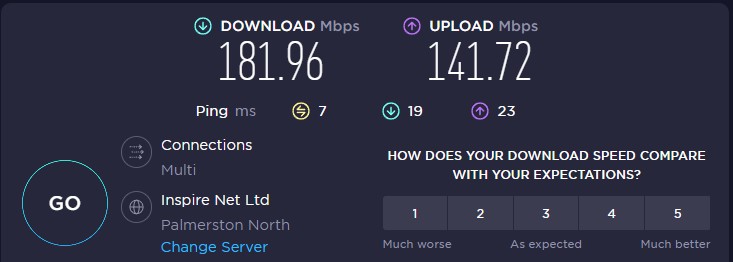
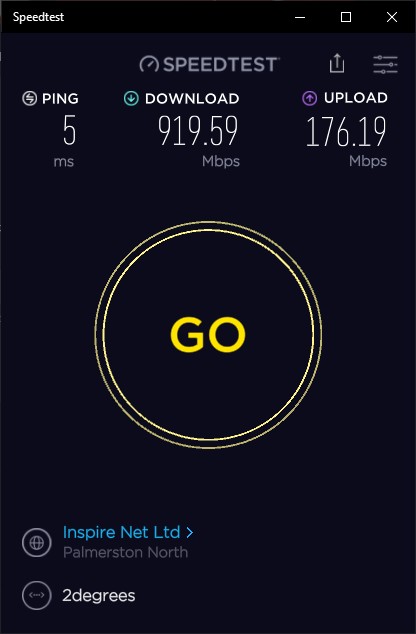
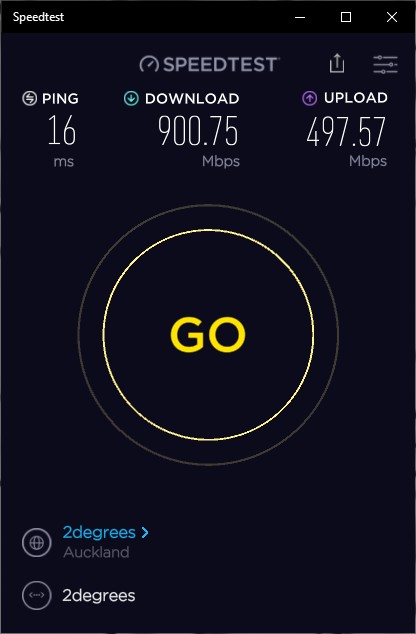
Just as an example - on 2d gigabit Fibre here. 

Test to Inspire server in web browser


And in speedtest app


And to a 2D server in the app. 


PhilANZ

356 posts

Ultimate Geek
+1 received by user: 3


  #2939307 7-Jul-2022 17:26
Send private message

Tried both Spark & Vodafone - both gave lower dl speeds.

Cable Vodafone 174.5385 98.98846 Wellington
Cable Spark 175.1749 97.6934 Wellington
Cable 202.6372 98.95939 Palmerston North
WIFI 206.4046 90.57965 Palmerston North

wratterus
1687 posts

Uber Geek
+1 received by user: 678


  #2939314 7-Jul-2022 17:35
Send private message

Next step really is to test with a different router. You'd be surprised how junk some of those 'gaming' routers can be. I think Inspire uses PPPoE, so it's not out of the question that it could be the D-Link bottlenecking you. 


Do you have other devices you can test with over Ethernet to see if you get the same results?


Shop now for Lenovo laptops and other devices (affiliate link).
PhilANZ

356 posts

Ultimate Geek
+1 received by user: 3


  #2939331 7-Jul-2022 18:00
Send private message

I'm close to replacing the router - although given we only thought we had 100 we're not In a rush.

Interesting to hear the "gaming" routers can be problematic. We've taken to buying gaming laptops - even though our only gaming is old PC-style. Surely they also wouldn't be a factor?

My wife's month-old laptop seems to get slightly worse performance than my 3-year-old laptop. We both mainly use WIFI, which doesn't have the same issues - it was only when I wanted to see if we were getting the new speed we found this issue.

Thanks for your help.

toejam316
1516 posts

Uber Geek
+1 received by user: 888

Trusted
Lifetime subscriber

  #2939367 7-Jul-2022 19:03
Send private message

If you're not gaming, gaming laptops are a waste. The GPU doesn't get you anything but power draw, look into business class devices instead.


As for the router, Fritz!box is a fairly safe consumer brand, with pretty decent performance.


Join Quic Broadband with my referral - no sign up fee and gives me account credit


Anything I say is the ramblings of an ill informed, opinionated so-and-so, and not representative of any of my past, present or future employers, and is also probably best disregarded.


PhilANZ

356 posts

Ultimate Geek
+1 received by user: 3


  #2939407 7-Jul-2022 21:31
Send private message

The reason is there are few business laptops with a 17" screen - particularly when I bought my last one. We've had so many issues with "cheap" brands (such as HP - oh how the mighty have fallen). Many brands we've had issues with, but, much to my surprise, have had no issues with ASUS. Every time we've tried another brand we've been from disappointed to immensely frustrated.

nitro
757 posts

Ultimate Geek
+1 received by user: 335


  #2939679 8-Jul-2022 10:50
Send private message

wouldn't be surprised if the current router can't cope with pppoe at the higher bandwidth.


as for 'gaming' laptops, the advice below generally makes sense... but it could also be that you're using it for video editing, in which case, you'll benefit from a solid gpu... some photoshop features as well.


toejam316:


If you're not gaming, gaming laptops are a waste. The GPU doesn't get you anything but power draw, look into business class devices instead.


richms
29098 posts

Uber Geek
+1 received by user: 10209

Trusted
Lifetime subscriber

  #2939686 8-Jul-2022 11:02
Send private message

Factory reset the router, check for updates, factory reset it again and reconfigure it and see if it improves. Particaully if you have changed it between provider connection types or done firmware updates on it.


Richard rich.ms


Shop now for Lego sets and other gifts (affiliate link).
PhilANZ

356 posts

Ultimate Geek
+1 received by user: 3


  #2939709 8-Jul-2022 11:24
Send private message

Is there an alternative to ppoe available as standard, or does it require a new router?

I don't do video editing - the most would be cutting or joining the occasional video.

PhilANZ

356 posts

Ultimate Geek
+1 received by user: 3


  #2939710 8-Jul-2022 11:26
Send private message

I'll try resetting and see what happens

Thanks

xpd

xpd
Geek of Coastguard
14116 posts

Uber Geek
+1 received by user: 4574

Retired Mod
ID Verified
Trusted
Lifetime subscriber

  #2939711 8-Jul-2022 11:29
Send private message

re laptops, HP Probooks are/were the way to go for reliability IME the last few years. However it appears the Probooks are now being phased out/merged to Elitebooks...with Elite pricing :(


XPD / Gavin


LinkTree


wratterus
1687 posts

Uber Geek
+1 received by user: 678


  #2939713 8-Jul-2022 11:31
Send private message

There are plenty of ProBooks around, the new G9 with 12th gen are all available now, and pricing is pretty sensible. 


 1 | 2
View this topic in a long page with up to 500 replies per page Create new topic


Geekzone Live »

Try automatic live updates from Geekzone directly in your browser, without refreshing the page, with Geekzone Live now.


Are you subscribed to our RSS feed? You can download the latest headlines and summaries from our stories directly to your computer or smartphone by using a feed reader.